Java Interview – Collection
1. What is a Collection?
A Collection is a group of individual objects represented as a single unit. Java provides Collection Framework which defines several classes and interfaces to represent a group of objects as a single unit.
2. Why do we need Collection?
Arrays are not dynamic. Once an array of a particular size is declared, the size cannot be changed. When it’s full and you need to add a new element, a new array has to be created with a bigger size and all the elements from the old array have to be copied to the new array.
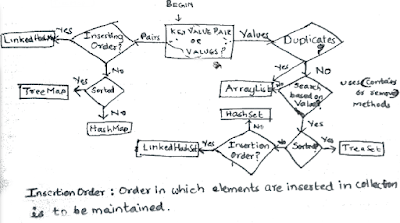
Collections are used in situations where data is dynamic. Collections allow adding an element, deleting an element, and other operations. There are a number of Collections in Java but you need to know how to choose the right Collection for the right context.
3. Advantages of Collection?
- Reduces programming effort: A programmer doesn’t have to worry about the design of Collection, and he can focus on its best use in his program.
- Increases program speed and quality: Increases performance by providing high-performance implementations of useful data structures and algorithms.
Dynamic Size: Collections provide dynamic sizing, allowing you to add, remove, or modify elements without worrying about managing the underlying data structure’s size manually. This flexibility is especially useful when the number of elements is unknown or may change over time.
Data Organization: Collections offer various data structures, such as lists, sets, maps, queues, etc., that can organize and store data in different ways to meet specific requirements. For example, ArrayList maintains an ordered collection of elements, HashSet ensures uniqueness, and HashMap provides key-value pair storage.
Type Safety: Collections in Java provide type safety by enforcing type constraints at compile-time. Generics allow you to specify the type of elements that a collection can hold, preventing runtime errors caused by incompatible data types.
3. What are the important methods in the Collection interface?
The most important methods declared in the Collection interface are the methods to add and remove an element. add method allows adding an element to a collection and delete method allows deleting an element from a collection.
size() method returns the number of elements in the collection. Other important methods defined as part of the collection interface are shown below.
interface Collection<E> extends Iterable<E>
{
  boolean add(E paramE);
  boolean remove(Object paramObject);

  int size();
  boolean isEmpty();
  void clear();

  boolean contains(Object paramObject);
  boolean containsAll(Collection<?> paramCollection);

  boolean addAll(Collection<? extends E> paramCollection);
  boolean removeAll(Collection<?> paramCollection);
  boolean retainAll(Collection<?> paramCollection);


  Iterator<E> iterator();

  //A NUMBER OF OTHER METHODS AS WELL..
}
4. Can you explain the List interface?
List interface extends Collection interface. So, it contains all methods defined in the Collection interface. In addition, the List interface allows operation specifying the position of the element in the Collection.
The most important thing to remember about a List interface – any implementation of the List interface would maintain the insertion order. When an element A is inserted into a List (without specifying position) and then another element B is inserted, A is stored before B in the List.
When a new element is inserted without specifying a position, it is inserted at the end of the list of elements.
However, We can also use the void add(int position, E param E); method to insert an element at a specific position.
Listed below are some of the important methods in the List interface (other than those inherited from Collection interface):

interface List<E> extends Collection<E>
{
  boolean addAll(int paramInt, Collection<? extends E> paramCollection);

  E get(int paramInt);
  E set(int paramInt, E paramE);

  void add(int paramInt, E paramE);
  E remove(int paramInt);

  int indexOf(Object paramObject);
  int lastIndexOf(Object paramObject);

  ListIterator<E> listIterator();
  ListIterator<E> listIterator(int paramInt);
  List<E> subList(int paramInt1, int paramInt2);
}
5. Can you explain the Map interface?
First and foremost, the Map interface does not extend the Collection interface. So, it does not inherit any of the methods from the Collection interface.
A Map interface supports Collections that use a key-value pair. A key-value pair is a set of linked data items: a key, which is a unique identifier for some item of data, and the value, which is either the data or a pointer to the data. Key-value pairs are used in lookup tables, hash tables and configuration files. A key-value pair in a Map interface is called an Entry.
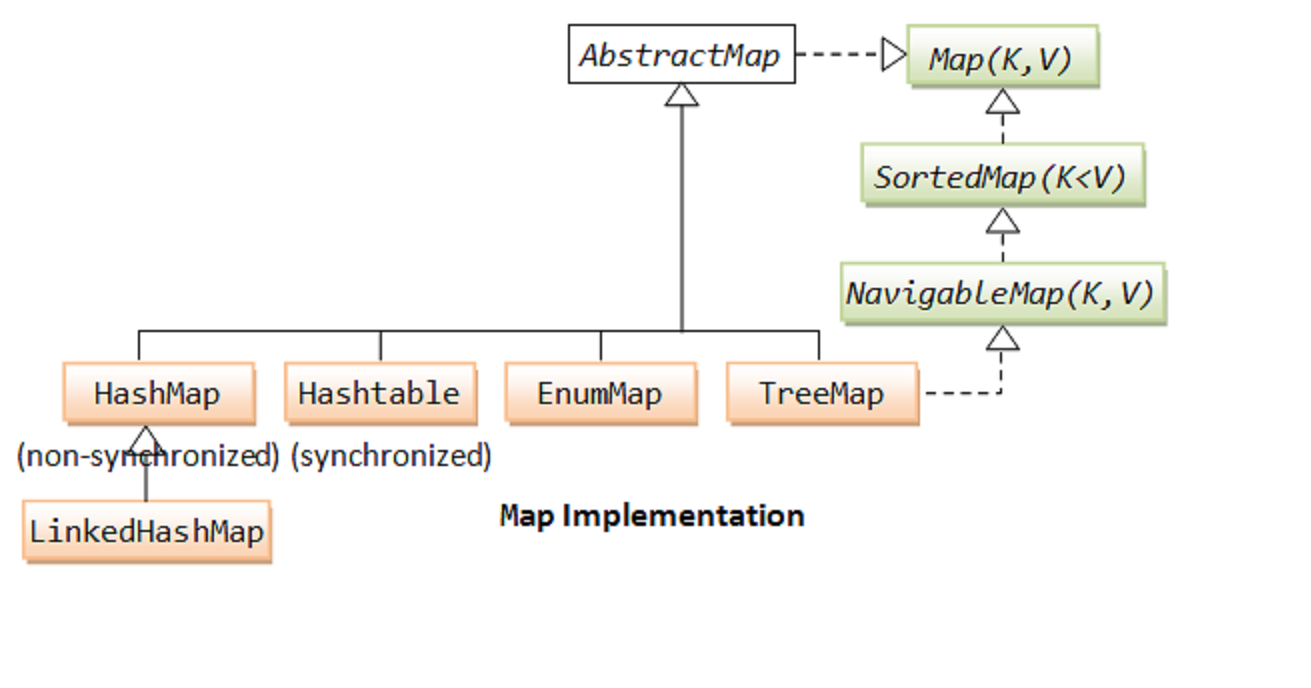
Put method allows to add a key, value pair to the Map.
V put(K paramK, V paramV);
Get method allows to get a value from the Map based on the key.
V get(Object paramObject);Other important methods in Map Inteface are shown below
interface Map<K, V>
{
  int size();
  boolean isEmpty();

  boolean containsKey(Object paramObject);
  boolean containsValue(Object paramObject);

  V get(Object paramObject);
  V put(K paramK, V paramV);
  V remove(Object paramObject);

  void putAll(Map<? extends K, ? extends V> paramMap);
  void clear();

  Set<K> keySet();
  Collection<V> values();
  Set<Entry<K, V>> entrySet();

  boolean equals(Object paramObject);
  int hashCode();

  public static abstract interface Entry<K, V>
  {
    K getKey();
    V getValue();
    V setValue(V paramV);
    boolean equals(Object paramObject);
    int hashCode();
  }
}
6. What is the difference between Set and SortedSet?

SortedSet Interface extends the Set Interface. Both Set and SortedSet do not allow duplicate elements.
The main difference between Set and SortedSet is – an implementation of SortedSet interface maintains its elements in a sorted order. Set interface does not guarantee any Order. For example, If elements 4,5,3 are inserted into an implementation of Set interface, it might store the elements in any order. However, if we use SortedSet, the elements are sorted. The SortedSet implementation would give an output 3,4,5.
Important Operations in the SortedSet interface which are not present in the Set Interface are listed below:
public interface SortedSet<E> extends Set<E> {

    SortedSet<E> subSet(E fromElement, E toElement);
    SortedSet<E> headSet(E toElement);
    SortedSet<E> tailSet(E fromElement);

    E first();
    E last();

    Comparator<? super E> comparator();
}
7. What is HashSet?
HashSet implements the Set interface. So, HashSet does not allow duplicates. However, HashSet does not support ordering. The order in which elements are inserted is not maintained.
Set<String> hashset = new HashSet<String>();

hashset.add("Sachin");
System.out.println(hashset);//[Sachin]

hashset.add("Dravid");
System.out.println(hashset);//[Sachin, Dravid]
Let’s try to add Sachin to the Set now. Sachin is Duplicate. So will not be added. returns false.
hashset.add("Sachin");//returns false since element is not added
System.out.println(hashset);//[Sachin, Dravid]
8. What is a LinkedHashSet? How is it different from HashSet?
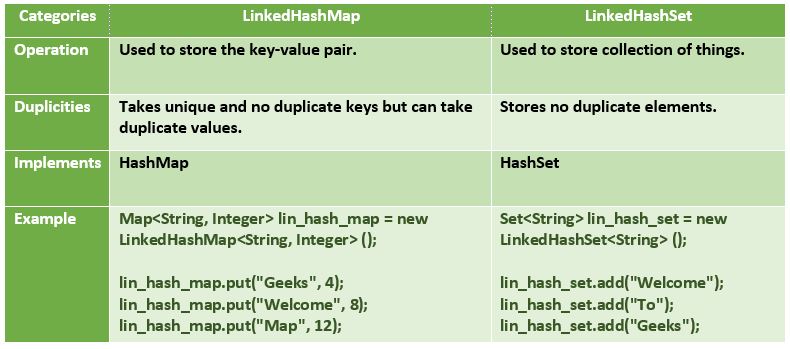
LinkedHashSet implements the Set interface and exposes similar operations to a HashSet. The difference is that LinkedHashSet maintains the insertion order. When we iterate a LinkedHashSet, we would get the elements back in the order in which they were inserted.
9. What is TreeSet? How is it different from HashSet?
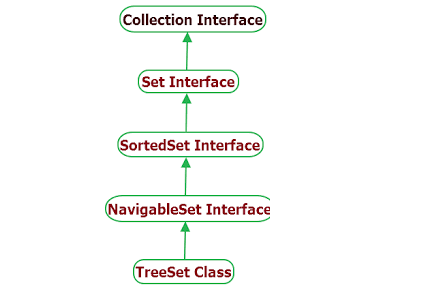
TreeSet implements Set, SortedSet and NavigableSet interfaces. TreeSet is similar to HashSet except that it stores element’s in Sorted Order. The ordering of the elements is maintained by a set using their natural ordering whether or not an explicit comparator is provided.
Set<String> treeSet = new TreeSet<String>();

treeSet.add("Sachin");
System.out.println(treeSet);//[Sachin]
Notice that the list is sorted after inserting Dravid.

//Alphabetical order
treeSet.add("Dravid");
System.out.println(treeSet);//[Dravid, Sachin]
Notice that the list is sorted after inserting Ganguly.

treeSet.add("Ganguly");
System.out.println(treeSet);//[Dravid, Ganguly, Sachin]
Sachin is Duplicate. So will not be added. returns false.

treeSet.add("Sachin");//returns false since element is not added
System.out.println(treeSet);//[Dravid, Ganguly, Sachin]
10. What is the difference between Map and SortedMap?
SortedMap interface extends the Map interface. In addition, an implementation of SortedMap interface maintains keys in a sorted order.
Methods are available in the interface to get a ranges of values based on their keys.
public interface SortedMap<K, V> extends Map<K, V> {
    Comparator<? super K> comparator();

    SortedMap<K, V> subMap(K fromKey, K toKey);

    SortedMap<K, V> headMap(K toKey);

    SortedMap<K, V> tailMap(K fromKey);

    K firstKey();

    K lastKey();
}
11. Explain the Queue interface
Queue Interface extends Collection interface. Queue Interface is typically used for implementation holding elements in order for some processing. Queue interface offers methods peek() and poll() which get the element at head of the queue. The difference is that poll() method removes the head from queue also. peek() would keep head of the queue unchanged.
interface Queue<E> extends Collection<E>
{
  boolean offer(E paramE);
  E remove();
  E poll();
  E element();
  E peek();
}
12. Explain the Iterator interface?
Iterator interface enables us to iterate (loop around) a collection. All collections define a method iterator() that gets an iterator of the collection.
hasNext() checks if there is another element in the collection being iterated. next() gets the next element.
public interface Iterator<E> {

    boolean hasNext();

    E next();
}
13. Explain ArrayList?
ArrayList implements the list interface. So, ArrayList stores the elements in insertion order (by default). Elements can be inserted into and removed from ArrayList based on their position.
Let’s look at how to instantiate an ArrayList of integers.
List<Integer> integers = new ArrayList<Integer>();
Code like below is permitted because of auto boxing. 5 is auto boxed into Integer object and stored in ArrayList.Add method (by default) adds the element at the end of the
list.integers.add(5);//new Integer(5)
ArrayList can have duplicates.
//Iterate an ArrayList using Iterator.
Iterator<String> arraylistIterator = arraylist.iterator();
while (arraylistIterator.hasNext()) {
    String str = arraylistIterator.next();
    System.out.println(str);//Prints the 4 names in the list on separate lines.
}
Sort an ArrayList
List<String> numbers = new ArrayList<String>();
numbers.add("one");
numbers.add("two");
numbers.add("three");
numbers.add("four");
System.out.println(numbers);//[one, two, three, four]

//Strings - By Default - are sorted alphabetically
Collections.sort(numbers);

System.out.println(numbers);//[four, one, three, two]
//Sort and ArrayList using Comparable
class Cricketer implements Comparable<Cricketer> {
    int runs;
    String name;

    public Cricketer(String name, int runs) {
        super();
        this.name = name;
        this.runs = runs;
    }

    @Override
    public String toString() {
        return name + " " + runs;
    }

    @Override
    public int compareTo(Cricketer that) {
        if (this.runs > that.runs) {
            return 1;
        }
        if (this.runs < that.runs) {
            return -1;
        }
        return 0;
    }
}

List<Cricketer> cricketers = new ArrayList<Cricketer>();
cricketers.add(new Cricketer("Bradman", 9996));
cricketers.add(new Cricketer("Sachin", 14000));
cricketers.add(new Cricketer("Dravid", 12000));
cricketers.add(new Cricketer("Ponting", 11000));
System.out.println(cricketers);
//[Bradman 9996, Sachin 14000, Dravid 12000, Ponting 11000]
Collections.sort(cricketers);
System.out.println(cricketers);
//[Bradman 9996, Ponting 11000, Dravid 12000, Sachin 14000]
Sort and ArrayList using Comparator
class DescendingSorter implements Comparator<Cricketer> {

    //compareTo returns -1 if cricketer1 < cricketer2
    //                   1 if cricketer1 > cricketer2
    //                   0 if cricketer1 = cricketer2

    //Since we want to sort in descending order,
    //we should return -1 when runs are more
    @Override
    public int compare(Cricketer cricketer1,
            Cricketer cricketer2) {
        if (cricketer1.runs > cricketer2.runs) {
            return -1;
        }
        if (cricketer1.runs < cricketer2.runs) {
            return 1;
        }
        return 0;
    }

}
Collections
        .sort(cricketers, new DescendingSorter());

System.out.println(cricketers);
//[Sachin 14000, Dravid 12000, Ponting 11000, Bradman 9996]
14. Convert Array to List
String values[] = { "value1", "value2", "value3" };
List<String> valuesList = Arrays.asList(values);
System.out.println(valuesList);//[value1, value2, value3]
15. Convert List to Array
List<String> list = Arrays.asList("C", "C++", "Java");
String[] array = list.toArray(new String[list.size()]);
System.out.println(Arrays.toString(array));
List<String> list = Arrays.asList("C", "C++", "Java");
String[] array = list.stream().toArray(String[]::new);
System.out.println(Arrays.toString(array));
// or
List<String> list = Arrays.asList("C", "C++", "Java");
String[] array = list.stream().toArray(n -> new String[n]);
System.out.println(Arrays.toString(array));
16. What is Vector? How is it different from List?
Vector has the same operations as an ArrayList. However, all methods in Vector are synchronized. So, we can use Vector if we share a list between two threads and we would want them synchronized.
17. What is LinkedList? How is it different from ArrayList?
Linked List extends List and Queue. Other than operations exposed by the Queue interface, LinkedList has the same operations as an ArrayList. However, the underlying implementation of Linked List is different from that of an ArrayList.
ArrayList uses an Array kind of structure to store elements. So, inserting and deleting from an ArrayList are expensive operations. However, searching in an ArrayList is faster than LinkedList.
LinkedList uses a linked representation. Each object holds a link to the next element. Hence, insertion and deletion are faster than ArrayList. But searching is slower.
18. What are the important methods in the NavigableSet interface?
//Find the highest number which is lower than 25
System.out.println(numbersTreeSet.lower(25));//5

//Find the highest number which is lower than or equal to 25
System.out.println(numbersTreeSet.floor(25));//25

//Find the lowest number higher than 25
System.out.println(numbersTreeSet.higher(25));//35

//Find the lowest number higher than or equal to 25
System.out.println(numbersTreeSet.ceiling(25));//25
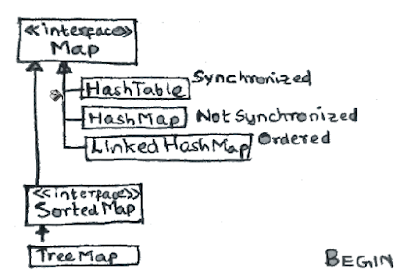
19. What the different implementations in the Map interface?
20. What is HashMap?
HashMap implements Map interface – thereby supporting key-value pairs. Let’s look at an example.
Map<String, Cricketer> hashmap = new HashMap<String, Cricketer>();
hashmap.put("sachin",
        new Cricketer("Sachin", 14000));
hashmap.put("dravid",
        new Cricketer("Dravid", 12000));
hashmap.put("ponting", new Cricketer("Ponting",
        11500));
hashmap.put("bradman", new Cricketer("Bradman",
        9996));
get method gets the value of the matching key.
System.out.println(hashmap.get("ponting"));//Ponting 11500

//if key is not found, returns null.
System.out.println(hashmap.get("lara"));//null
If existing key is reused, it would replace existing value with the new value passed in.

//In the example below, an entry with key "ponting" is already present.
//Runs are updated to 11800.
hashmap.put("ponting", new Cricketer("Ponting",
        11800));

//gets the recently updated value
System.out.println(hashmap.get("ponting"));//Ponting 11800
21. What is TreeMap? How is different from HashMap?
TreeMap is similar to HashMap except that it stores keys in sorted order. It implements the NavigableMap interface and SortedMap interfaces along with the Map interface.
Map<String, Cricketer> treemap = new TreeMap<String, Cricketer>();

treemap.put("sachin",
        new Cricketer("Sachin", 14000));
System.out.println(treemap);
//{sachin=Sachin 14000}
We will now insert a Cricketer with key dravid. In sorted order,dravid comes before sachin. So, the value with key dravid is inserted at the start of the Map.

treemap.put("dravid",
        new Cricketer("Dravid", 12000));
System.out.println(treemap);
//{dravid=Dravid 12000, sachin=Sachin 14000}
We will now insert a Cricketer with key ponting. In sorted order, ponting fits in between dravid and sachin.

treemap.put("ponting", new Cricketer("Ponting",
        11500));
System.out.println(treemap);
//{dravid=Dravid 12000, ponting=Ponting 11500, sachin=Sachin 14000}

treemap.put("bradman", new Cricketer("Bradman",
        9996));
System.out.println(treemap);
//{bradman=Bradman 9996, dravid=Dravid 12000, ponting=Ponting 11500, sachin=Sachin 14000}
22. What is a PriorityQueue?
A PriorityQueue is used when the objects are supposed to be processed based on the priority. It is known that a queue follows First-In-First-Out algorithm, but sometimes the elements of the queue are needed to be processed according to the priority, that’s when the PriorityQueue comes into play. The PriorityQueue is based on the priority heap. The elements of the priority queue are ordered according to the natural ordering, or by a Comparator provided at queue construction time, depending on which constructor is used.
- PriorityQueue doesn’t permit null.
- We can’t create PriorityQueue of Objects that are non-comparable
- PriorityQueue are unbound queues.
- The head of this queue is the least element with respect to the specified ordering. If multiple elements are tied for least value, the head is one of those elements — ties are broken arbitrarily.
- The queue retrieval operations poll, remove, peek, and element access the element at the head of the queue.
- It inherits methods from AbstractQueue, AbstractCollection, Collection and Object class.
PriorityQueue<Integer> priorityQueue =
                          new PriorityQueue<Integer>();
priorityQueue.offer(24);
priorityQueue.offer(15);
priorityQueue.offer(9);
priorityQueue.offer(45);

System.out.println(priorityQueue);//[9, 24, 15, 45]
Peek method examples

//peek method get the element with highest priority.
System.out.println(priorityQueue.peek());//9
//peek method does not change the queue
System.out.println(priorityQueue);//[9, 24, 15, 45]

//poll method gets the element with highest priority.
System.out.println(priorityQueue.poll());//9
//peek method removes the highest priority element from the queue.
System.out.println(priorityQueue);//[24, 15, 45]

//This comparator gives high priority to the biggest number.
Comparator reverseComparator = new Comparator<Integer>() {
    public int compare(Integer paramT1,
            Integer paramT2) {
        return paramT2 - paramT1;
    }

};
23. What is the Collections class?
This class consists exclusively of static methods that operate on or return collections. It contains polymorphic algorithms that operate on collections, “wrappers”, which return a new collection backed by a specified collection, and a few other odds and ends.
The java.util.Collections class is a utility class in Java that provides various static methods for working with collections (interfaces and classes that implement the java.util.Collection interface). It contains methods to perform operations such as searching, sorting, shuffling, reversing, and synchronizing collections. The methods in the Collections class operate on the collection itself and do not modify the original collection; instead, they return modified views or create new collections.
The methods of this class all throw a NullPointerException if the collections or class objects provided to them are null.
- static int binarySearch(List, key)
- Can be used only on sorted list
- static int binarySearch(List, key, Comparator)
- static void reverse(List)
- Reverse the order of elements in a List.
- static Comparator reverseOrder();
- Return a Comparator that sorts the reverse of the collection current sort sequence.
- static void sort(List)
- static void sort(List, Comparator)
24. What are the differences between synchronized and concurrent collections?
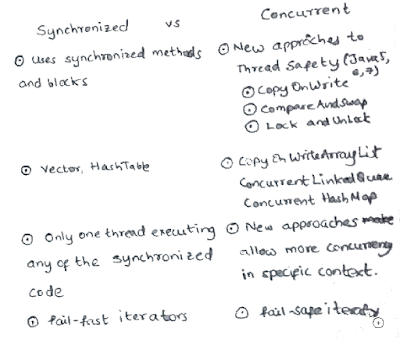
Synchronized collections are implemented using synchronized methods and synchronized blocks. Only one thread can executing any of the synchronized code at a given point in time. This places severe restrictions on the concurrency of threads – thereby affecting performance of the application. All the pre Java 5 synchronized collections (HashTable & Vector, for example) use this approach.
Post Java 5, collections using new approaches to synchronization are available in Java. These are called concurrent collections. More details below.
25. What is the initial capacity of Collection?
An instance of HashMap has two parameters that affect its performance: initial capacity and load factor. The capacity is the number of buckets in the hash table, and the initial capacity is simply the capacity at the time the hash table is created. The load factor is a measure of how full the hash table is allowed to get before its capacity is automatically increased. When the number of entries in the hash table exceeds the product of the load factor and the current capacity, the hash table is rehashed (that is, internal data structures are rebuilt) so that the hash table has approximately twice the number of buckets.
As a general rule, the default load factor (.75) offers a good tradeoff between time and space costs. Higher values decrease the space overhead but increase the lookup cost (reflected in most of the operations of the HashMap class, including get and put).
The expected number of entries in the map and its load factor should be taken into account when setting its initial capacity, so as to minimize the number of rehash operations.
List doubles its size by 50%.
26. When does Collection throw UnSupportedOperationException?
All Java Collections extend Collection interface. So, they have to implement all the methods in the Collection interface. However, certain Java collections are optimized to be used in specific conditions and do not support all the Collection operations (methods). When an unsupported operation is called on a Collection, the Collection Implementation would throw an UnsupportedOperationException.
Arrays.asList returns a fixed-size list backed by the specified array. When an attempt is made to add or remove from this collection an UnsupportedOperationException is thrown. Below code throws UnsupportedOperationException.

List<String> list=Arrays.asList(new String[]{"ac","bddefe"});
list.remove();//throws UnsupportedOperationException
27. What is the difference between fail-fast and fail-safe iterators?
Fail Fast Iterators throw a ConcurrentModificationException if there is a modification to the underlying collection is modified. This was the default behavior of the synchronized collections of pre Java 5 age.
Fail Safe Iterators do not throw exceptions even when there are changes in the collection. This is the default behavior of the concurrent collections, introduced since Java 5.
28. Explain about the stream API?
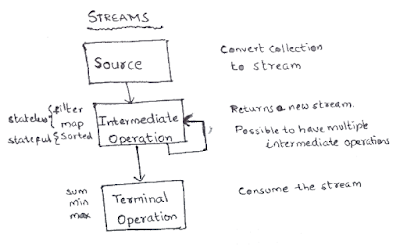
Streams are introduced in Java 8. In combination with Lambda expressions, they attempt to bring some of the important functional programming concepts to Java.
A stream is a sequence of elements supporting sequential and parallel aggregate operations. Consider the example code below. Following steps are done:
- Step I : Creating an array as a stream
- Step II : Use Lambda Expression to create a filter
- Step III : Use map function to invoke a String function
- Step IV : Use sorted function to sort the array
- Step V : Print the array using forEach
Arrays.stream(new String[] {
 "Ram", "Robert", "Rahim"
})
 .filter(s - > s.startsWith("Ro"))
 .map(String::toLowerCase)
 .sorted()
 .forEach(System.out::println);
In general any use of streams involves
- Source – Creation or use of existing stream : Step I above
- Intermediate Operations – Step II, III and IV above. Intermediate Operations return a new stream
- Terminal Operation – Step V. Consume the stream. Print it to output or produce a result (sum,min,max etc).
Intermediate Operations are of two kinds
- Stateful : Elements need to be compared against one another (sort, distinct etc)
- Stateless : No need for comparing with other elements (map, filter etc)
29. What are the atomic operations in Java?
Atomic Access Java Tutorial states “In programming, an atomic action is one that effectively happens all at once. An atomic action cannot stop in the middle: it either happens completely, or it doesn’t happen at all. No side effects of an atomic action are visible until the action is complete”.
Let’s assume we are writing a multi threaded program. Let’s create an int variable i. Even a small operation, like i++ (increment), is not thread safe. i++ operation involves three steps.
- Read the value which is currently stored in i
- Add one to it (atomic operation).
- Store it in i
In a multi-threaded environment, there can be unexpected results. For example, if thread1 is reading the value (step 1) and immediately after thread2 stores the value (step 3).
To prevent these, Java provides atomic operations. Atomic operations are performed as a single unit without interference from other threads ensuring data consistency.
A good example is AtomicInteger. To increment a value of AtomicInteger, we use the incrementAndGet() method. Java ensures this operation is Atomic.
30. What is BlockedQueue?
BlockedQueue interface is introduced in Java specifically to address specific needs of some Producer Consumer scenarios. BlockedQueue allows the consumer to wait (for a specified time or infinitely) for an element to become available.
31. Comparator vs Comparable
The method returns a number indicating whether the object being compared is less than, equal to or greater than the object being passed as an argument.
Comparable is used for default sorting. You have a default sorting that you can’t change. Once you set it, it’s there and you can change it at runtime.
Comparable:
- Comparable is an interface that allows objects to be compared and sorted based on their natural ordering.
- When a class implements the Comparable interface, it defines a natural order for its objects.
- The Comparable interface has a single method:
compareTo(Object o). This method compares the current object with the specified object and returns a negative integer, zero, or a positive integer to indicate the object’s relative order. - The natural ordering defined by Comparable is used by default in sorting methods like
Collections.sort()orArrays.sort().
public class Person implements Comparable<Person> {
    private String name;
    private int age;

    // Constructor and other methods

    @Override
    public int compareTo(Person other) {
        return this.name.compareTo(other.name);
    }
}
@Override
public int compareTo(Player otherPlayer) {
     return (this.getRanking() - otherPlayer.getRanking());
}
Order depending on the comparison. Pay attention here to the comparison.(this.getRanking() - otherPlayer.getRanking());// ascending(otherPlayer.getRanking() – this.getRanking());// descending
Comparator:
- Comparator is an interface that allows for custom comparison and sorting of objects that do not implement the Comparable interface or when a different sorting order is required.
- With a Comparator, you can define multiple comparison rules and sorting orders for objects of a class.
- The Comparator interface has a single method:
compare(Object o1, Object o2). This method compares two objects and returns a negative integer, zero, or a positive integer to indicate the objects’ relative order. - The Comparator interface provides flexibility in sorting by allowing you to define different comparison logic for different scenarios.
- Comparator implementations can be used with sorting methods by explicitly passing the Comparator object as a parameter.
public class PersonAgeComparator implements Comparator<Person> {
    @Override
    public int compare(Person p1, Person p2) {
        return Integer.compare(p1.getAge(), p2.getAge());
    }
}
Comparator
public class PlayerRankingComparator implements Comparator<Player> {

    @Override
    public int compare(Player firstPlayer, Player secondPlayer) {
       return (firstPlayer.getRanking() - secondPlayer.getRanking());
    }
}
You can Create different comparators(sortings) and use them according to your needs. With comparable you are stuck to one type of sorting.
- Sometimes, we can’t modify the source code of the class whose objects we want to sort, thus making the use of Comparable impossible
- Using Comparators allows us to avoid adding additional code to our domain classes
- We can define multiple different comparison strategies which isn’t possible when using Comparable
In most real-life scenarios, we want sorting based on different parameters. For example, as a CEO, I would like to sort the employees based on Salary, an HR would like to sort them based on age. This is the situation where we need to use Java Comparator interface because Comparable.compareTo(Object o) method implementation can provide default sorting and we can’t change it dynamically. Whereas with Comparator, we can define multiple methods with different ways of sorting and then chose the sorting method based on our requirements.
- Comparable interface can be used to provide single way of sorting whereas Comparator interface is used to provide different ways of sorting.
- For using Comparable, Class needs to implement it whereas for using Comparator we don’t need to make any change in the class.
- Comparable interface is in
java.langpackage whereas Comparator interface is present injava.utilpackage. - We don’t need to make any code changes at client side for using Comparable,
Arrays.sort()orCollection.sort()methods automatically uses thecompareTo()method of the class. For Comparator, client needs to provide the Comparator class to use in compare() method.
Comparable is used to define the natural ordering of objects within a class, while Comparator is used to define custom ordering or multiple comparison rules for objects. If a class implements Comparable, its natural ordering is used by default for sorting. If a custom ordering or multiple sorting options are needed, a Comparator can be implemented and passed explicitly to sorting methods.
32. How to sort by multiple fields?
public int compare(Member a, Member b){
	// sort by age
	int order = a.getAge() - b.getAge();

	if(order==0){
		// if ages are the same, compare name
		order = a.getName().compareTo(b.getName());
	}

	if(order==0){
		// if ages and names are the same, compare gender
		order = a.getGender().compareTo(a.getGender());
	}

	return order;
}
33. What is the importance of hashCode() and equals() methods ?
hashCode() and equals() are used for object comparison, hashing, and indexing purposes.
The hashCode() and equals() methods are closely related and must be implemented consistently. When overriding equals(), you should also override hashCode() to ensure that equal objects have the same hash code. This is crucial when using objects in hash-based collections to maintain data integrity and retrieve objects correctly based on equality.
hashCode() Method:
- The
hashCode()method returns an integer value, known as the hash code, which represents the object’s internal address or identity. - Hash codes are used extensively in hashing-based data structures like hash tables, hash sets, and hash maps to determine the object’s storage location or bucket.
- Objects that are equal according to the
equals()method must have the same hash code. However, objects with the same hash code are not necessarily equal according toequals(). - It is important to override the
hashCode()method when overriding theequals()method to ensure consistency between the two methods. This is necessary to maintain the contract between equality and hash-based collections. - The
hashCode()method should be implemented in a way that distributes hash codes evenly across different objects to avoid collisions and improve the performance of hash-based data structures.
equals() Method:
The equals() method is used to compare the equality of two objects. It determines whether two objects have the same content or state.
The default implementation of equals() in the Object class compares object references for identity equality, which checks if two object references point to the same memory location.
By overriding the equals() method, you can provide your own implementation to define equality based on specific criteria, such as comparing the values of certain attributes.
The equals() method must satisfy the following properties:
- Reflexivity: An object must be equal to itself (
x.equals(x)should return true). - Symmetry: If
x.equals(y)returns true, theny.equals(x)should also return true. - Transitivity: If
x.equals(y)andy.equals(z)both return true, thenx.equals(z)should also return true. - Consistency: Multiple invocations of
equals()on the same objects should consistently return true or false, provided that the object’s state doesn’t change. - Null Handling:
x.equals(null)should return false, and it should not throw an exception.
It is recommended to override the equals() method whenever a custom class defines its notion of equality based on attribute values.
equals(Object otherObject)– As method name suggests, is used to simply verify the equality of two objects. It’s default implementation simply check the object references of two objects to verify their equality. By default, two objects are equal if and only if they are stored in the same memory address.hashcode()– Returns a unique integer value for the object in runtime. By default, integer value is mostly derived from memory address of the object in heap (but it’s not mandatory always).- This hash code is used for determining the bucket location, when this object needs to be stored in some HashTable like data structure.
Contract
It is generally necessary to override the hashCode() method whenever equals() method is overridden, so as to maintain the general contract for the hashCode() method, which states that equal objects must have equal hash codes.
- Whenever it is invoked on the same object more than once during an execution of a Java application, the
hashCodemethod must consistently return the same integer, provided no information used inequalscomparisons on the object is modified.
This integer need not remain consistent from one execution of an application to another execution of the same application. - If two objects are equal according to the
equals(Object)method, then calling thehashCodemethod on each of the two objects must produce the same integer result. - It is not required that if two objects are unequal according to the
equals(java.lang.Object)method, then calling thehashCodemethod on each of the two objects must produce distinct integer results.
However, the programmer should be aware that producing distinct integer results for unequal objects may improve the performance of hash tables.
hashCode() and equals() is used to compare two objects to determine whether they are the same or equal or not.
In HashMap, hashCode() is used to calculate the bucket and therefore calculate the index.
HashMap uses equals() to compare the key whether the are equal or not. If equals() method return true, they are equal otherwise not equal.
A HashMap in Java uses the hashCode and equals methods to determine the index of the key-value pair. These methods are also used when we request the value of a specific key. If these methods are not implemented correctly, two different keys might produce the same hash value and thus, will be considered as equal by the collection. Furthermore, these methods are also used to detect duplicates. Thus, the implementation of both methods is crucial to the accuracy and correctness of the HashMap.
Java interview – Fundamentals
1.What modifiers are allowed for methods in an interface?
Public: Interface methods are implicitly public, meaning they are accessible from anywhere.
Abstract: Interface methods are implicitly abstract, indicating that they do not have an implementation in the interface itself.
Default: Starting from Java 8, interfaces can have default methods, which provide a default implementation for the method. Default methods are declared using the default keyword and can be overridden by implementing classes if needed.
Static: Interfaces can have static methods, which are defined using the static keyword. Static methods in interfaces are not inherited and can be called directly using the interface name.
It’s important to note that in Java 17 and earlier versions, interface methods cannot have the private, protected, or final modifiers. These modifiers are not allowed for interface methods until Java 18, which introduced the private and protected modifiers for interface methods.
2. What is a local, member, and a class variable?
Variables declared within a method are local. Variables declared within a class but outside of methods are member variables. Variables within a class that are static are called class variables.
A local variable is a variable declared inside a method, constructor, or a block of code, such as a loop or conditional statement. It is accessible only within its enclosing scope and is not visible outside of that scope. Local variables are used for temporary storage and hold data that is relevant only within a specific block of code. Local variables must be initialized before they can be used.
public void process() {
    int num = 10; // Local variable declaration and initialization
    // ...
}
In the above example, num is a local variable declared inside the process() method. It is accessible only within the method and is not visible outside of it.
Member variables, also known as instance variables, are declared within a class but outside of any method. They are associated with instances (objects) of the class and each instance of the class has its own copy of these variables. Member variables have default values if not explicitly initialized. They are accessible within the entire class, including its methods and constructors.
public class User {
    private String name; // Member variable declaration

    public void setName(String value) {
        name = value; // Accessing member variable within a method
    }
}
In the above example, name is a member variable declared within the User class. It is accessible in all methods and constructors of the class, and each instance of User will have its own copy of this variable.
Class variables, also known as static variables, are declared within a class with the static modifier. Unlike member variables, class variables are associated with the class itself rather than with instances of the class. There is only one copy of a class variable shared by all instances of the class. Class variables are initialized only once when the class is loaded into memory and retain their values throughout the program execution.
public class User {
    private static int time; // Class variable declaration

    public static void setTime(int value) {
        time = value; // Accessing class variable within a static method
    }
}
In the above example, time is a class variable declared within the User class. It is shared among all instances of the class, and its value can be accessed and modified through static methods or by directly referencing the class name (User.time).
It’s important to note that local variables are temporary and exist only within the scope of a method or block, member variables belong to instances of a class, and class variables are associated with the class itself and are shared among all instances of the class.
3. What are Serialization and Deserialization?
Serialization is the process of saving/writing the state of an object to a byte stream.
Deserialization is the process of restoring a serialized object.
4. Can you have an inner class within a method and what variables can you access?
It is possible to have an inner class within a method. These inner classes are called local inner classes or method-local inner classes. They are defined within a method or a block of code and have their own scope limited to that method or block. Local inner classes have access to variables declared within the method/block, as well as to the method’s/block’s parameters and any final or effectively final variables.
public class OuterClass {
    public void outerMethod() {
        int outerVariable = 10;

        class LocalInnerClass {
            public void innerMethod() {
                System.out.println("Accessing outer variable: " + outerVariable);
            }
        }

        LocalInnerClass innerObj = new LocalInnerClass();
        innerObj.innerMethod();
    }
}
5. What is the clonable interface?
The clonable interface is a marker interface. The Cloneable interface is a marker interface that indicates a class’s ability to be cloned using the clone() method. It serves as a marker for objects that can support cloning, allowing you to create a copy of an object with the same state.
The Cloneable interface does not contain any methods. It acts as a flag, notifying the clone() method that the object can be cloned without throwing a CloneNotSupportedException. If a class implements Cloneable, it indicates that instances of that class can be cloned.
To make a class cloneable, you need to follow these steps:
public class MyClass implements Cloneable {
    // class members and methods

    @Override
    protected Object clone() throws CloneNotSupportedException {
        return super.clone();
    }
}
The clone() method is declared in the Object class and is protected, so you need to provide a public implementation in your class to make it accessible.
When cloning an object, you call the clone() method on an instance of the class, which creates and returns a shallow copy of the object. It is important to note that the clone() method performs a shallow copy by default, meaning that only the object’s references are copied, not the referenced objects themselves.
In a shallow copy, only the references of the fields are copied from the original object to the cloned object. Both the original and cloned objects will point to the same referenced objects in memory. In other words, changes made to the referenced objects in one object will be reflected in the other object as well.
If you need a deep copy (i.e., copies of the referenced objects as well), you need to implement a custom cloning mechanism within the clone() method. To deep copy an object you ensure that all the referenced objects in the class also implement the Cloneable interface and override their clone() methods.
6. What is the difference between Integer and int?
Integer is a wrapper class for the primitive int. Integer can be used for generic like List<Integer> list. It cannot be List<int> list.
int is the primitive.
7. What is an inner class and an anonymous class?
An inner class is any class defined in another class even an inner class within a method.
An anonymous class is a class defined inside a method. This class does not have a name. It is instantiated and declared in the same place. It can’t have explicit constructors.
An anonymous class is a specific type of inner class that does not have a name. It is declared and instantiated in a single expression, usually at the point of use. Anonymous classes are commonly used to implement interfaces, extend classes, or define event handlers.
Here’s an example of an anonymous class implementing an interface:
interface MyInterface {
    void doSomething();
}

public class MyClass {
    public void performAction() {
        MyInterface myInterface = new MyInterface() {
            public void doSomething() {
                System.out.println("Doing something...");
            }
        };

        myInterface.doSomething();
    }
}
8. What modifiers can a top-class have?
public, abstract, and final.
9. What is the difference between a superclass and a subclass?
A superclass is a class that is inherited.
A subclass is a class that does the inheriting.
10. What is the difference between overloading and overriding?
Overloading is a relationship between different methods within a class.
Overloading methods have the same name with different method signatures.
Overloading:
- Overloading refers to the ability to define multiple methods with the same name but with different parameters in the same class.
- Overloaded methods must have different parameter lists, which can differ in terms of the number of parameters, types of parameters, or order of parameters.
- The compiler determines which overloaded method to invoke based on the arguments passed at the call site.
- Overloading allows you to provide multiple ways of using a method with different input parameters or return types.
- Overloading is resolved at compile-time based on the method signature.
public class Calculator {
    public int add(int a, int b) {
        return a + b;
    }

    public double add(double a, double b) {
        return a + b;
    }
}
Overriding is a relationship between a superclass and a subclass.
Overriding methods must have the same method signatures.
Overriding:
- Overriding is the ability of a subclass to provide a different implementation for a method that is already defined in its superclass.
- Overriding occurs when a subclass defines a method with the same name, return type, and parameter list as a method in its superclass.
- The overridden method in the subclass must have the same signature as the method in the superclass.
- The method in the subclass overrides the implementation of the superclass method for objects of the subclass type.
- Overriding allows you to provide a specialized implementation of a method in a subclass, tailored to its specific needs.
- Overriding is resolved at runtime based on the actual type of the object.
public class Animal {
    public void makeSound() {
        System.out.println("Animal makes a sound.");
    }
}

public class Dog extends Animal {
    @Override
    public void makeSound() {
        System.out.println("Dog barks.");
    }
}
11. What is final, finalize(), and finally?
final: a final class can’t be extended. a final method can’t be overridden. a final variable can be changed from its initial value.
finalize(): this method is called just be an object is garbage collected.
finally: a finally block a block which is part of a try or try and catch block. This block runs regardless of an exception is thrown or not.
12. What are the different types of access modifiers in Java?
public: can be accessed from everywhere.
private: can be accessed outside of the class in which private is used.
protected: can be accessed from the same package or subclasses from different packages.
Default modifier: can be accessed only from the same package.
13. What do static methods mean?
Static methods can be called using just the class name. Static methods belong to class not an object of the class. You don’t have to create an object to access static methods.
14. What does it mean that a method or a field is static?
Static variables and methods are instantiated only once per class. If you change the value of a static variable, it will change for all instances of that class.
15. What is the common usage of serialization?
Serialization in Java refers to the process of converting an object into a byte stream, which can be saved to a file, sent over a network, or stored in a database. Deserialization is the reverse process, where the byte stream is converted back into an object.
When an object(and its state) is to be saved somewhere and be retrieved for later use then serialization comes into the picture. When you cache an object using a cache manager(Redis) the object must be serialized.
Caching: Serialization can be used for caching objects in memory or on disk. By serializing objects, they can be stored in a cache and quickly retrieved when needed. This helps improve performance by reducing the need to recreate objects from scratch.
Network Communication: Serialization enables objects to be transmitted across a network or between distributed systems. By serializing an object and sending it over the network, the receiving end can deserialize it to obtain the original object. This is commonly used in client-server architectures, remote procedure calls (RPC), distributed computing, and messaging systems.
Persistence: Serialization allows objects to be stored persistently in files or databases. By serializing an object, its state can be saved, and later, the object can be deserialized to recreate the exact state. This is useful for saving and loading application data, configuration settings, user preferences, and more.
import java.io.*;

public class SerializationExample {
    public static void main(String[] args) {
        // Create an object to serialize
        Person person = new Person("John Doe", 30);

        // Serialize the object to a file
        serializeObject(person, "person.ser");

        // Deserialize the object from the file
        Person deserializedPerson = deserializeObject("person.ser");

        // Print the deserialized object
        System.out.println("Deserialized Person: " + deserializedPerson);
    }

    public static void serializeObject(Object obj, String fileName) {
        try {
            // Create a FileOutputStream to write object data to a file
            FileOutputStream fileOut = new FileOutputStream(fileName);

            // Create an ObjectOutputStream to serialize the object
            ObjectOutputStream objectOut = new ObjectOutputStream(fileOut);

            // Write the object to the ObjectOutputStream
            objectOut.writeObject(obj);

            // Close the streams
            objectOut.close();
            fileOut.close();

            System.out.println("Object serialized and saved to " + fileName);
        } catch (IOException e) {
            e.printStackTrace();
        }
    }

    public static <T> T deserializeObject(String fileName) {
        T obj = null;

        try {
            // Create a FileInputStream to read object data from a file
            FileInputStream fileIn = new FileInputStream(fileName);

            // Create an ObjectInputStream to deserialize the object
            ObjectInputStream objectIn = new ObjectInputStream(fileIn);

            // Read the object from the ObjectInputStream
            obj = (T) objectIn.readObject();

            // Close the streams
            objectIn.close();
            fileIn.close();

            System.out.println("Object deserialized from " + fileName);
        } catch (IOException | ClassNotFoundException e) {
            e.printStackTrace();
        }

        return obj;
    }
}

class Person implements Serializable {
    private String name;
    private int age;

    public Person(String name, int age) {
        this.name = name;
        this.age = age;
    }

    @Override
    public String toString() {
        return "Person{name='" + name + "', age=" + age + "}";
    }
}
16. What is java String Pool?
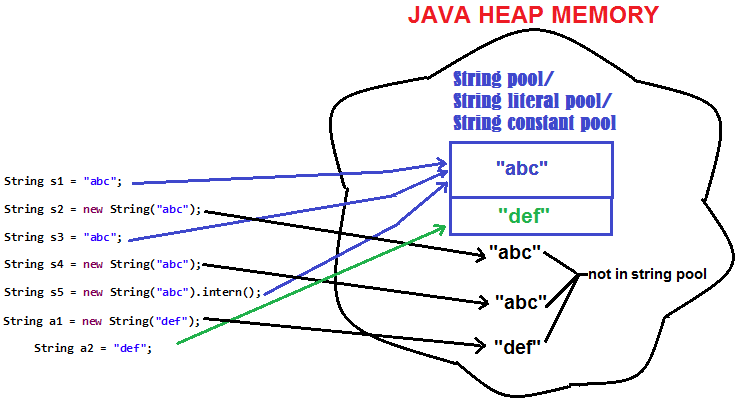
The string pool is a memory area in the Java heap where String literals are stored. The string pool is a way of conserving memory by reusing existing String objects instead of creating new ones with the same content. Whenever a new string object is created, String pool first checks whether the object is already present in the pool or not. If it is present, then the same reference is returned to the variable else new object will be created in the String pool and the respective reference will be returned.
17. What are the differences between this() and super()?
| this() | super() |
| 1. this() represents the current instance of a class | 1. super() represents the current instance of a parent/base class |
| 2. Used to call the default constructor of the same class | 2. Used to call the default constructor of the parent/base class |
| 3. Used to access methods of the current class | 3. Used to access methods of the base class |
| 4. Used for pointing the current class instance | 4. Used for pointing the superclass instance |
| 5. Must be the first line of a block | 5. Must be the first line of a block |
18. What are the differences between String, String Builder, and String Buffer?
| Factor | String | String Builder | String Buffer |
| Storage Area | Constant String Pool | Heap Area | Heap Area |
| Mutability | Immutable | Mutable | Mutable |
| Thread Safety | Yes | No | Yes |
| Performance | Fast | Fast | Slow |
19. What is constructor chaining?
Constructor chaining is the process of calling a constructor from another constructor. This is done using this() keyword.
It’s the process of calling one constructor from another constructor within the same class or between parent and child classes. It allows constructors to invoke other constructors to perform common initialization tasks or to provide different options for object creation.
Within the Same Class:
- In a class, constructors can be overloaded with different parameter lists.
- By using the
this()keyword, a constructor can call another constructor in the same class. - The chained constructor call using
this()must be the first statement in the constructor body. - This allows the common initialization logic to be written in one constructor and reused by other constructors.
public class MyClass {
    private int value;

    public MyClass() {
        this(0); // Calls the parameterized constructor with value 0
    }

    public MyClass(int value) {
        this.value = value;
    }
}
Between Parent and Child Classes:
- In a class hierarchy, a subclass constructor can call a constructor from its superclass using the
super()keyword. - The
super()call must be the first statement in the subclass constructor. - This ensures that the superclass initialization is performed before the subclass initialization.
public class Animal {
    protected String name;

    public Animal(String name) {
        this.name = name;
    }
}

public class Dog extends Animal {
    private String breed;

    public Dog(String name, String breed) {
        super(name); // Calls the constructor of the superclass (Animal)
        this.breed = breed;
    }
}
Constructor chaining allows for code reuse and helps maintain a clean and modular design by centralizing common initialization logic in one place. It enables constructors to be flexible and provide different ways to construct objects based on the available parameters.
20. Why do we need constructor chaining?
Constructor chaining is useful when we want to perform multiple tasks in a single constructor rather than creating code for each task in a single constructor. We create a separate constructor for each task and make it a chain that makes the program more readable.
21. Why is String immutable?
In Java, string objects are immutable in nature which simply means once the String object is created its state cannot be modified. Whenever you try to update the value of that string, Java creates a new string object instead of updating the values of that particular string. Java String objects are immutable as String objects are generally cached in the String pool. Since String literals are usually shared between multiple clients, action from one client might affect the rest. It enhances security, caching, synchronization, and performance of the application.
22. What are the differences between Array and ArrayList?
| Array | ArrayList |
|---|---|
| Cannot contain values of different data types | It can contain values of different data types. |
| Size must be defined at the time of declaration | Size can be dynamically changed |
| Need to specify the index in order to add data | No need to specify the index |
| Arrays are not type parameterized | ArrayList are type |
| Arrays can contain primitive data types as well as objects | ArrayList can contain only objects, no primitive data types are allowed |
23. What is pass by value?
You are passing the values copied. Java is passed by value when you pass primitive data types and passed by reference when you pass custom object data types.
24. What is pass by reference?
You are passing the memory address of the variables you are passing.
25. What is an interface?
An interface is similar to a class but it is an abstract class completely. An interface has abstract methods that its subclasses have to implement. When we talk about an interface we are talking about its capabilities. We are not even talking about how these capabilities are formed, just what they are.
26. 30 commonly asked Java interview questions
-
Question: Explain the difference between JDK, JRE, and JVM. Answer:
- JDK (Java Development Kit) is a software development kit that provides tools and libraries necessary for Java development.
- JRE (Java Runtime Environment) is the runtime environment required to run Java applications. It includes the JVM (Java Virtual Machine) and core libraries.
- JVM is the virtual machine that executes Java bytecode. It provides the runtime environment for Java applications.
-
Question: What is the difference between a class and an object in Java? Answer: A class is a blueprint or template that defines the structure and behavior of objects, while an object is an instance of a class.
-
Question: What is the difference between the
==operator and theequals()method in Java? Answer: The==operator is used to compare the references of two objects, while theequals()method is used to compare the content or value of two objects. Theequals()method should be overridden in classes to define custom equality. -
Question: What is the difference between checked and unchecked exceptions in Java? Answer: Checked exceptions are checked at compile-time and must be handled explicitly using try-catch blocks or declared in the method signature using the
throwskeyword. Unchecked exceptions, also known as runtime exceptions, do not require explicit handling or declaration. -
Question: What are access modifiers in Java? Explain their significance. Answer: Access modifiers control the visibility and accessibility of classes, methods, and variables. They include
public,protected,private, and default (no modifier). Access modifiers ensure proper encapsulation and provide control over the accessibility of code. -
Question: What is the
statickeyword in Java used for? Answer: Thestatickeyword is used to define class-level members that are shared among all instances of a class.staticmethods and variables can be accessed without creating an instance of the class. -
Question: What is the purpose of the
finalkeyword in Java? Answer: Thefinalkeyword is used to restrict the behavior of classes, methods, and variables. A final class cannot be subclassed, a final method cannot be overridden, and a final variable cannot be reassigned once initialized. -
Question: What is the difference between method overloading and method overriding? Answer: Method overloading is the process of defining multiple methods with the same name but different parameters within the same class. Method overriding occurs when a subclass provides a different implementation of a method that is already defined in its superclass.
-
Question: Explain the concept of inheritance in Java. Answer: Inheritance allows a class to inherit the properties (fields and methods) of another class, known as the superclass or parent class. It promotes code reuse and allows for the creation of specialized classes from a general superclass.
-
Question: What is the
thiskeyword in Java used for? Answer: Thethiskeyword refers to the current instance of a class. It is often used to differentiate between instance variables and method parameters or to invoke constructors within a class. -
Question: What is the purpose ofContinuing from the previous response, here are more Java interview questions along with their answers:
-
Question: What are abstract classes and interfaces in Java? Answer: Abstract classes are classes that cannot be instantiated but can be used as base classes for subclasses. They can have abstract methods (without implementation) and concrete methods. Interfaces, on the other hand, define a contract of methods that a class must implement. They cannot contain implementation details.
-
Question: What is method overriding in Java? Answer: Method overriding occurs when a subclass provides a different implementation of a method that is already defined in its superclass. The overridden method in the subclass must have the same signature (name, return type, and parameters) as the method in the superclass.
-
Question: What is the difference between checked and unchecked exceptions in Java? Answer: Checked exceptions are checked at compile-time and must be handled explicitly using try-catch blocks or declared in the method signature using the
throwskeyword. Unchecked exceptions, also known as runtime exceptions, do not require explicit handling or declaration. -
Question: What is the purpose of the
StringBuilderclass in Java? Answer: TheStringBuilderclass is used to create and manipulate mutable strings. It provides methods for appending, inserting, and modifying strings efficiently. -
Question: Explain the concept of autoboxing and unboxing in Java. Answer: Autoboxing is the automatic conversion of primitive types to their corresponding wrapper classes, while unboxing is the automatic conversion of wrapper classes back to primitive types. This conversion is done by the compiler.
-
Question: What is the difference between
String,StringBuilder, andStringBufferin Java? Answer:Stringis an immutable class, meaning its value cannot be changed once created. It is suitable for situations where the value needs to remain constant.StringBuilderandStringBufferare mutable classes that can be used to manipulate strings.StringBuilderis not thread-safe, whileStringBufferis thread-safe due to its synchronized methods.
-
Question: What is the purpose of the
Collectionsclass in Java? Answer: TheCollectionsclass provides utility methods for working with collections (lists, sets, etc.) in Java. It includes methods for sorting, searching, and modifying collections. -
Question: What is the purpose of the
equals()method in Java? Answer: Theequals()method is used to compare the equality of two objects. It is typically overridden to provide a custom implementation for object comparison based on specific criteria. -
Question: Explain the concept of serialization in Java. Answer: Serialization is the process of converting an object into a byte stream to be stored in memory, sent over a network, or persisted to a file. Deserialization is the reverse process of reconstructing the object from the byte stream.
-
Question: What is the purpose of the
try-catch-finallyblock in Java? Answer: Thetry-catch-finallyblock is used for exception handling. Thetryblock contains the code that may throw an exception, thecatchblock handles the exception, and thefinallyblock is executed regardless of whether an exception occurs or not. -
Question: What is the difference between
ArrayListandLinkedListin Java? Answer:ArrayListis implemented as a dynamic array, providing fast random access and iteration. It is suitable for scenarios where frequent element access and modification are required.LinkedListis implemented as a doubly-linked list, providing fast insertion and deletion at both ends. It is suitable for scenarios where frequent insertions and deletions are required.
-
Question:Continuing from the previous response, here are more Java interview questions along with their answers:
-
Question: What is the difference between the
throwandthrowskeywords in Java? Answer:- The
throwkeyword is used to explicitly throw an exception within a method or block of code. - The
throwskeyword is used in a method signature to indicate that the method may throw one or more exceptions. It is used for checked exceptions.
- The
-
Question: What is the difference between
HashMapandHashTablein Java? Answer:HashMapis not synchronized and allows null values and keys, whileHashTableis synchronized and does not allow null values or keys.HashMapis generally preferred overHashTablefor better performance unless thread-safety is required.
-
Question: What is the purpose of the
finalize()method in Java? Answer: Thefinalize()method is a method of theObjectclass that is called by the garbage collector before reclaiming an object’s memory. It can be overridden to perform cleanup tasks before the object is garbage collected. -
Question: What is the difference between shallow copy and deep copy? Answer:
- Shallow copy creates a new object that references the same memory as the original object, while deep copy creates a new object with its own memory, copying all the values of the original object.
- Shallow copy is a bitwise copy of the object, while deep copy involves creating a new instance and copying the values of the fields recursively.
-
Question: What is the purpose of the
staticinitializer block in Java? Answer: Thestaticinitializer block is a block of code that is executed only once when the class is loaded into memory. It is used to initialize static variables or perform one-time setup tasks for the class. -
Question: What is the purpose of the
System.gc()method in Java? Answer: TheSystem.gc()method is used to suggest to the JVM that it should run the garbage collector to free up memory. However, it does not guarantee immediate garbage collection.
Javascript Interaction Functions
Alert function
The alert() method displays an alert box with a specified message and an OK button. An alert box is often used if you want to make sure information comes through to the user.The alert box takes the focus away from the current window, and forces the browser to read the message. Do not overuse this method, as it prevents the user from accessing other parts of the page until the box is closed. It does not return a value.
<div class="row">
    <div class="col-3">
        Alert
    </div>
    <div class="col-4">
        <button onclick="showAlert()" type="button" class="btn btn-outline-primary btn-block">Click Alert</button>
    </div>
</div>
<script>
    function showAlert(){
        alert("This is an alert");
    }
</script>
Prompt function
The prompt() method displays a dialog box that prompts the visitor for input. A prompt box is often used if you want the user to input a value before entering a page. When a prompt box pops up, the user will have to click either “OK” or “Cancel” to proceed after entering an input value. Do not overuse this method, as it prevents the user from accessing other parts of the page until the box is closed. The prompt() method returns the input value if the user clicks “OK”. If the user clicks “cancel” the method returns null.
<div class="row">
    <div class="col-3">
        Prompt
    </div>
    <div class="col-4">
        <button onclick="showPrompt()" type="button" class="btn btn-outline-primary btn-block">Click Prompt</button>
    </div>
    <div class="col-5" id="promptResponse">

    </div>
</div>
<script>
    function showPrompt(){
        // message, defaultValue or defaultAnswer
        let name = prompt("What's your name?","John Doe");
        document.getElementById("promptResponse").innerHTML = "Welcome "+name;
    }
</script>
Confirm function
The confirm() method displays a dialog box with a specified message, along with an OK and a Cancel button. A confirm box is often used if you want the user to verify or accept something. The confirm box takes the focus away from the current window, and forces the browser to read the message. Do not overuse this method, as it prevents the user from accessing other parts of the page until the box is closed. The confirm() method returns true if the user clicked “OK”, and false otherwise.
<div class="row">
    <div class="col-3">
        Confirmation
    </div>
    <div class="col-4">
        <button onclick="showConfirmation()" type="button" class="btn btn-outline-primary btn-block">Click Confirmation</button>
    </div>
    <div class="col-5" id="confirmationResponse">

    </div>
</div>
<script>
    function showConfirmation(){
        let confirmed = confirm("Delete this post?");
        document.getElementById("confirmationResponse").innerHTML = "You said "+(confirmed ? "yes" : "no")+" to deleting the post.";
    }
</script>
Javascript Arrays
JavaScript arrays are used to store multiple values in a single variable. If you have a list of names, storing the names in single variables look like this.
var name1 = "Folau";
var name2 = "Kinga";
var name3 = "Laulau";
var name4 = "Tonga";
var name5 = "Isi";
However, what if you want to loop through the names and find a specific one? And what if you had 1000 names instead of 5 names?
The solution to this problem is arrays. An array can hold many values under a single name, and you can access the values by referring to an index number.
Array Declaration
You can use new Array or [].
let names = new Array('John','Peter','James');
let numbers = [1,2,3,4,5];
Access elements on Arrays
You access an array element by referring to the index number starting from 0.
let scores = new Array(12,34,56,100);
let highScore = scores[3];
console.log("highScore: "+highScore);//100
Update element of an array
let scores = new Array(12,34,56,100);
scores[3] = 505;
let highScore = scores[3];
console.log("highScore: "+highScore);//505
Array size
The length property of an array returns the length of an array (the number of array elements).
let scores = new Array(12,34,56,100);
console.log("scores.length: "+scores.length);//4
Add elements to an array
The easiest way to add a new element to an array is using the push() method. The push() method adds elements to the end of the array.
let names = ['John','Peter','James'];
console.log("names");
console.log(names);["John", "Peter", "James"]
names.push('Juan');

console.log("names");
console.log(names);["John", "Peter", "James","Juan"]
Use the unshift method to add elements to the beginning of the array.
let names = ['John','Peter','James'];
console.log("names");
console.log(names);["John", "Peter", "James"]

names.unshift('Juan');
console.log("names");
console.log(names);["Juan","John", "Peter", "James"]
Use the splice method can be used to add new items to an array.
let names = ['John','Peter','James'];
console.log("names");
console.log(names);//['John','Peter','James']

names.splice(2, 0, "Folau");
console.log("names");
console.log(names);//['John','Peter','Folau','James']
Remove elements from an array
Use the pop() method which removes elements from the end of the array.
let names = ['John','Peter','James'];
console.log("names");
console.log(names);//['John','Peter','James']

names.pop();
console.log("names");
console.log(names);//['John','Peter']
Use the shift() method to remove elements from the beginning of the array.
let names = ['John','Peter','James'];
console.log("names");
console.log(names);//['John','Peter','James']

names.shift();
console.log("names");
console.log(names);//['Peter','James']
Note: methods push/pop run fast, while shift/unshift are slow.
Difference between Arrays and Objects.
Arrays use numbered indexes. Objects use named indexes.
let arr = ["Peter",25];
console.log("arr[0]: "+arr[0]);//Peter
console.log("arr[1]: "+arr[1]);//25

let obj = {"name":"Peter","age":"25"};
console.log("obj.name: "+obj.name);//Peter
Sorting
By default, the sort() function sorts values as strings.
let names = ['John','Peter','James'];

console.log("names");
console.log(names);

names.sort();
console.log("names");
console.log(names);//["James", "John", "Peter"]
Sorting numbers using a comparator
var numbers = [40, 100, 1, 5, 25, 10];
numbers.sort(function(a, b){return a - b});// asc order - 1,5,10,25,40,100
numbers.sort(function(a, b){return b - a});// desc order - 100,40,25,10,5,1
Array Iteration
The foreach() method calls a function (a callback function) once for each array element.
/*
* Array iteration
*/
console.log("Array Iteration with foreach");
var numbers = [2, 4, 6, 8 , 10];

// value
numbers.forEach(function(number){
    console.log("number: "+number);
});
// value, index
numbers.forEach(function(number,index){
    console.log("number: "+number+", index: "+index);
});
// value, index, array
numbers.forEach(function(number,index, arr){
    console.log("number: "+number+", index: "+index+", original array: "+arr);
});
Using for loop to iterate through array elements.
/*
* Array iteration
*/
var numbers = [2, 4, 6, 8 , 10];

console.log("Array Iteration with for loop");
for(let i=0;i<numbers.length;i++){
    let number = numbers[i];
    console.log("index: "+i+", number: "+number);
}
Array map
The map() method creates a new array by performing a function on each array element. The map() method does not execute the function for array elements without values. The map() method does not change the original array.
console.log("Array map");
var numbers2 = numbers.map(function(number){
    console.log("number: "+number);
    return number * 2;
});
console.log(numbers);
console.log("numbers2 * 2");
console.log(numbers2);

var numbers3 = numbers.map(function(number, index){
    console.log("number: "+number+", index: "+index);
    return number * 3;
});
console.log(numbers);
console.log("numbers3 * 3");
console.log(numbers3);

var numbers4 = numbers.map(function(number, index, arr){
    console.log("number: "+number+", index: "+index+", original array: "+arr);
    return number * 4;
});
console.log(numbers);
console.log("numbers4 * 4");
console.log(numbers4);
Output
number: 2
number: 4
number: 6
number: 8
number: 10
numbers - (5) [2, 4, 6, 8, 10]
numbers2 * 2
numbers2 - (5) [4, 8, 12, 16, 20]
number: 2, index: 0
number: 4, index: 1
number: 6, index: 2
number: 8, index: 3
number: 10, index: 4
numbers - (5) [2, 4, 6, 8, 10]
numbers3 * 3
numbers3 - (5) [6, 12, 18, 24, 30]
number: 2, index: 0, original array: 2,4,6,8,10
number: 4, index: 1, original array: 2,4,6,8,10
number: 6, index: 2, original array: 2,4,6,8,10
number: 8, index: 3, original array: 2,4,6,8,10
number: 10, index: 4, original array: 2,4,6,8,10
numbers - (5) [2, 4, 6, 8, 10]
numbers4 * 4
numbers4 - (5) [8, 16, 24, 32, 40]
Array filter
The filter() method creates a new array with array elements that passes a condition.
console.log("Array filter");
var over8 = numbers.filter(function(number, index){
    console.log("number: "+number+", index: "+index);
    return number >= 8;
});
console.log("numbers: "+numbers);
console.log("numbers greater than or equal 8");
console.log(over8);//[8, 10]

var over4 = numbers.filter(function(number, index, arr){
    console.log("number: "+number+", index: "+index+", original array: "+arr);
    return number >= 4;
});
console.log("numbers: "+numbers);
console.log("numbers greater than or equal 4");
console.log(over4);//[4, 6, 8, 10]
Array reduce
The reduce() method runs a function on each array element to produce (reduce it to) a single value. The reduce() method works from left-to-right in the array. Note that the reduce() method does not reduce the original array.
console.log("Array reduce");
var numbers = [2, 4, 6, 8 , 10];
var sum = numbers.reduce(function(total, number, index, arr){
    console.log("total: "+total+", number: "+number+", index: "+index+", arr: "+arr);
    return total + number;
});

console.log("numbers: "+numbers);
console.log("sum of numbers: "+sum);// 30
Array every
The every() method check if all array values pass a condition.
console.log("Array every");
var numbers = [2, 4, 6, 8 , 10];
var allOver2 = numbers.every(function(number,index){
    console.log("number: "+number+", index: "+index);
    return number >=2;
});
console.log("allOver2: "+allOver2);// true

var allOver4 = numbers.every(function(number,index,arr){
    console.log("number: "+number+", index: "+index+", original array: "+arr);
    return number >=4;
});
console.log("allOver4: "+allOver4);// false
Array some
The some() method check if some array values pass a condition.
console.log("Array some");
var numbers = [2, 4, 6, 8 , 10];
var someOver2 = numbers.some(function(number,index){
    console.log("number: "+number+", index: "+index);
    return number >=2;
});
console.log("someOver2: "+someOver2);// true
var someOver4 = numbers.some(function(number,index,arr){
    console.log("number: "+number+", index: "+index+", original array: "+arr);
    return number >=4;
});
console.log("someOver4: "+someOver4);// true
Array indexOf
console.log("Array indexOf");
let names = ['John','James','Fika','Peter'];
var peterIndex = names.indexOf("Peter");
console.log("peterIndex: "+peterIndex);// 3
Array find
The find() method returns the value of the first array element that passes a condition function.
console.log("Array find");
var numbers = [2, 4, 6, 8 , 10];
var first3 = numbers.find(function(number, index, arr){
    return number > 3;
});
console.log("first3: "+first3);// 4
Javascript String
JavaScript strings are primitive values. JavaScript strings are also immutable. It means that if you process a string, you will always get a new string. The original string doesn’t change. Strings are used for storing and manipulating text.
To create a string, you can use single quote or double quote.
let firstName = 'Folau';
let lastName = "Kaveinga";
String as objects
Don’t create strings as objects. It slows down execution speed and when it comes to comparison, it produces unexpected results.
let folau = new String("Folau");

let lisa = new String("Lisa");

let sameString = (folau=="Folau");// true
let sameObject = (folau==="Folau");// false

//When using the === operator, equal strings are not equal, because the === operator expects equality in both type and value.

var kinga = new String("kinga");
var king = new String("kinga");

let samePerson = (kinga==king);// false, even though the value for both objects is "kinga"
To escape special characters, you use the backslash \ character.
if it’s a single quote string and you want to escape a single quote, you do this: \’
if it’s a double quote string and you want to escape a double quote, you do this: \”
if want to escape a backslash \, you do this: \\
let str = 'I\'m Folau Kaveinga.';
document.getElementById("userDesc").innerHTML = str;
let str1 = "I\"m Folau Kaveinga.";
let str2 = 'I\'m slash \\';

document.getElementById("userDesc").innerHTML += str1;
document.getElementById("userDesc").innerHTML += str2;

// output
I'm Folau Kaveinga.I"m Folau Kaveinga.I'm slash \
To get length of a string, you use the length function
let str = 'I\'m Folau Kaveinga.';

let strLength = str.length;
console.log("strLength: "+strLength); // strLength: 19
To access the characters in a string, you use the array-like [] notation with the zero-based index.
let name = "Folau Kaveinga";
let letter = name[4];
console.log("letter: "+letter);// u
To convert a non-string value to a string, use toString(), number + “”, or String(number)
let active = false;
let activeStr = active.toString();
console.log("activeStr: "+activeStr);// "false"
let five = 5;
let fiveStr = new String(five);
console.log("fiveStr: "+fiveStr);// 5
String concatenate
The concat() method concatenates one or more strings to another and returns the result string. Note that the concat() method does not modify the original string.
let firstName = 'Folau';
let fullName = firstName.concat(' ','Kaveinga', ' ', 'Jr');
console.log(fullName); // "Folau Kaveinga Jr"
You can also use the + operator to concatenate strings. In practice, the addition operator is used more often than the concate() method.
let firstName = 'Folau';
let fullName = firstName + ' '+ 'Kaveinga'+' '+'Jr';
console.log(fullName); // "Folau Kaveinga Jr"
To get a substring, use the substr or substring function
substr(startIndex,length);
The first argument startIndex the location at which the characters are being extracted, while the second argument length specifies the number of characters to extract.
substring(startIndex,endIndex)
Sometimes, you want to extract a substring from a string using starting and ending indexes.
let phrase = "I love coding";

console.log(phrase.substr(2, 4)); // "love"
console.log(phrase.substr(7, 6)); // "coding"
console.log(phrase.substring(7, 13)); // "coding"
To find position of a substring with a string, use the indexOf function
string.indexOf(substring,fromIndex);
You can also find the last index of a substring in a string by using the lastIndexOf function
string.lastIndexOf(substring,fromIndex)
let phrase = "I love coding so much";
console.log(phrase.indexOf("o")); // 3
console.log(phrase.indexOf('o', 3)); // 3
console.log(phrase.lastIndexOf('o')); // 15
console.log(phrase.indexOf('test'));// -1
The indexOf and lastIndexOf functions return -1 if substring is not found in the string.
There are more modern methods str.includes(substr, pos) returns true/false depending on whether str contains subtr within.
console.log( "Folau".includes("lau") ); // true
console.log( "Folau".includes("ol", 4 )); // false, from position 4 there is no "ol"

console.log( "Folau".startsWith("Fol") ); // true, "Folau" starts with "Fol"
console.log( "Folau".endsWith("lau") ); // true, "Folau" ends with "lau"
Remove leading and trailing whitespace, use trim(), trimStart(), and trimEnd()
let name = ' Folau ';
let strippedName= name.trim();
let leadingStrippedName= name.trimStart();
let trailingStrippedName= name.trimEnd();
console.log(strippedName); // "Folau"
console.log(leadingStrippedName); // "Folau "
console.log(trailingStrippedName); // " Folau"
Replace substring within a string, use replace function
string.replace(regularExpression, replaceText)
The first argument of the replace method could be a regular expression or a string. If it is a regular expression, the replace() method will find the matches and replace them with the second argument (replaceText). In case it is a string, the replace() method will perform an exact search and carry the replacement.
let phrase = "I love coding so much";
// replace "the" with "a"
let newPhrase = phrase.replace(/so/g, "very");
console.log(newPhrase); // "I love coding very much"
console.log(phrase); // "I love coding so much"