AWS – Elastic Container Service(ECS)
Get list of clusters within ECS
aws ecs list-clusters --profile {profile-name}

// output
{
    "clusterArns": [
        "arn:aws:ecs:us-east-1:123456789:cluster/server-api",
        "arn:aws:ecs:us-east-1:123456789:cluster/server-web"
    ]
}
Get list of services within a cluster
aws ecs list-services --cluster server-api --profile {profile-name}

//output
{
    "serviceArns": [
        "arn:aws:ecs:us-east-1:12345679:service/server-api-service"
    ]
}
Build docker and push image to ECR
# authenticate to ECR
aws ecr get-login-password --region us-east-1 --profile folau | docker login --username AWS --password-stdin {account-num}.dkr.ecr.us-east-1.amazonaws.com

# build image
docker build -t backend-api .

# tag
docker tag backend-api:latest {account-num}.dkr.ecr.us-east-1.amazonaws.com/backend-api:latest

# push imge to ECR
docker push {account-num}.dkr.ecr.us-east-1.amazonaws.com/backend-api:latest
Build docker, push image to ECR, and deploy image to ECS Fargate
#!/bin/sh

# us-east-1
aws ecr get-login-password --region us-east-1 --profile {aws-profile} | docker login --username AWS --password-stdin {aws-account-number}.dkr.ecr.{aws-region}.amazonaws.com

docker build -t {project-name} .

docker tag {project-name}:latest {aws-account-number}.dkr.ecr.{aws-region}.amazonaws.com/{ecr-repository}:latest

docker push {aws-account-number}.dkr.ecr.{aws-region}.amazonaws.com/{ecr-repository}:latest

# task-definition with no version will use the lastest version
aws ecs update-service \
--cluster {cluster-name} \
--service {service-name} \
--task-definition {task-def-name} \
--force-new-deployment \
--profile {profileName}

# Example
#!/bin/sh

aws ecr get-login-password --region us-east-1 --profile folau | docker login --username AWS --password-stdin 1231231231.dkr.ecr.us-east-1.amazonaws.com

docker build -t backend-api .

docker tag backend-api:latest 1231231231.dkr.ecr.us-east-1.amazonaws.com/backend-api:latest

docker push 1231231231.dkr.ecr.us-east-1.amazonaws.com/backend-api:latest

aws ecs update-service \
--cluster backend-api \
--service backend-api \
--task-definition backend-api \
--force-new-deployment \
--profile folau
Update desired count
aws ecs update-service --cluster backend-api --service backend-api --task-definition backend-api \
--desired-count 0 \
--profile folau
Stack
Stack is a simple data structure that allows adding and removing elements in a particular order. Every time an element is added, it goes on the top of the stack and the only element that can be removed is the element that is at the top of the stack, just like a pile of objects.
A stack, under the hood, is an ordered list in which insertion and deletion are done only at the top. The last element inserted is the first one to be deleted. Hence, it is called the Last in First out (LIFO) or First in Last out (FILO) list.
A pile of plates in a cafeteria is a good example of a stack. The plates are added to the stack as they are cleaned and they are placed on the top. When a plate, is required it is taken from the top of the stack. The first plate placed on the stack is the last one to be used.
Special names are given to the two changes that can be made to a stack. When an element is inserted in a stack, the concept is called push, and when an element is removed from the stack, the concept is called pop. Trying to pop out an empty stack is called underflow and trying to push an element in a full stack is called overflow.
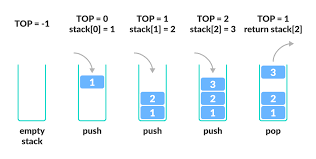
There are some basic operations that allow us to perform different actions on a stack.
- Push: Add an element to the top of a stack
- Pop: Remove an element from the top of a stack
- IsEmpty: Check if the stack is empty
- Peek: Get the value of the top element without removing it
Basic features of Stack
- Stack is an ordered list of similar data type.
- Stack is a LIFO(Last in First out) structure or we can say FILO(First in Last out).
push()function is used to insert new elements into the Stack andpop()function is used to remove an element from the stack. Both insertion and removal are allowed at only one end of Stack called Top.- Stack is said to be in Overflow state when it is completely full and is said to be in Underflow state if it is completely empty.

Applications of Stack
- Expression Evaluation. Stack is used to evaluate prefix, postfix and infix expressions.
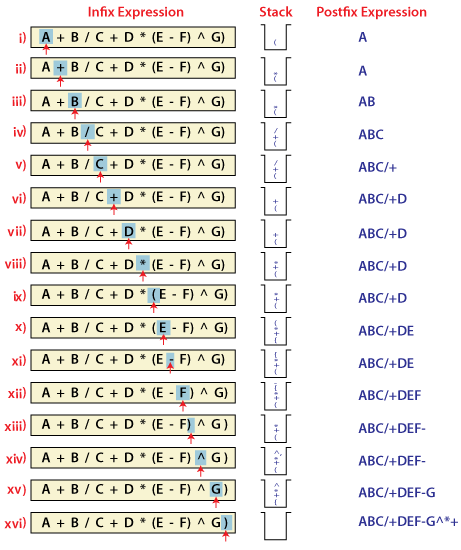
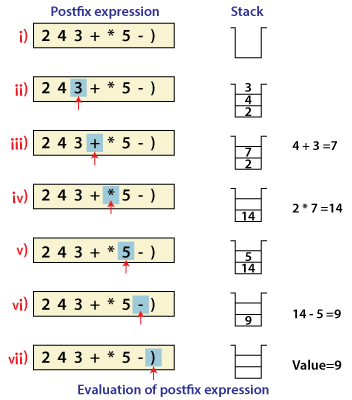
- Expression Conversion. An expression can be represented in prefix, postfix or infix notation. Stack can be used to convert one form of expression to another.
- Syntax Parsing. Many compilers use a stack for parsing the syntax of expressions, program blocks etc. before translating into low level code.As many of the Programming Languages are context-free languages. So, Stack is also heavily used for Syntax Parsing by most of the Compilers.
- Backtracking. Suppose we are finding a path for solving maze problem. We choose a path and after following it we realize that it is wrong. Now we need to go back to the beginning of the path to start with new path. This can be done with the help of stack.Backtracking is a recursive algorithm which is used for solving the optimization problem.So, In order to find the optimized solution of a problem with Backtracking, we have to find each and every possible solution of the problem, doesn’t matter if it is correct or not.In Backtracking, while finding the every possible solution of a problem, we store the solution of a previously calculated problem in Stack and use that solution to solve the upcoming problems.
- Parenthesis Checking. Stack is used to check the proper opening and closing of parenthesis.In Programming, we make use of different type of parenthesis, like – (, ), {, }, which are used for opening and closing a block of code.So, these parenthesis get stored in Stack and control the flow of our program.
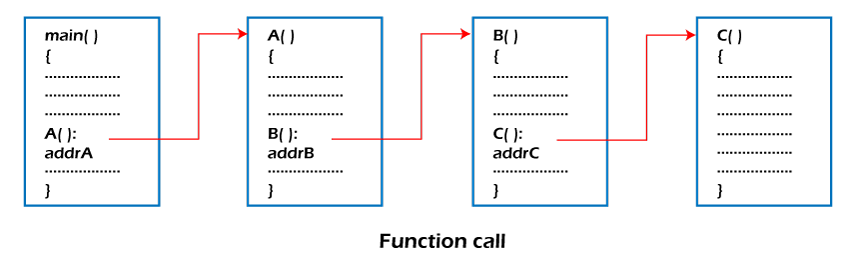
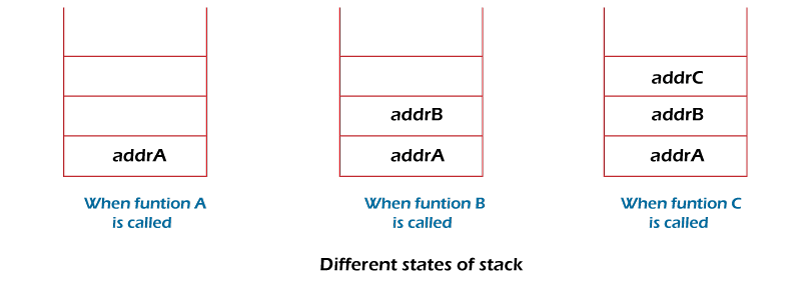
- Function call. Stack is used to keep information about the active functions or subroutines.In Programming, whenever you make a call from one function to the another function. The address of the calling function gets stored in the Stack.So, when the called function gets terminated. The program control move back to the calling function with the help of the address which was stored in the Stack.So, Stack plays the main role when it comes to Calling a Function from other Function.
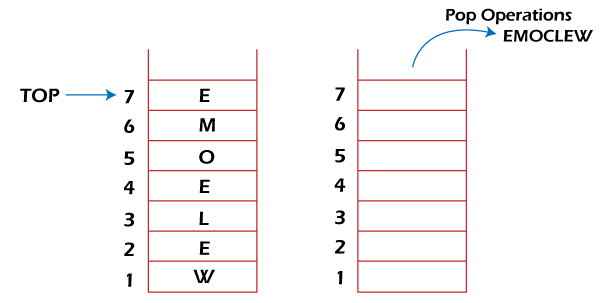
- String reversal. Stack is used to reverse a string. We push the characters of string one by one into stack and then pop character from stack.String Reversal is another amazing Application of Stack. Here, one by one each character of the Stack get inserted into the Stack.So, the first character of the Stack is on the bottom of the Stack and the last character of the String is on the Top of the Stack.After performing the pop operation in Stack, we get the String in Reverse order.
- Memory management. Memory Management is the important function of the Operating System. Stack also plays the main role when it comes to Memory Management.
@Data
@NoArgsConstructor
public class MyStack<E> {

    private LinkedList<E> list = new LinkedList<>();

    public E push(E item) {
        list.addFirst(item);
        return item;
    }

    public E pop() {
        if (list.size() <= 0) {
            throw new EmptyStackException();
        }
        return list.remove();
    }

    public int getSize() {
        return list.size();
    }

    public E peek() {
        if (list.size() <= 0) {
            throw new EmptyStackException();
        }
        return list.getFirst();
    }

    public void print() {

        int size = getSize();
        int count = 1;

        if (count >= size) {
            return;
        }

        E item = list.getFirst();

        while (item != null) {

            System.out.println(item.toString());

            if (count >= size) {
                break;
            }

            item = list.get(count);

            count++;
        }
    }
}
Javascript Module
JavaScript programs start off pretty small almost every time. Not until your project grows and grows so large that your scripts may start to look like spaghetti code. At this point, your code has to be broken down into separate modules that can be imported where needed.
The good news is that modern browsers have started to support module functionality natively, and this is what this article is all about. This can only be a good thing — browsers can optimize loading of modules, making it more efficient than having to use a library and do all of that extra client-side processing and extra round trips.
Export
The first thing you do to get access to module features is export them. This is done using the export statement. The easiest way to use it is to place it in front of any items you want exported out of the module. A more convenient way of exporting all the items you want to export is to use a single export statement at the end of your module file.
You can export functions, var, let, const, and classes. They need to be top-level items; you can’t use export inside a function
class User{
    //private fields are declared with #
    #name;
    constructor(name) {
        this.name = name;
    }

    getName(){
        return this.name;
    }

}

function sayHi(name) {
    return `Hello, ${name}!`;
}

let folau = {

    name: "Folau",

    getName(){
        return this.name;
    }
}

/**
 * export class User {...} -> import {User} from ..
 * export default class User {...} -> import User from ...
 */
// export has to be in the same order as import
// Named exports are explicit. They exactly name what they import, so we have that information from them; that’s a good thing.
export {User, sayHi, folau};
Import
Once you’ve exported some features out of your module, you need to import them into your script to be able to use them.
You use the import statement, followed by a comma-separated list of the features you want to import wrapped in curly braces, followed by the keyword from, followed by the path to the module file — a path relative to the site root. we are using the dot (.) syntax to mean “the current location”, followed by the path beyond that to the file we are trying to find. This is much better than writing out the entire relative path each time, as it is shorter, and it makes the URL portable — the example will still work if you move it to a different location in the site hierarchy.
<script type="module">
    // import has to be in the same order as export
    // Named exports are explicit. They exactly name what they import, so we have that information from them; that’s a good thing.
    import {User, sayHi, folau} from './module.js';

    console.log("Module");

    let greeting = sayHi("Folau");

    console.log(greeting);// Hello, Folau

    console.log("name: ", folau.getName());// Folau

    let lisa = new User("Lisa");
    console.log("name: ", lisa.getName());// Lisa
</script>
Linked List
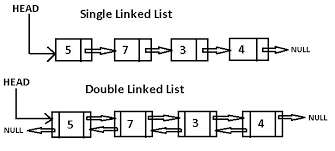
Linked List is a very commonly used linear data structure which consists of group of nodes in a sequence. Each node holds its own data and the address of the next node hence forming a chain like structure.
Linked Lists are used to create trees and graphs.
Advantages of Linked List
- Linkedlist is dynamic in nature which means it can expand in constant time. It does not have to create a new array as dynamic array does.
- Insertion and deletion operations can be easily implemented.
- Stacks and queues can be easily executed.
- Linked List reduces the access time.
Disadvantages of Linked List
- The memory is wasted as pointers require extra memory for storage.
- No element can be accessed randomly; it has to access each node sequentially.
- Reverse Traversing is difficult in linked list.
Where to use Linked List
- Linked lists are used to implement stacks, queues, graphs, etc.
- Linked lists let you insert elements at the beginning and end of the list.
- In Linked Lists we don’t need to know the size in advance.
When to use Linked List
- When you insert and delete elements often from a list.
There are 3 different implementations of Linked List available, they are:
- Singly Linked List
- Doubly Linked List
- Circular Linked List
Singly Linked List
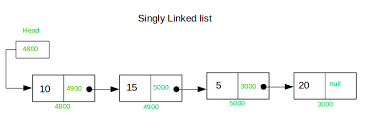
Singly linked lists contain nodes which have a data part as well as an address part i.e. next, which points to the next node in the sequence of nodes.
The operations we can perform on singly linked lists are insertion, deletion and traversal.
@ToString
@NoArgsConstructor
@AllArgsConstructor
@Data
public class Customer {

    private String firstName;
    private String lastName;
    private String email;
}
@ToString
@Data
public class SingleNode {

    private Customer data;
    private SingleNode     next;

    public SingleNode(Customer data) {
        this(data, null);
    }

    public SingleNode(Customer data, SingleNode next) {
        this.data = data;
        this.next = next;
    }

}
@NoArgsConstructor
@Data
public class MySingleLinkedList {

    int                size = 0;

    private SingleNode head;
    private SingleNode tail;

    public MySingleLinkedList(SingleNode head) {
        append(head);
    }

    /**
     * add to end of list<br>
     * 1. If the Linked List is empty then we simply, add the new Node as the Head of the Linked List.<br>
     * 2. If the Linked List is not empty then we find the last node, and make it' next to the new Node, hence making
     * the new node the last Node.
     *
     * Time complexity of append is O(n) where n is the number of nodes in the linked list. Since there is a loop from
     * head to end, the function does O(n) work. This method can also be optimized to work in O(1) by keeping an extra
     * pointer to the tail of the linked list.
     */
    public void append(SingleNode node) {
        if (node == null) {
            return;
        }
        if (this.head == null) {
            this.head = node;
            this.tail = node;
        } else {
            this.tail.setNext(node);
            this.tail = node;
        }
        size++;
    }

    /**
     * append to front of list<br>
     * 1. The first Node is the Head for any Linked List.<br>
     * 2. When a new Linked List is instantiated, it just has the Head, which is Null.<br>
     * 3. Else, the Head holds the pointer to the first Node of the List.<br>
     * 4. When we want to add any Node at the front, we must make the head point to it.<br>
     * 5. And the Next pointer of the newly added Node, must point to the previous Head, whether it be NULL(in case of
     * new List) or the pointer to the first Node of the List.<br>
     * 6. The previous Head Node is now the second Node of Linked List, because the new Node is added at the front.<br>
     */
    public void prepend(SingleNode node) {
        if (node == null) {
            return;
        }
        if (this.head == null) {
            this.head = node;
        } else {
            node.setNext(this.head);
            this.head = node;
        }
        size++;
    }

    /**
     * add at position of list
     */
    public void add(int index, SingleNode node) {
        if (node == null) {
            return;
        }

        int count = 0;

        SingleNode currentNode = this.head;

        if (this.head.equals(currentNode)) {
            /*
             * adding to the head
             */
            node.setNext(currentNode);
            this.head = node;

        } else if (this.tail.equals(currentNode)) {

            this.tail.setNext(node);
            this.tail = node;

        }

        SingleNode previous = null;

        while (currentNode.getNext() != null) {

            if (index == count) {
                break;
            }

            previous = currentNode;
            currentNode = currentNode.getNext();

            count++;

        }

        node.setNext(currentNode);
        previous.setNext(node);

        size++;
    }

    /**
     * is empty?
     */
    public boolean isEmpty() {
        return size <= 0 || this.head == null;
    }

    /**
     * exist? search by email
     */
    public boolean existByEmail(String email) {
        if (email == null || email.length() <= 0) {
            return false;
        }
        if (this.head == null) {
            return false;
        } else {
            SingleNode currentNode = this.head;

            /**
             * if email not found, keep checking the next node<br>
             * when email is found, break out of while loop
             */
            while (!currentNode.getData().getEmail().equalsIgnoreCase(email.toLowerCase())) {

                /**
                 * next is null, so email is not found
                 */
                if (currentNode.getNext() == null) {
                    return false;
                }

                currentNode = currentNode.getNext();
            }
            return true;
        }

    }

    /**
     * get node on index
     */
    public SingleNode get(int index) {
        if (index < 0 || index >= size) {
            throw new IllegalArgumentException("index out of bounds");
        }

        if (index == 0) {

            return this.head;

        } else if (index == (size - 1)) {

            return this.tail;

        } else {

            int count = 0;

            SingleNode currentNode = this.head;

            while (currentNode.getNext() != null) {
                currentNode = currentNode.getNext();

                count++;

                if (index == count) {
                    break;
                }

            }
            return currentNode;
        }

    }

    /**
     * remove node base on index<br>
     * 1. If the Node to be deleted is the first node, then simply set the Next pointer of the Head to point to the next
     * element from the Node to be deleted.<br>
     * 2. If the Node is in the middle somewhere, then find the Node before it, and make the Node before it point to the
     * Node next to it.<br>
     */
    public void removeAt(int index) {
        if (index < 0 || index >= size) {
            throw new IllegalArgumentException("index out of bounds");
        }

        if (index==0) {

            this.head = this.head.getNext();
            return;

        }

        int count = 1;

        SingleNode previous = this.head;
        SingleNode currentNode = this.head.getNext();
        SingleNode next = null;

        while (count < index) {

            previous = currentNode;
            currentNode = currentNode.getNext();
            next = currentNode.getNext();

            count++;

        }

        if (currentNode.equals(this.tail)) {

            this.tail = previous;
            this.tail.setNext(null);

        } else {
            // drop currentNode
            previous.setNext(next);
        }

    }

    /**
     * remove all<br>
     * set head to null
     */

    public void removeAll() {
        this.head = null;
        this.tail = null;
    }

    /**
     * print out list
     */

    public void printList() {
        if (this.head == null) {
            System.out.println("list is empty");
        }

        int count = 0;
        SingleNode node = this.head;
        while (node != null) {
            System.out.println("index: " + count);
            System.out.println("data: " + node.getData().toString());
            node = node.getNext();

            if (node == null) {
                System.out.println("tail: " + tail.getData().toString());
                System.out.println("end of list\n");
            }

            System.out.println("\n");

            count++;
        }

    }
}
Doubly Linked List
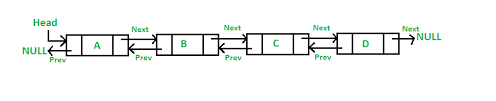
In a doubly linked list, each node contains a data part and two addresses, one for the previous node and one for the next node.
@AllArgsConstructor
@ToString
@Data
public class DoubleNode {

    private DoubleNode prev;
    private Customer   data;
    private DoubleNode next;

    public DoubleNode(Customer data) {
        this(null, data, null);
    }
}
@NoArgsConstructor
@Data
public class MyDoubleLinkedList {

    int                size = 0;

    private DoubleNode head;
    private DoubleNode tail;

    public MyDoubleLinkedList(DoubleNode head) {
        append(head);
    }

    /**
     * add to end of list<br>
     * 1. If the Linked List is empty then we simply, add the new Node as the Head of the Linked List.<br>
     * 2. If the Linked List is not empty then we find the last node, and make it' next to the new Node, hence making
     * the new node the last Node.
     */
    public void append(DoubleNode node) {
        if (node == null) {
            return;
        }
        if (this.head == null) {
            this.head = node;
            this.tail = node;
        } else {
            DoubleNode currentNode = this.head;
            while (currentNode.getNext() != null) {
                currentNode = currentNode.getNext();
            }
            // order doesn't matter, as long as the last operation is tail=node
            this.tail.setNext(node);
            node.setPrev(this.tail);
            this.tail = node;

        }
        size++;
    }

    /**
     * append to front of list<br>
     * 1. The first Node is the Head for any Linked List.<br>
     * 2. When a new Linked List is instantiated, it just has the Head, which is Null.<br>
     * 3. Else, the Head holds the pointer to the first Node of the List.<br>
     * 4. When we want to add any Node at the front, we must make the head point to it.<br>
     * 5. And the Next pointer of the newly added Node, must point to the previous Head, whether it be NULL(in case of
     * new List) or the pointer to the first Node of the List.<br>
     * 6. The previous Head Node is now the second Node of Linked List, because the new Node is added at the front.<br>
     */
    public void prepend(DoubleNode node) {
        if (node == null) {
            return;
        }
        if (this.head == null) {
            this.head = node;
        } else {

            // order doesn't matter, as long as the last operation is head=node
            this.head.setPrev(node);
            node.setNext(this.head);
            this.head = node;
        }
        size++;
    }

    /**
     * add at position of list
     */
    public void add(int index, DoubleNode node) {
        if (node == null) {
            return;
        }

        int count = 0;

        DoubleNode currentNode = this.head;

        if (index == 0) {

            node.setNext(currentNode);
            this.head = node;

        } else if (index == (size - 1)) {

            this.tail.setNext(node);
            this.tail = node;

        } else {

            DoubleNode previous = null;

            while (currentNode.getNext() != null) {

                if (index == count) {
                    break;
                }

                previous = currentNode;
                currentNode = currentNode.getNext();

                count++;

            }

            node.setNext(currentNode);
            previous.setNext(node);

        }

        size++;
    }

    /**
     * is empty?
     */
    public boolean isEmpty() {
        return size <= 0 || this.head == null;
    }

    /**
     * exist? search by email
     */
    public boolean existByEmail(String email) {
        if (email == null || email.length() <= 0) {
            return false;
        }
        if (this.head == null) {
            return false;
        } else {
            DoubleNode currentNode = this.head;

            /**
             * if email not found, keep checking the next node<br>
             * when email is found, break out of while loop
             */
            while (!currentNode.getData().getEmail().equalsIgnoreCase(email.toLowerCase())) {

                /**
                 * next is null, so email is not found
                 */
                if (currentNode.getNext() == null) {
                    return false;
                }

                currentNode = currentNode.getNext();
            }
            return true;
        }

    }

    /**
     * get node on index
     */
    public DoubleNode get(int index) {
        if (index < 0 || index >= size) {
            throw new IllegalArgumentException("index out of bounds");
        }
        if (index == 0) {
            return this.head;
        }

        if (index == 0) {

            return this.head;

        } else if (index == (size - 1)) {

            return this.tail;

        } else {

            int count = 0;

            DoubleNode currentNode = this.head;

            while (currentNode.getNext() != null) {
                currentNode = currentNode.getNext();

                count++;

                if (index == count) {
                    break;
                }

            }
            return currentNode;
        }

    }

    /**
     * remove node base on index<br>
     * 1. If the Node to be deleted is the first node, then simply set the Next pointer of the Head to point to the next
     * element from the Node to be deleted.<br>
     * 2. If the Node is in the middle somewhere, then find the Node before it, and make the Node before it point to the
     * Node next to it.<br>
     */
    public void remove(int index) {
        if (index < 0 || index >= size) {
            throw new IllegalArgumentException("index out of bounds");
        }

        int count = 0;

        if (index == 0) {

            this.head = this.head.getNext();
            this.head.setPrev(null);

        } else if (index == (size - 1)) {

            this.tail = this.tail.getPrev();
            this.tail.setNext(null);

        } else {

            DoubleNode previous = null;
            DoubleNode currentNode = this.head;
            DoubleNode next = null;

            while (currentNode.getNext() != null) {

                if (index == count) {
                    break;
                }

                previous = currentNode;
                currentNode = currentNode.getNext();
                next = currentNode.getNext();

                count++;

            }

            previous.setNext(next);
            next.setPrev(previous);

        }

    }

    /**
     * remove all<br>
     * set head to null
     */

    public void removeAll() {
        this.head = null;
        this.tail = null;
    }

    /**
     * print out list
     */

    public void printList() {
        if (this.head == null) {
            System.out.println("list is empty");
        }

        int count = 0;
        DoubleNode node = this.head;
        while (node != null) {
            System.out.println("index: " + count);
            System.out.println("prev: " + ((node.getPrev() != null) ? node.getPrev().getData().toString() : ""));
            System.out.println("current: " + node.getData().toString());
            System.out.println("next: " + ((node.getNext() != null) ? node.getNext().getData().toString() : ""));
            node = node.getNext();

            if (node == null) {
                System.out.println("tail: " + tail.getData().toString());
                System.out.println("end of list\n");
            }

            System.out.println("\n");

            count++;
        }

    }
}
Circular Linked List
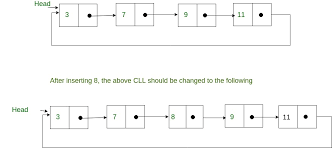
In circular linked list the last node of the list holds the address of the first node hence forming a circular chain.
Time Complexity
| Data Structure | Time Complexity | Space Complexity | |||||||
|---|---|---|---|---|---|---|---|---|---|
| Average | Worst | Worst | |||||||
| Access | Search | Insertion | Deletion | Access | Search | Insertion | Deletion | ||
| Singly-Linked List | Θ(n) |
Θ(n) |
Θ(1) |
Θ(1) |
O(n) |
O(n) |
O(1) |
O(1) |
O(n) |
| Doubly-Linked List | Θ(n) |
Θ(n) |
Θ(1) |
Θ(1) |
O(n) |
O(n) |
O(1) |
O(1) |
O(n) |
- add() – appends an element to the end of the list. So it only updates the tail node, therefore O(1) constant-time complexity.
- add(index, element) – in average runs in O(n) time
- get() – searching for an element takes O(n) time
- remove(element) – to remove an element, only pointers have to be updated. This operation is O(1).
- remove(index) – to remove an element by index, we first need to find it, therefor the overall complexity is O(n)
- contains() – also has O(n) time complexity
Multithreading
1. What is Multithreading?
Imagine a restaurant with a single waiter. One waiter takes an order, walks to the kitchen, waits for the food, brings it back, then moves to the next table. During peak hours, customers wait forever. Now imagine the same restaurant with five waiters. While one waiter is waiting for food at the kitchen, another is taking an order, a third is serving a table, and a fourth is processing a payment. The restaurant handles far more customers in the same amount of time — not because each waiter is faster, but because work happens concurrently.
Multithreading is the restaurant-with-multiple-waiters approach applied to software. A thread is an independent path of execution within a program. Multithreading means running multiple threads simultaneously within a single process, allowing your program to do several things at once.
Process vs. Thread
These two terms are often confused, but they are fundamentally different:
| Feature | Process | Thread |
|---|---|---|
| Definition | An independent program in execution with its own memory space | A lightweight unit of execution within a process |
| Memory | Each process has its own heap, stack, and data segments | Threads within a process share the heap but have separate stacks |
| Communication | Inter-process communication (IPC) — sockets, pipes, shared memory (expensive) | Direct access to shared variables (fast but requires synchronization) |
| Creation cost | Expensive — OS must allocate memory, file descriptors, etc. | Cheap — only needs a new stack and program counter |
| Isolation | One process crashing does not affect others | One thread crashing can kill the entire process |
| Example | Running Chrome and IntelliJ side by side | Chrome loading 10 tabs simultaneously within one Chrome process |
Why Multithreading?
- Performance — Modern CPUs have multiple cores. A single-threaded program uses one core while the others sit idle. Multithreading spreads work across all cores, dramatically improving throughput for CPU-intensive tasks.
- Responsiveness — In a GUI application, a long-running computation on the main thread freezes the entire UI. Moving that work to a background thread keeps the UI responsive. Same principle applies to servers handling multiple client requests simultaneously.
- Resource utilization — When one thread is blocked waiting for I/O (disk read, network response, database query), other threads can use the CPU. Without multithreading, your program wastes time doing nothing while waiting.
- Simplicity of modeling — Some problems are naturally concurrent. A web server handling multiple requests, a chat application managing multiple users, or a data pipeline with multiple stages are all simpler to model with threads than with a single-threaded event loop.
A Word of Caution
Multithreading is powerful but dangerous. Shared mutable state, race conditions, deadlocks, and visibility problems make concurrent code the most difficult category of bugs to write, debug, and fix. As Brian Goetz wrote in Java Concurrency in Practice: “Writing correct concurrent programs is hard; writing correct concurrent programs that are also performant is harder still.” This tutorial will teach you both the tools and the discipline to get it right.
2. Creating Threads
Java provides two fundamental ways to create a thread: extending the Thread class and implementing the Runnable interface. Both achieve the same result — a new thread of execution — but they have important design trade-offs.
2.1 Extending the Thread Class
The simplest approach: create a subclass of java.lang.Thread and override the run() method. The code inside run() is what the new thread will execute.
public class MyThread extends Thread {

    @Override
    public void run() {
        for (int i = 1; i <= 5; i++) {
            System.out.println(Thread.currentThread().getName() + " - Count: " + i);
            try {
                Thread.sleep(500); // Pause 500ms between iterations
            } catch (InterruptedException e) {
                System.out.println("Thread was interrupted");
                return;
            }
        }
    }

    public static void main(String[] args) {
        MyThread thread1 = new MyThread();
        MyThread thread2 = new MyThread();

        thread1.setName("Worker-A");
        thread2.setName("Worker-B");

        thread1.start(); // Starts a NEW thread that calls run()
        thread2.start(); // Starts another NEW thread

        System.out.println("Main thread continues immediately");
    }
}
// Output (order may vary -- that's the nature of concurrency):
// Main thread continues immediately
// Worker-A - Count: 1
// Worker-B - Count: 1
// Worker-A - Count: 2
// Worker-B - Count: 2
// Worker-A - Count: 3
// Worker-B - Count: 3
// Worker-A - Count: 4
// Worker-B - Count: 4
// Worker-A - Count: 5
// Worker-B - Count: 5
2.2 Implementing the Runnable Interface
The preferred approach. Instead of subclassing Thread, you implement Runnable -- a functional interface with a single run() method -- and pass it to a Thread object.
public class MyRunnable implements Runnable {

    private final String taskName;

    public MyRunnable(String taskName) {
        this.taskName = taskName;
    }

    @Override
    public void run() {
        for (int i = 1; i <= 5; i++) {
            System.out.println(taskName + " - Step " + i + " [" + Thread.currentThread().getName() + "]");
            try {
                Thread.sleep(300);
            } catch (InterruptedException e) {
                Thread.currentThread().interrupt(); // Restore interrupt flag
                return;
            }
        }
    }

    public static void main(String[] args) {
        Thread thread1 = new Thread(new MyRunnable("Download"), "IO-Thread-1");
        Thread thread2 = new Thread(new MyRunnable("Parse"), "IO-Thread-2");

        thread1.start();
        thread2.start();
    }
}
// Output (order varies):
// Download - Step 1 [IO-Thread-1]
// Parse - Step 1 [IO-Thread-2]
// Download - Step 2 [IO-Thread-1]
// Parse - Step 2 [IO-Thread-2]
// ...
2.3 Runnable with Lambda (Java 8+)
Since Runnable is a functional interface (one abstract method), you can express it as a lambda. This is the most concise and modern approach for simple tasks.
public class LambdaThreadDemo {
    public static void main(String[] args) {
        // Inline lambda -- no need for a separate class
        Thread thread1 = new Thread(() -> {
            for (int i = 0; i < 3; i++) {
                System.out.println("Lambda thread: " + i);
            }
        });
        thread1.start();

        // Even shorter for one-liners
        new Thread(() -> System.out.println("Quick task on " + Thread.currentThread().getName())).start();

        // Method reference (if you have an existing method)
        new Thread(LambdaThreadDemo::doWork).start();
    }

    private static void doWork() {
        System.out.println("Doing work on " + Thread.currentThread().getName());
    }
}
// Output (order varies):
// Lambda thread: 0
// Lambda thread: 1
// Lambda thread: 2
// Quick task on Thread-1
// Doing work on Thread-2
2.4 Thread Lifecycle
Every thread in Java goes through a well-defined set of states. Understanding these states is essential for debugging threading issues.
         new Thread()           start()
              |                    |
              v                    v
           [ NEW ] ----------> [ RUNNABLE ] <---------+
                                /      \              |
                               /        \             |
              sleep()/wait()  /          \ I/O done / |
              lock wait      /            \ notify  / |
                            v              v        |  |
                     [ TIMED_WAITING ]  [ WAITING ] --+
                     [ BLOCKED ]        (waiting for lock)
                            \              /
                             \            /
                              v          v
                           [ TERMINATED ]
                          (run() completes or
                           exception thrown)
| State | Description | How to Enter |
|---|---|---|
NEW |
Thread object created but start() not yet called |
new Thread() |
RUNNABLE |
Thread is eligible to run. May be actually running or waiting for CPU time | start(), or returning from a blocked/waiting state |
BLOCKED |
Thread is waiting to acquire a monitor lock (synchronized block/method) | Attempting to enter a synchronized block held by another thread |
WAITING |
Thread is waiting indefinitely for another thread to perform an action | Object.wait(), Thread.join(), LockSupport.park() |
TIMED_WAITING |
Thread is waiting for a specified amount of time | Thread.sleep(ms), Object.wait(ms), Thread.join(ms) |
TERMINATED |
Thread has completed execution (run() returned or exception thrown) | run() completes normally or throws an uncaught exception |
2.5 Thread vs. Runnable: Which to Use?
| Criteria | extends Thread | implements Runnable |
|---|---|---|
| Inheritance | Uses up your single inheritance slot | Your class can still extend another class |
| Separation of concerns | Mixes task logic with threading infrastructure | Separates the task (what to do) from the mechanism (how to run it) |
| Reusability | Task is tied to Thread -- cannot submit to a thread pool | Same Runnable can be passed to Thread, ExecutorService, etc. |
| Lambda support | Not possible (abstract class, not interface) | Supported (Runnable is a functional interface) |
| Resource sharing | Each Thread instance has its own fields | Multiple threads can share a single Runnable instance |
| When to use | Almost never -- only if you need to override other Thread methods | Almost always -- this is the standard approach |
Rule of thumb: Always prefer Runnable (or even better, use an ExecutorService as shown in Section 7). Extending Thread is a legacy pattern that you will see in older codebases but should avoid in new code.
3. Thread Methods
The Thread class provides several methods for controlling thread behavior. Understanding these methods -- especially the difference between start() and run() -- is critical for writing correct concurrent programs.
3.1 start() vs. run() -- The Most Important Distinction
This is the single most common mistake beginners make with threads. Calling run() does NOT create a new thread. It executes the method on the current thread, just like any other method call. Only start() creates a new thread and invokes run() on that new thread.
public class StartVsRun {
    public static void main(String[] args) {
        Runnable task = () -> System.out.println("Running on: " + Thread.currentThread().getName());

        // WRONG: Calling run() directly -- executes on main thread
        Thread t1 = new Thread(task, "Worker-1");
        t1.run(); // Output: Running on: main  <-- NOT on Worker-1!

        // CORRECT: Calling start() -- executes on new thread
        Thread t2 = new Thread(task, "Worker-2");
        t2.start(); // Output: Running on: Worker-2
    }
}
// Output:
// Running on: main
// Running on: Worker-2
3.2 sleep() -- Pause the Current Thread
Thread.sleep(milliseconds) pauses the currently executing thread for at least the specified duration. It does not release any locks the thread holds. It throws InterruptedException if another thread interrupts the sleeping thread.
public class SleepDemo {
    public static void main(String[] args) {
        System.out.println("Start: " + System.currentTimeMillis());

        try {
            Thread.sleep(2000); // Pause for 2 seconds
        } catch (InterruptedException e) {
            System.out.println("Sleep was interrupted!");
        }

        System.out.println("End: " + System.currentTimeMillis());
        // The difference will be approximately 2000ms
    }
}
3.3 join() -- Wait for a Thread to Finish
join() makes the calling thread wait until the target thread completes. This is how you enforce ordering -- "don't continue until this thread is done." You can also pass a timeout: join(5000) waits at most 5 seconds.
public class JoinDemo {
    public static void main(String[] args) throws InterruptedException {
        Thread downloader = new Thread(() -> {
            System.out.println("Downloading file...");
            try { Thread.sleep(3000); } catch (InterruptedException e) { return; }
            System.out.println("Download complete!");
        });

        Thread processor = new Thread(() -> {
            System.out.println("Processing file...");
            try { Thread.sleep(1000); } catch (InterruptedException e) { return; }
            System.out.println("Processing complete!");
        });

        downloader.start();
        downloader.join(); // Main thread WAITS until downloader finishes

        // Only after download is complete do we start processing
        processor.start();
        processor.join(); // Main thread WAITS until processor finishes

        System.out.println("All work done!");
    }
}
// Output (always in this order due to join()):
// Downloading file...
// Download complete!
// Processing file...
// Processing complete!
// All work done!
3.4 Other Useful Thread Methods
| Method | Description | Example |
|---|---|---|
Thread.currentThread() |
Returns a reference to the currently executing thread | String name = Thread.currentThread().getName(); |
setName(String) / getName() |
Set or get the thread's name (extremely useful for debugging and logging) | thread.setName("OrderProcessor-1"); |
setPriority(int) / getPriority() |
Set priority from 1 (MIN) to 10 (MAX). Default is 5. Note: priority is a hint to the OS scheduler -- not a guarantee | thread.setPriority(Thread.MAX_PRIORITY); |
isAlive() |
Returns true if the thread has been started and has not yet terminated |
if (thread.isAlive()) { ... } |
yield() |
Suggests to the scheduler that the current thread is willing to yield its current CPU time. Rarely used and behavior is platform-dependent | Thread.yield(); |
interrupt() |
Sets the thread's interrupt flag. If the thread is sleeping or waiting, it throws InterruptedException. Otherwise, the thread must check Thread.interrupted() or isInterrupted() |
thread.interrupt(); |
isInterrupted() |
Checks the thread's interrupt flag without clearing it | while (!Thread.currentThread().isInterrupted()) { ... } |
Thread.interrupted() |
Checks AND clears the current thread's interrupt flag (static method) | if (Thread.interrupted()) { cleanup(); } |
setDaemon(boolean) |
Mark thread as a daemon thread. Daemon threads are killed when all non-daemon threads finish. Must be called before start() |
thread.setDaemon(true); |
3.5 interrupt() -- The Correct Way to Stop a Thread
Never use the deprecated stop() method. The correct way to signal a thread to stop is with interrupt(). The thread itself must cooperate by checking for interruption.
public class InterruptDemo {
    public static void main(String[] args) throws InterruptedException {
        Thread worker = new Thread(() -> {
            while (!Thread.currentThread().isInterrupted()) {
                System.out.println("Working...");
                try {
                    Thread.sleep(500);
                } catch (InterruptedException e) {
                    // sleep() clears the interrupt flag, so we re-set it
                    System.out.println("Interrupted during sleep -- shutting down gracefully");
                    Thread.currentThread().interrupt(); // Restore the flag
                    break; // Exit the loop
                }
            }
            System.out.println("Worker finished cleanup and exiting");
        });

        worker.start();
        Thread.sleep(2000); // Let it work for 2 seconds
        worker.interrupt(); // Signal the thread to stop
        worker.join(); // Wait for it to actually finish
        System.out.println("Main thread done");
    }
}
// Output:
// Working...
// Working...
// Working...
// Working...
// Interrupted during sleep -- shutting down gracefully
// Worker finished cleanup and exiting
// Main thread done
4. Thread Synchronization
When multiple threads read and write shared data simultaneously, you get race conditions -- one of the most insidious bugs in software development. Race conditions are non-deterministic: the code might work correctly 99 times and fail on the 100th, or pass all tests in development and fail in production under load.
4.1 The Problem: Race Conditions
Let us demonstrate the problem with a simple shared counter. Two threads each increment it 100,000 times. The expected result is 200,000. But without synchronization, the result is unpredictable.
public class RaceConditionDemo {
    private static int counter = 0;

    public static void main(String[] args) throws InterruptedException {
        Runnable increment = () -> {
            for (int i = 0; i < 100_000; i++) {
                counter++; // NOT atomic! Read -> Increment -> Write (3 steps)
            }
        };

        Thread t1 = new Thread(increment);
        Thread t2 = new Thread(increment);

        t1.start();
        t2.start();
        t1.join();
        t2.join();

        System.out.println("Expected: 200000");
        System.out.println("Actual:   " + counter);
    }
}
// Output (varies on each run):
// Expected: 200000
// Actual:   156823   <-- WRONG! Lost updates due to race condition
Why does this happen? The expression counter++ looks atomic but is actually three steps: (1) read the current value of counter, (2) add 1, (3) write the new value back. If Thread A reads counter = 50, then Thread B also reads counter = 50 before A writes back, both threads write 51 -- and one increment is lost.
4.2 The synchronized Keyword
Java's built-in solution is the synchronized keyword. It ensures that only one thread at a time can execute a synchronized block or method on the same object. Every Java object has an intrinsic lock (also called a monitor). When a thread enters a synchronized block, it acquires the lock. When it exits, it releases the lock. Any other thread trying to enter a synchronized block on the same object will be blocked until the lock is released.
Synchronized Method
public class SynchronizedCounter {
    private int count = 0;

    // Synchronized method -- locks on 'this' object
    public synchronized void increment() {
        count++; // Only one thread at a time can execute this
    }

    public synchronized int getCount() {
        return count;
    }

    public static void main(String[] args) throws InterruptedException {
        SynchronizedCounter counter = new SynchronizedCounter();

        Runnable task = () -> {
            for (int i = 0; i < 100_000; i++) {
                counter.increment();
            }
        };

        Thread t1 = new Thread(task);
        Thread t2 = new Thread(task);

        t1.start();
        t2.start();
        t1.join();
        t2.join();

        System.out.println("Count: " + counter.getCount());
    }
}
// Output (always correct now):
// Count: 200000
Synchronized Block
Synchronized blocks are more flexible than synchronized methods because you can synchronize on any object and limit the scope of the lock to only the code that actually needs protection.
public class SynchronizedBlockDemo {
    private int count = 0;
    private final Object lock = new Object(); // Dedicated lock object

    public void increment() {
        // Only the critical section is synchronized -- not the whole method
        synchronized (lock) {
            count++;
        }
    }

    // You can also synchronize on 'this'
    public void decrement() {
        synchronized (this) {
            count--;
        }
    }

    // Static synchronized method locks on the Class object
    private static int globalCount = 0;
    public static synchronized void incrementGlobal() {
        globalCount++; // Locks on SynchronizedBlockDemo.class
    }

    public static void main(String[] args) throws InterruptedException {
        SynchronizedBlockDemo demo = new SynchronizedBlockDemo();

        Thread t1 = new Thread(() -> {
            for (int i = 0; i < 100_000; i++) demo.increment();
        });
        Thread t2 = new Thread(() -> {
            for (int i = 0; i < 100_000; i++) demo.increment();
        });

        t1.start();
        t2.start();
        t1.join();
        t2.join();

        System.out.println("Count: " + demo.count); // Always 200000
    }
}
4.3 Deadlock
A deadlock occurs when two or more threads are each waiting for a lock held by another, creating a circular dependency that can never be resolved. The program hangs forever.
Classic scenario: Thread A holds Lock 1 and waits for Lock 2. Thread B holds Lock 2 and waits for Lock 1. Neither can proceed.
public class DeadlockDemo {
    private static final Object lockA = new Object();
    private static final Object lockB = new Object();

    public static void main(String[] args) {
        Thread thread1 = new Thread(() -> {
            synchronized (lockA) {
                System.out.println("Thread 1: Holding Lock A...");
                try { Thread.sleep(100); } catch (InterruptedException e) {}

                System.out.println("Thread 1: Waiting for Lock B...");
                synchronized (lockB) { // BLOCKED -- Thread 2 holds lockB
                    System.out.println("Thread 1: Holding both locks!");
                }
            }
        });

        Thread thread2 = new Thread(() -> {
            synchronized (lockB) {
                System.out.println("Thread 2: Holding Lock B...");
                try { Thread.sleep(100); } catch (InterruptedException e) {}

                System.out.println("Thread 2: Waiting for Lock A...");
                synchronized (lockA) { // BLOCKED -- Thread 1 holds lockA
                    System.out.println("Thread 2: Holding both locks!");
                }
            }
        });

        thread1.start();
        thread2.start();
        // DEADLOCK! Both threads are stuck forever.
    }
}
// Output:
// Thread 1: Holding Lock A...
// Thread 2: Holding Lock B...
// Thread 1: Waiting for Lock B...
// Thread 2: Waiting for Lock A...
// (program hangs -- deadlock)
How to Prevent Deadlock
- Lock ordering -- Always acquire locks in the same order. If every thread acquires Lock A before Lock B, circular dependencies are impossible.
- Lock timeout -- Use
tryLock(timeout)fromjava.util.concurrent.locks.ReentrantLockinstead ofsynchronized. If the lock is not available within the timeout, back off. - Minimize lock scope -- Hold locks for the shortest time possible. The less code inside a synchronized block, the lower the chance of deadlock.
- Avoid nested locks -- If you must acquire multiple locks, document the locking order and enforce it consistently across the codebase.
// FIX: Consistent lock ordering prevents deadlock
public class DeadlockFixed {
    private static final Object lockA = new Object();
    private static final Object lockB = new Object();

    public static void main(String[] args) {
        // Both threads acquire locks in the SAME order: A then B
        Runnable task = () -> {
            synchronized (lockA) { // Always lock A first
                System.out.println(Thread.currentThread().getName() + ": Holding Lock A");
                try { Thread.sleep(100); } catch (InterruptedException e) {}

                synchronized (lockB) { // Then lock B
                    System.out.println(Thread.currentThread().getName() + ": Holding both locks!");
                }
            }
        };

        new Thread(task, "Thread-1").start();
        new Thread(task, "Thread-2").start();
    }
}
// Output (no deadlock):
// Thread-1: Holding Lock A
// Thread-1: Holding both locks!
// Thread-2: Holding Lock A
// Thread-2: Holding both locks!
5. The volatile Keyword
The volatile keyword solves a different problem than synchronized. While synchronized provides mutual exclusion (only one thread at a time), volatile provides visibility -- it guarantees that when one thread writes a value, all other threads see the updated value immediately.
5.1 The Visibility Problem
Modern CPUs have caches. When a thread reads a variable, it may read a cached copy rather than the actual value in main memory. Without volatile, one thread's writes may never be visible to another thread.
public class VisibilityProblem {
    private static boolean running = true; // NOT volatile -- may be cached

    public static void main(String[] args) throws InterruptedException {
        Thread worker = new Thread(() -> {
            int count = 0;
            while (running) { // May read cached value of 'running' forever!
                count++;
            }
            System.out.println("Worker stopped after " + count + " iterations");
        });

        worker.start();
        Thread.sleep(1000);
        running = false; // Main thread sets running to false
        System.out.println("Main thread set running = false");

        // BUG: The worker thread might NEVER see running = false
        // because it keeps reading its cached copy.
        // The program might hang forever!
    }
}
public class VisibilityFixed {
    private static volatile boolean running = true; // volatile guarantees visibility

    public static void main(String[] args) throws InterruptedException {
        Thread worker = new Thread(() -> {
            int count = 0;
            while (running) { // Always reads from main memory
                count++;
            }
            System.out.println("Worker stopped after " + count + " iterations");
        });

        worker.start();
        Thread.sleep(1000);
        running = false; // This write is immediately visible to the worker
        System.out.println("Main thread set running = false");
        worker.join();
    }
}
// Output:
// Main thread set running = false
// Worker stopped after 248573921 iterations
5.2 When volatile is Enough vs. When synchronized is Needed
| Scenario | volatile | synchronized |
|---|---|---|
| One thread writes, other threads only read (flag pattern) | Sufficient | Not needed |
| Multiple threads do read-modify-write (counter++) | NOT sufficient | Required (or use AtomicInteger) |
| Writing one variable that depends on another | NOT sufficient | Required |
| Single write/read of a primitive (boolean, int, etc.) | Sufficient | Works but overkill |
Rule of thumb: Use volatile for simple flags and status indicators where only one thread writes. Use synchronized (or atomic classes) for anything that involves compound operations like check-then-act or read-modify-write.
6. wait(), notify(), notifyAll()
Sometimes threads need to communicate with each other -- not just prevent simultaneous access, but actually coordinate: "I've produced data, you can consume it now" or "The buffer is full, stop producing until I make room." This is inter-thread communication, and Java provides wait(), notify(), and notifyAll() for exactly this purpose.
6.1 How They Work
- wait() -- The current thread releases the lock and goes to sleep until another thread calls
notify()ornotifyAll()on the same object. It must be called from inside asynchronizedblock -- otherwise you get anIllegalMonitorStateException. - notify() -- Wakes up exactly one thread that is waiting on this object's monitor. Which thread is woken is decided by the JVM (no guarantee).
- notifyAll() -- Wakes up ALL threads waiting on this object's monitor. Each woken thread competes to re-acquire the lock and proceed.
Critical rule: Always call wait() in a while loop, not an if statement. A thread can be woken for reasons other than notify() (spurious wakeup), so it must re-check the condition.
6.2 Producer-Consumer Pattern
This is the classic use case for wait()/notify(). One or more threads produce data, and one or more threads consume it. They coordinate through a shared buffer.
import java.util.LinkedList;
import java.util.Queue;

public class ProducerConsumer {
    private static final int MAX_SIZE = 5;
    private static final Queue buffer = new LinkedList<>();

    public static void main(String[] args) {
        Thread producer = new Thread(() -> {
            int value = 0;
            while (true) {
                synchronized (buffer) {
                    // Wait while buffer is full
                    while (buffer.size() == MAX_SIZE) {
                        try {
                            System.out.println("Buffer full -- producer waiting...");
                            buffer.wait(); // Release lock and wait
                        } catch (InterruptedException e) {
                            Thread.currentThread().interrupt();
                            return;
                        }
                    }
                    buffer.add(value);
                    System.out.println("Produced: " + value);
                    value++;
                    buffer.notifyAll(); // Wake up consumer(s)
                }
                try { Thread.sleep(200); } catch (InterruptedException e) { return; }
            }
        }, "Producer");

        Thread consumer = new Thread(() -> {
            while (true) {
                synchronized (buffer) {
                    // Wait while buffer is empty
                    while (buffer.isEmpty()) {
                        try {
                            System.out.println("Buffer empty -- consumer waiting...");
                            buffer.wait(); // Release lock and wait
                        } catch (InterruptedException e) {
                            Thread.currentThread().interrupt();
                            return;
                        }
                    }
                    int value = buffer.poll();
                    System.out.println("Consumed: " + value);
                    buffer.notifyAll(); // Wake up producer(s)
                }
                try { Thread.sleep(500); } catch (InterruptedException e) { return; }
            }
        }, "Consumer");

        producer.setDaemon(true);
        consumer.setDaemon(true);
        producer.start();
        consumer.start();

        // Let them run for a few seconds
        try { Thread.sleep(5000); } catch (InterruptedException e) {}
        System.out.println("Main thread done -- daemon threads will stop");
    }
}
// Output (excerpt):
// Produced: 0
// Produced: 1
// Consumed: 0
// Produced: 2
// Consumed: 1
// Produced: 3
// Produced: 4
// Produced: 5
// Buffer full -- producer waiting...
// Consumed: 2
// Produced: 6
// ...
6.3 Why notify/wait Must Be in synchronized Blocks
The wait() and notify() mechanism is built on top of the object's intrinsic lock. When you call wait(), the thread releases the lock and goes to sleep atomically -- meaning no other thread can slip in between the "check condition" and "go to sleep" steps. Without synchronization, you would have a race condition: the producer could call notify() after the consumer checks the condition but before it calls wait(), and the signal would be lost forever.
In modern Java, prefer BlockingQueue (Section 9) over manual wait()/notify() for producer-consumer patterns. It handles all the synchronization internally and is much less error-prone.
7. Thread Pools (ExecutorService)
Creating a new Thread object for every task is expensive. Each thread allocates its own stack (typically 512KB-1MB), and the OS must schedule it. If your application creates thousands of threads, you will run out of memory or suffer from excessive context switching.
Thread pools solve this by maintaining a fixed set of reusable threads. Tasks are submitted to a queue, and the pool's threads pick them up as they become available. When a thread finishes a task, it does not die -- it goes back to the pool and waits for the next task.
7.1 ExecutorService Overview
ExecutorService is the primary interface for thread pool management in Java. The Executors factory class provides convenient methods to create common pool configurations.
| Factory Method | Pool Behavior | Best For |
|---|---|---|
Executors.newFixedThreadPool(n) |
Exactly n threads. Tasks queue up when all threads are busy |
CPU-bound work where you want to control parallelism |
Executors.newCachedThreadPool() |
Creates new threads as needed, reuses idle threads. Idle threads expire after 60 seconds | Many short-lived I/O-bound tasks |
Executors.newSingleThreadExecutor() |
One thread. Tasks execute sequentially in submission order | Tasks that must not overlap (logging, database writes) |
Executors.newScheduledThreadPool(n) |
n threads that can run tasks after a delay or periodically |
Scheduled tasks, heartbeats, periodic cleanup |
import java.util.concurrent.ExecutorService;
import java.util.concurrent.Executors;
import java.util.concurrent.TimeUnit;

public class ThreadPoolDemo {
    public static void main(String[] args) throws InterruptedException {
        // Create a pool with 3 threads
        ExecutorService pool = Executors.newFixedThreadPool(3);

        // Submit 10 tasks -- only 3 run at a time, others queue up
        for (int i = 1; i <= 10; i++) {
            final int taskId = i;
            pool.submit(() -> {
                System.out.println("Task " + taskId + " running on " +
                    Thread.currentThread().getName());
                try { Thread.sleep(1000); } catch (InterruptedException e) {
                    Thread.currentThread().interrupt();
                }
                System.out.println("Task " + taskId + " complete");
            });
        }

        // Graceful shutdown
        pool.shutdown(); // No new tasks accepted
        boolean finished = pool.awaitTermination(30, TimeUnit.SECONDS); // Wait up to 30s
        System.out.println("All tasks finished: " + finished);
    }
}
// Output (task grouping shows 3 concurrent threads):
// Task 1 running on pool-1-thread-1
// Task 2 running on pool-1-thread-2
// Task 3 running on pool-1-thread-3
// Task 1 complete
// Task 4 running on pool-1-thread-1
// Task 2 complete
// Task 5 running on pool-1-thread-2
// Task 3 complete
// Task 6 running on pool-1-thread-3
// ...
// All tasks finished: true
7.2 submit() vs. execute()
| Method | Return Type | Exception Handling | Defined In |
|---|---|---|---|
execute(Runnable) |
void |
Uncaught exceptions crash the thread (logged by default UncaughtExceptionHandler) | Executor |
submit(Runnable) |
Future<?> |
Exceptions are captured inside the Future. Call future.get() to retrieve them |
ExecutorService |
submit(Callable<T>) |
Future<T> |
Same as above, plus you get a return value | ExecutorService |
Best practice: Prefer submit() over execute(). With execute(), exceptions in tasks silently kill the thread. With submit(), exceptions are captured and you can retrieve them via future.get().
7.3 Proper Shutdown
Failing to shut down an ExecutorService keeps the JVM alive because the pool's threads are non-daemon by default. Always use this pattern:
import java.util.concurrent.ExecutorService;
import java.util.concurrent.Executors;
import java.util.concurrent.TimeUnit;

public class ProperShutdown {
    public static void main(String[] args) {
        ExecutorService pool = Executors.newFixedThreadPool(4);

        // Submit work...
        for (int i = 0; i < 20; i++) {
            final int taskId = i;
            pool.submit(() -> {
                try { Thread.sleep(500); } catch (InterruptedException e) {
                    Thread.currentThread().interrupt();
                }
                System.out.println("Task " + taskId + " done");
            });
        }

        // Step 1: Stop accepting new tasks
        pool.shutdown();

        try {
            // Step 2: Wait for existing tasks to finish
            if (!pool.awaitTermination(10, TimeUnit.SECONDS)) {
                // Step 3: Force shutdown if tasks take too long
                System.out.println("Forcing shutdown...");
                pool.shutdownNow(); // Interrupts running tasks

                // Step 4: Wait again briefly
                if (!pool.awaitTermination(5, TimeUnit.SECONDS)) {
                    System.err.println("Pool did not terminate!");
                }
            }
        } catch (InterruptedException e) {
            pool.shutdownNow();
            Thread.currentThread().interrupt();
        }

        System.out.println("Pool shut down cleanly");
    }
}
7.4 ScheduledExecutorService
For tasks that need to run after a delay or periodically (like heartbeat checks, cache expiration, or scheduled reports), use ScheduledExecutorService.
import java.util.concurrent.*;
import java.time.LocalTime;

public class ScheduledTaskDemo {
    public static void main(String[] args) throws InterruptedException {
        ScheduledExecutorService scheduler = Executors.newScheduledThreadPool(2);

        // Run once after a 2-second delay
        scheduler.schedule(() -> {
            System.out.println("Delayed task executed at " + LocalTime.now());
        }, 2, TimeUnit.SECONDS);

        // Run repeatedly: initial delay 1s, then every 3s
        scheduler.scheduleAtFixedRate(() -> {
            System.out.println("Heartbeat at " + LocalTime.now());
        }, 1, 3, TimeUnit.SECONDS);

        // Run with fixed delay between end of one execution and start of next
        scheduler.scheduleWithFixedDelay(() -> {
            System.out.println("Cleanup at " + LocalTime.now());
            try { Thread.sleep(1000); } catch (InterruptedException e) {}
        }, 0, 2, TimeUnit.SECONDS);

        // Let it run for 15 seconds
        Thread.sleep(15000);
        scheduler.shutdown();
    }
}
// Output (timestamps vary):
// Cleanup at 14:30:00.001
// Heartbeat at 14:30:01.002
// Cleanup at 14:30:03.005
// Delayed task executed at 14:30:02.001
// Heartbeat at 14:30:04.002
// Cleanup at 14:30:06.008
// Heartbeat at 14:30:07.002
// ...
8. Callable and Future
Runnable has two fundamental limitations: it cannot return a value and it cannot throw checked exceptions. When you need both, use Callable.
8.1 Callable vs. Runnable
| Feature | Runnable | Callable<V> |
|---|---|---|
| Method | void run() |
V call() throws Exception |
| Return value | No | Yes -- returns V |
| Checked exceptions | Cannot throw (must catch internally) | Can throw any exception |
| Submit to pool | submit(runnable) returns Future<?> |
submit(callable) returns Future<V> |
| Lambda compatible | Yes | Yes |
8.2 Future -- A Handle to an Asynchronous Result
When you submit a Callable to an ExecutorService, you get back a Future. This Future is a placeholder for the result that will be available when the computation completes.
import java.util.concurrent.*;
import java.util.List;
import java.util.ArrayList;

public class CallableFutureDemo {
    public static void main(String[] args) throws Exception {
        ExecutorService pool = Executors.newFixedThreadPool(3);

        // Submit Callable tasks that return results
        List> futures = new ArrayList<>();
        for (int i = 1; i <= 5; i++) {
            final int taskId = i;
            Future future = pool.submit(() -> {
                Thread.sleep(1000 + (int)(Math.random() * 2000));
                return "Result from task " + taskId;
            });
            futures.add(future);
        }

        // Collect results as they complete
        for (Future future : futures) {
            // get() blocks until the result is available
            String result = future.get(); // Can also use get(timeout, unit)
            System.out.println(result);
        }

        pool.shutdown();
    }
}
// Output:
// Result from task 1
// Result from task 2
// Result from task 3
// Result from task 4
// Result from task 5
8.3 Future Methods
| Method | Description |
|---|---|
get() |
Blocks until the result is available. Throws ExecutionException if the task threw an exception |
get(timeout, unit) |
Blocks for at most the specified time. Throws TimeoutException if the result is not ready in time |
isDone() |
Returns true if the task completed (normally, with exception, or cancelled) |
cancel(mayInterruptIfRunning) |
Attempts to cancel the task. If true, interrupts the thread. Returns true if cancellation was successful |
isCancelled() |
Returns true if the task was cancelled before completion |
8.4 Handling Exceptions from Threads
When a Callable throws an exception, the exception does not propagate to the calling thread immediately. It is wrapped in an ExecutionException and thrown when you call future.get(). You must unwrap it to get the original exception.
import java.util.concurrent.*;

public class FutureExceptionHandling {
    public static void main(String[] args) {
        ExecutorService pool = Executors.newSingleThreadExecutor();

        Future future = pool.submit(() -> {
            // This task throws an exception
            if (true) throw new IllegalArgumentException("Invalid input!");
            return 42;
        });

        try {
            Integer result = future.get();
            System.out.println("Result: " + result);
        } catch (ExecutionException e) {
            // The original exception is wrapped inside ExecutionException
            Throwable cause = e.getCause();
            System.out.println("Task failed with: " + cause.getClass().getSimpleName()
                + " - " + cause.getMessage());
        } catch (InterruptedException e) {
            Thread.currentThread().interrupt();
        }

        // With timeout
        Future slowTask = pool.submit(() -> {
            Thread.sleep(10_000);
            return "Done";
        });

        try {
            String result = slowTask.get(2, TimeUnit.SECONDS); // Wait max 2 seconds
        } catch (TimeoutException e) {
            System.out.println("Task timed out! Cancelling...");
            slowTask.cancel(true); // Interrupt the running task
        } catch (ExecutionException | InterruptedException e) {
            System.out.println("Error: " + e.getMessage());
        }

        pool.shutdown();
    }
}
// Output:
// Task failed with: IllegalArgumentException - Invalid input!
// Task timed out! Cancelling...
9. java.util.concurrent Utilities
The java.util.concurrent package (introduced in Java 5) contains a rich set of high-level concurrency utilities that replace error-prone manual synchronization. These are the tools professional Java developers use daily.
9.1 CountDownLatch
A CountDownLatch allows one or more threads to wait until a set of operations in other threads completes. You initialize it with a count, threads call countDown() when they finish, and waiting threads call await() which blocks until the count reaches zero.
Use case: "Start processing only after all services have initialized" or "Wait for all worker threads to finish before aggregating results."
import java.util.concurrent.*;

public class CountDownLatchDemo {
    public static void main(String[] args) throws InterruptedException {
        int serviceCount = 3;
        CountDownLatch latch = new CountDownLatch(serviceCount);

        // Simulate 3 services starting up
        String[] services = {"Database", "Cache", "MessageQueue"};
        ExecutorService pool = Executors.newFixedThreadPool(3);

        for (String service : services) {
            pool.submit(() -> {
                try {
                    int startupTime = (int)(Math.random() * 3000);
                    Thread.sleep(startupTime);
                    System.out.println(service + " started in " + startupTime + "ms");
                } catch (InterruptedException e) {
                    Thread.currentThread().interrupt();
                } finally {
                    latch.countDown(); // Signal this service is ready
                }
            });
        }

        System.out.println("Waiting for all services to start...");
        latch.await(); // Block until count reaches 0
        System.out.println("All services ready! Application is starting...");

        pool.shutdown();
    }
}
// Output:
// Waiting for all services to start...
// Cache started in 892ms
// Database started in 1543ms
// MessageQueue started in 2701ms
// All services ready! Application is starting...
9.2 CyclicBarrier
Similar to CountDownLatch, but reusable. All threads wait at the barrier until everyone arrives, then they all proceed simultaneously. Useful for iterative algorithms where threads must synchronize between phases.
import java.util.concurrent.*;

public class CyclicBarrierDemo {
    public static void main(String[] args) {
        int numWorkers = 3;

        // The optional Runnable runs when all threads arrive at the barrier
        CyclicBarrier barrier = new CyclicBarrier(numWorkers, () -> {
            System.out.println("--- All workers reached the barrier! Proceeding to next phase ---");
        });

        ExecutorService pool = Executors.newFixedThreadPool(numWorkers);

        for (int i = 1; i <= numWorkers; i++) {
            final int workerId = i;
            pool.submit(() -> {
                try {
                    // Phase 1
                    System.out.println("Worker " + workerId + ": Phase 1 complete");
                    barrier.await(); // Wait for all workers

                    // Phase 2
                    Thread.sleep((long)(Math.random() * 1000));
                    System.out.println("Worker " + workerId + ": Phase 2 complete");
                    barrier.await(); // Barrier resets automatically!

                    System.out.println("Worker " + workerId + ": All done!");
                } catch (InterruptedException | BrokenBarrierException e) {
                    Thread.currentThread().interrupt();
                }
            });
        }

        pool.shutdown();
    }
}
// Output:
// Worker 1: Phase 1 complete
// Worker 3: Phase 1 complete
// Worker 2: Phase 1 complete
// --- All workers reached the barrier! Proceeding to next phase ---
// Worker 2: Phase 2 complete
// Worker 1: Phase 2 complete
// Worker 3: Phase 2 complete
// --- All workers reached the barrier! Proceeding to next phase ---
// Worker 2: All done!
// Worker 1: All done!
// Worker 3: All done!
9.3 Semaphore
A Semaphore controls access to a shared resource by maintaining a set of permits. Threads call acquire() to get a permit (blocking if none are available) and release() to return one. Unlike a lock, a semaphore allows multiple threads to access the resource simultaneously -- up to the permit count.
Use case: Rate limiting, connection pools, bounded resource access.
import java.util.concurrent.*;

public class SemaphoreDemo {
    public static void main(String[] args) {
        // Only 3 threads can access the database simultaneously
        Semaphore dbConnectionPool = new Semaphore(3);
        ExecutorService pool = Executors.newFixedThreadPool(10);

        for (int i = 1; i <= 10; i++) {
            final int userId = i;
            pool.submit(() -> {
                try {
                    System.out.println("User " + userId + " waiting for connection...");
                    dbConnectionPool.acquire(); // Block if all 3 permits are taken

                    System.out.println("User " + userId + " got connection! " +
                        "Available: " + dbConnectionPool.availablePermits());
                    Thread.sleep(2000); // Simulate database query

                } catch (InterruptedException e) {
                    Thread.currentThread().interrupt();
                } finally {
                    dbConnectionPool.release(); // Return the permit
                    System.out.println("User " + userId + " released connection");
                }
            });
        }

        pool.shutdown();
    }
}
// Output (excerpt -- only 3 users have connections at any time):
// User 1 waiting for connection...
// User 1 got connection! Available: 2
// User 2 waiting for connection...
// User 2 got connection! Available: 1
// User 3 waiting for connection...
// User 3 got connection! Available: 0
// User 4 waiting for connection...
// (User 4 blocks until someone releases)
// User 1 released connection
// User 4 got connection! Available: 2
// ...
9.4 Atomic Classes
The java.util.concurrent.atomic package provides thread-safe classes for common operations without locks. They use CPU-level compare-and-swap (CAS) instructions, which are much faster than synchronized for simple operations like incrementing a counter.
import java.util.concurrent.atomic.*;
import java.util.concurrent.*;

public class AtomicDemo {
    // AtomicInteger -- thread-safe counter without synchronized
    private static final AtomicInteger counter = new AtomicInteger(0);

    // AtomicLong -- same but for long values
    private static final AtomicLong totalBytes = new AtomicLong(0);

    // AtomicBoolean -- thread-safe flag
    private static final AtomicBoolean isRunning = new AtomicBoolean(true);

    // AtomicReference -- thread-safe reference to any object
    private static final AtomicReference currentUser = new AtomicReference<>("none");

    public static void main(String[] args) throws InterruptedException {
        ExecutorService pool = Executors.newFixedThreadPool(4);

        // 4 threads incrementing the counter 100,000 times each
        for (int i = 0; i < 4; i++) {
            pool.submit(() -> {
                for (int j = 0; j < 100_000; j++) {
                    counter.incrementAndGet(); // Atomic increment
                }
            });
        }

        pool.shutdown();
        pool.awaitTermination(10, TimeUnit.SECONDS);

        System.out.println("Counter: " + counter.get()); // Always 400000

        // Other useful AtomicInteger methods
        AtomicInteger ai = new AtomicInteger(10);
        System.out.println("Get and add 5: " + ai.getAndAdd(5));     // 10 (returns old value)
        System.out.println("Current value: " + ai.get());             // 15
        System.out.println("Compare and set: " + ai.compareAndSet(15, 20)); // true
        System.out.println("Current value: " + ai.get());             // 20
        System.out.println("Update atomically: " + ai.updateAndGet(x -> x * 2)); // 40
        System.out.println("Accumulate: " + ai.accumulateAndGet(3, Integer::sum)); // 43
    }
}
// Output:
// Counter: 400000
// Get and add 5: 10
// Current value: 15
// Compare and set: true
// Current value: 20
// Update atomically: 40
// Accumulate: 43
9.5 Concurrent Collections
Standard collections like HashMap and ArrayList are not thread-safe. Using them from multiple threads without synchronization causes data corruption. Java provides concurrent alternatives that handle synchronization internally.
| Standard Collection | Concurrent Alternative | Key Characteristics |
|---|---|---|
HashMap |
ConcurrentHashMap |
Segment-based locking. Multiple threads can read/write different segments simultaneously. No null keys or values |
ArrayList |
CopyOnWriteArrayList |
Creates a new copy of the array on every write. Excellent for read-heavy, write-rare scenarios (e.g., listener lists) |
HashSet |
CopyOnWriteArraySet |
Backed by CopyOnWriteArrayList. Same read-heavy trade-off |
| N/A | BlockingQueue |
Queue that blocks on take() when empty and on put() when full. Perfect for producer-consumer |
import java.util.concurrent.*;
import java.util.Map;

public class ConcurrentCollectionsDemo {
    public static void main(String[] args) throws InterruptedException {
        // === ConcurrentHashMap ===
        ConcurrentHashMap wordCounts = new ConcurrentHashMap<>();
        ExecutorService pool = Executors.newFixedThreadPool(4);

        String[] words = {"java", "thread", "java", "pool", "thread", "java", "sync", "pool"};
        for (String word : words) {
            pool.submit(() -> {
                // merge() is atomic -- no external synchronization needed
                wordCounts.merge(word, 1, Integer::sum);
            });
        }

        pool.shutdown();
        pool.awaitTermination(5, TimeUnit.SECONDS);
        System.out.println("Word counts: " + wordCounts);
        // Output: Word counts: {java=3, thread=2, pool=2, sync=1}

        // === CopyOnWriteArrayList ===
        CopyOnWriteArrayList listeners = new CopyOnWriteArrayList<>();
        listeners.add("Listener-A");
        listeners.add("Listener-B");

        // Safe to iterate even while another thread modifies the list
        // Iterator sees a snapshot -- no ConcurrentModificationException
        for (String listener : listeners) {
            System.out.println("Notifying: " + listener);
        }

        // === BlockingQueue (producer-consumer) ===
        BlockingQueue queue = new LinkedBlockingQueue<>(5);

        // Producer
        new Thread(() -> {
            try {
                for (int i = 1; i <= 8; i++) {
                    queue.put("Item-" + i); // Blocks if queue is full
                    System.out.println("Produced: Item-" + i);
                }
            } catch (InterruptedException e) {
                Thread.currentThread().interrupt();
            }
        }).start();

        // Consumer
        new Thread(() -> {
            try {
                for (int i = 1; i <= 8; i++) {
                    String item = queue.take(); // Blocks if queue is empty
                    System.out.println("Consumed: " + item);
                    Thread.sleep(500);
                }
            } catch (InterruptedException e) {
                Thread.currentThread().interrupt();
            }
        }).start();

        Thread.sleep(6000); // Let producer-consumer run
    }
}
10. Virtual Threads (Java 21+)
Virtual threads are the biggest change to Java concurrency since java.util.concurrent was introduced in Java 5. They fundamentally change how we think about threads.
10.1 The Problem with Platform Threads
Traditional Java threads (now called platform threads) are thin wrappers around OS-level threads. Each one consumes about 1MB of stack space and carries significant OS overhead. This means a server can typically handle only a few thousand concurrent threads before running out of memory or overwhelming the OS scheduler. For I/O-bound applications (web servers, microservices) that spend most of their time waiting for database queries, HTTP calls, or file reads, this is a severe bottleneck.
10.2 What Are Virtual Threads?
A virtual thread is a lightweight thread managed by the JVM, not the OS. It runs on top of a small pool of platform threads (called carrier threads). When a virtual thread blocks (e.g., waiting for I/O), the JVM unmounts it from the carrier thread, freeing that carrier to run another virtual thread. When the I/O completes, the virtual thread is remounted on any available carrier and resumes.
| Feature | Platform Thread | Virtual Thread |
|---|---|---|
| Managed by | OS kernel | JVM |
| Stack size | ~1MB (fixed) | ~few KB (grows as needed) |
| Creation cost | Expensive (~1ms) | Cheap (~1us) |
| Max concurrent | Thousands | Millions |
| Blocking behavior | Blocks the OS thread | JVM unmounts; carrier thread is freed |
| Best for | CPU-bound work | I/O-bound work (HTTP calls, DB queries, file I/O) |
| Thread pooling needed? | Yes (expensive to create) | No (so cheap you create one per task) |
import java.util.concurrent.*;
import java.time.Duration;
import java.time.Instant;

public class VirtualThreadDemo {
    public static void main(String[] args) throws Exception {
        // === Creating a single virtual thread ===
        Thread vThread = Thread.ofVirtual()
            .name("my-virtual-thread")
            .start(() -> {
                System.out.println("Running on: " + Thread.currentThread());
                System.out.println("Is virtual: " + Thread.currentThread().isVirtual());
            });
        vThread.join();
        // Output:
        // Running on: VirtualThread[#21,my-virtual-thread]/runnable@ForkJoinPool-1-worker-1
        // Is virtual: true

        // === Launching 100,000 virtual threads ===
        Instant start = Instant.now();

        try (ExecutorService executor = Executors.newVirtualThreadPerTaskExecutor()) {
            for (int i = 0; i < 100_000; i++) {
                final int taskId = i;
                executor.submit(() -> {
                    // Simulate an I/O operation
                    try { Thread.sleep(1000); } catch (InterruptedException e) {}
                    return taskId;
                });
            }
        } // AutoCloseable -- waits for all tasks to complete

        Duration elapsed = Duration.between(start, Instant.now());
        System.out.println("100,000 tasks completed in " + elapsed.toMillis() + "ms");
        // Output: 100,000 tasks completed in ~1100ms
        // (Not 100,000 seconds! Virtual threads let all sleep() calls overlap)
    }
}
10.3 Virtual Thread Factory and Builder
import java.util.concurrent.*;

public class VirtualThreadFactoryDemo {
    public static void main(String[] args) throws InterruptedException {
        // Thread.ofVirtual() builder
        Thread.Builder builder = Thread.ofVirtual().name("worker-", 0);
        // Creates: worker-0, worker-1, worker-2, ...

        Thread t1 = builder.start(() -> System.out.println(Thread.currentThread().getName()));
        Thread t2 = builder.start(() -> System.out.println(Thread.currentThread().getName()));
        t1.join();
        t2.join();
        // Output:
        // worker-0
        // worker-1

        // Factory for use with ExecutorService
        ThreadFactory factory = Thread.ofVirtual().name("http-handler-", 0).factory();
        ExecutorService pool = Executors.newThreadPerTaskExecutor(factory);

        for (int i = 0; i < 5; i++) {
            pool.submit(() -> {
                System.out.println(Thread.currentThread().getName() + " handling request");
            });
        }

        pool.shutdown();
        pool.awaitTermination(5, TimeUnit.SECONDS);
        // Output:
        // http-handler-0 handling request
        // http-handler-1 handling request
        // http-handler-2 handling request
        // http-handler-3 handling request
        // http-handler-4 handling request
    }
}
10.4 When to Use Virtual Threads
- I/O-bound tasks -- HTTP requests, database queries, file I/O, messaging. Virtual threads shine here because they efficiently handle blocking without wasting OS resources.
- High-concurrency servers -- Web servers handling thousands of concurrent requests. Instead of a thread pool of 200 platform threads, create one virtual thread per request.
- NOT for CPU-bound tasks -- If your task is doing heavy computation (sorting, encryption, image processing), virtual threads provide no benefit. The work is limited by CPU cores, not thread count. Use platform thread pools sized to the number of cores instead.
Important caveats:
- Do not pool virtual threads. They are so cheap to create that pooling adds overhead for no benefit.
- Avoid
synchronizedblocks that perform I/O inside them -- this "pins" the virtual thread to its carrier, negating the benefit. UseReentrantLockinstead. - Virtual threads always have priority
Thread.NORM_PRIORITYand are always daemon threads.
11. Common Concurrency Problems
Concurrency bugs are notoriously difficult to find, reproduce, and fix. They may only appear under specific timing conditions, making them invisible in unit tests but catastrophic in production. Here are the four most common problems and how to handle each.
11.1 Race Conditions
A race condition occurs when the correctness of a program depends on the relative timing of thread execution. The most common form is check-then-act: a thread checks a condition and acts on it, but another thread changes the condition between the check and the action.
import java.util.concurrent.ConcurrentHashMap;
import java.util.Map;
import java.util.HashMap;

public class CheckThenActRace {
    // BAD: Race condition -- check and act are not atomic
    private static final Map unsafeMap = new HashMap<>();

    static void unsafeAddIfAbsent(String key, int value) {
        if (!unsafeMap.containsKey(key)) { // CHECK
            // Another thread could insert the key RIGHT HERE
            unsafeMap.put(key, value);       // ACT
        }
    }

    // GOOD: Use ConcurrentHashMap's atomic putIfAbsent
    private static final ConcurrentHashMap safeMap = new ConcurrentHashMap<>();

    static void safeAddIfAbsent(String key, int value) {
        safeMap.putIfAbsent(key, value); // Atomic check-and-act
    }

    // GOOD: Use computeIfAbsent for lazy initialization
    static int safeGetOrCompute(String key) {
        return safeMap.computeIfAbsent(key, k -> {
            System.out.println("Computing value for: " + k);
            return k.length(); // Expensive computation
        });
    }
}
11.2 Deadlocks
Covered in Section 4.3. Four conditions must ALL hold for a deadlock to occur (Coffman conditions):
- Mutual exclusion -- At least one resource is held in a non-sharable mode
- Hold and wait -- A thread holds one resource while waiting for another
- No preemption -- Resources cannot be forcibly taken away from a thread
- Circular wait -- A circular chain of threads, each waiting for a resource held by the next
Prevention: Break any one of these conditions. The most practical approach is to break "circular wait" by enforcing a global lock ordering.
11.3 Livelocks
A livelock is similar to a deadlock, but the threads are not blocked -- they are actively running and responding to each other, but making no progress. Think of two people meeting in a hallway: one steps left, the other steps left; then one steps right, the other steps right. They are moving, but neither gets past.
Prevention: Introduce randomness into retry delays. Instead of immediately retrying, wait a random amount of time before trying again. This is the same principle used in Ethernet collision avoidance (exponential backoff).
11.4 Starvation
A thread suffers from starvation when it cannot access a shared resource because other threads are perpetually monopolizing it. For example, if high-priority threads constantly acquire a lock, a low-priority thread may never get a chance.
Prevention:
- Use fair locks:
new ReentrantLock(true)grants access in FIFO order - Avoid using thread priorities as a synchronization mechanism
- Ensure all threads eventually release locks and don't hold them for excessively long periods
Detection Tools
| Tool | What It Detects | How to Use |
|---|---|---|
jstack |
Deadlocks, thread dumps | jstack <pid> from the command line |
jconsole |
Deadlocks, thread states | Launch jconsole and connect to your JVM process |
| VisualVM | Thread activity, deadlocks, CPU usage | Download from visualvm.github.io |
| IDE debugger | Thread states, variable inspection | IntelliJ: Run > Threads tab; Eclipse: Debug perspective |
ThreadMXBean |
Deadlock detection programmatically | ManagementFactory.getThreadMXBean().findDeadlockedThreads() |
12. Best Practices
Concurrency is one of the hardest areas in software development. Following these best practices will help you write correct, maintainable, and performant concurrent code.
12.1 Use Thread Pools, Not Raw Threads
Never create threads manually in production code (except for the simplest cases). Thread pools manage thread lifecycle, limit resource consumption, and improve performance through thread reuse.
import java.util.concurrent.*;

public class PoolVsRawThread {
    // BAD: Creating a new thread for every task
    static void handleRequestBad(String request) {
        new Thread(() -> processRequest(request)).start();
        // 10,000 requests = 10,000 threads = ~10GB of stack memory = OutOfMemoryError
    }

    // GOOD: Submit to a thread pool
    private static final ExecutorService pool = Executors.newFixedThreadPool(
        Runtime.getRuntime().availableProcessors() // Size pool to CPU cores
    );

    static void handleRequestGood(String request) {
        pool.submit(() -> processRequest(request));
        // 10,000 requests queued, processed by a fixed number of threads
    }

    // BEST (Java 21+): Virtual threads for I/O-bound work
    static void handleRequestBest(String request) {
        Thread.ofVirtual().start(() -> processRequest(request));
        // 10,000 virtual threads = barely any memory overhead
    }

    private static void processRequest(String request) {
        // ... process the request
    }
}
12.2 Minimize Synchronized Blocks
Only synchronize the minimum amount of code necessary. Larger synchronized blocks reduce parallelism and increase contention.
import java.util.ArrayList;
import java.util.List;

public class MinimizeSyncBlocks {
    private final List data = new ArrayList<>();
    private final Object lock = new Object();

    // BAD: Entire method is synchronized, including non-critical work
    public synchronized void processAndStoreBad(String input) {
        String processed = input.trim().toUpperCase(); // No shared state -- doesn't need sync
        String validated = validate(processed);        // No shared state -- doesn't need sync
        data.add(validated);                            // Shared state -- NEEDS sync
    }

    // GOOD: Only the critical section is synchronized
    public void processAndStoreGood(String input) {
        String processed = input.trim().toUpperCase(); // Done outside the lock
        String validated = validate(processed);         // Done outside the lock
        synchronized (lock) {
            data.add(validated);                        // Only this needs the lock
        }
    }

    private String validate(String input) {
        return input.isEmpty() ? "DEFAULT" : input;
    }
}
12.3 Summary of Best Practices
| # | Practice | Do | Don't |
|---|---|---|---|
| 1 | Thread management | Use ExecutorService or virtual threads |
Create raw new Thread() for every task |
| 2 | Synchronization scope | Synchronize only the critical section | Synchronize entire methods unnecessarily |
| 3 | Collections | Use ConcurrentHashMap, CopyOnWriteArrayList |
Use HashMap/ArrayList from multiple threads |
| 4 | Simple counters | Use AtomicInteger, AtomicLong |
Use synchronized for a single counter |
| 5 | Shared state | Minimize it. Use immutable objects and local variables | Share mutable fields across threads without protection |
| 6 | Immutability | Make fields final. Use record. Return defensive copies |
Expose mutable objects to multiple threads |
| 7 | Concurrency utilities | Use CountDownLatch, Semaphore, BlockingQueue |
Roll your own with wait()/notify() |
| 8 | Thread stopping | Use interrupt() and check isInterrupted() |
Use deprecated stop() or destroy() |
| 9 | Exception handling | Use submit() and check future.get() for exceptions |
Use execute() and lose exceptions silently |
| 10 | Thread naming | Always name your threads for debugging: thread.setName("OrderProcessor-1") |
Leave default names like Thread-0 |
| 11 | Pool shutdown | shutdown() then awaitTermination() with timeout |
Forget to shutdown (JVM never exits) |
| 12 | Pool sizing | CPU-bound: cores. I/O-bound: cores * (1 + wait/compute ratio) | Use arbitrary pool sizes or newCachedThreadPool() for everything |
13. Complete Practical Example: Parallel Web Scraper
Let us tie everything together with a real-world example: a parallel web scraper that fetches multiple URLs concurrently, collects results into a thread-safe map, uses a CountDownLatch for completion tracking, and shuts down cleanly. This example demonstrates thread pools, Callable/Future, ConcurrentHashMap, CountDownLatch, proper exception handling, and graceful shutdown.
import java.util.concurrent.*;
import java.util.concurrent.atomic.AtomicInteger;
import java.util.*;
import java.net.URI;
import java.net.http.HttpClient;
import java.net.http.HttpRequest;
import java.net.http.HttpResponse;
import java.time.Duration;
import java.time.Instant;
/**
* Parallel Web Scraper
*
* Demonstrates:
* 1. ExecutorService (thread pool management)
* 2. Callable + Future (tasks that return results)
* 3. ConcurrentHashMap (thread-safe result collection)
* 4. CountDownLatch (waiting for all tasks to complete)
* 5. AtomicInteger (thread-safe counters)
* 6. Proper exception handling in concurrent code
* 7. Graceful shutdown with timeout
* 8. Thread naming for debugging
*/
public class ParallelWebScraper {
// Thread-safe storage for results
private final ConcurrentHashMap results = new ConcurrentHashMap<>();
// Thread-safe counters for statistics
private final AtomicInteger successCount = new AtomicInteger(0);
private final AtomicInteger failureCount = new AtomicInteger(0);
// HTTP client (thread-safe, reusable)
private final HttpClient httpClient;
// Thread pool
private final ExecutorService executor;
public ParallelWebScraper(int maxConcurrency) {
this.httpClient = HttpClient.newBuilder()
.connectTimeout(Duration.ofSeconds(10))
.build();
this.executor = Executors.newFixedThreadPool(maxConcurrency, r -> {
Thread t = new Thread(r);
t.setName("Scraper-" + t.getId());
t.setDaemon(true); // Don't prevent JVM shutdown
return t;
});
}
/**
* Scrape multiple URLs concurrently and return all results.
*/
public Map scrape(List urls) {
CountDownLatch latch = new CountDownLatch(urls.size());
Instant startTime = Instant.now();
System.out.println("Starting scrape of " + urls.size() + " URLs with thread pool...\n");
// Submit all scrape tasks
List> futures = new ArrayList<>();
for (String url : urls) {
Future future = executor.submit(() -> {
try {
return fetchUrl(url);
} finally {
latch.countDown(); // Always count down, even on failure
}
});
futures.add(future);
}
// Wait for all tasks to complete (with timeout)
try {
boolean completed = latch.await(30, TimeUnit.SECONDS);
if (!completed) {
System.out.println("WARNING: Timed out waiting for all URLs to complete!");
}
} catch (InterruptedException e) {
Thread.currentThread().interrupt();
System.out.println("Scrape was interrupted!");
}
// Collect any results we haven't gotten yet (handles exceptions)
for (int i = 0; i < urls.size(); i++) {
Future future = futures.get(i);
String url = urls.get(i);
try {
if (future.isDone()) {
ScrapeResult result = future.get();
results.put(url, result);
}
} catch (ExecutionException e) {
results.put(url, new ScrapeResult(url, -1, "",
e.getCause().getMessage(), 0));
failureCount.incrementAndGet();
} catch (InterruptedException e) {
Thread.currentThread().interrupt();
}
}
Duration totalTime = Duration.between(startTime, Instant.now());
printSummary(totalTime);
return new HashMap<>(results); // Return a snapshot
}
/**
* Fetch a single URL and return the result.
*/
private ScrapeResult fetchUrl(String url) {
Instant start = Instant.now();
try {
HttpRequest request = HttpRequest.newBuilder()
.uri(URI.create(url))
.GET()
.timeout(Duration.ofSeconds(15))
.build();
HttpResponse response = httpClient.send(request,
HttpResponse.BodyHandlers.ofString());
long durationMs = Duration.between(start, Instant.now()).toMillis();
String title = extractTitle(response.body());
System.out.printf("[%s] %d %s (%dms) - \"%s\"%n",
Thread.currentThread().getName(),
response.statusCode(), url, durationMs, title);
ScrapeResult result = new ScrapeResult(url, response.statusCode(),
title, null, durationMs);
results.put(url, result);
successCount.incrementAndGet();
return result;
} catch (Exception e) {
long durationMs = Duration.between(start, Instant.now()).toMillis();
System.out.printf("[%s] FAILED %s (%dms) - %s%n",
Thread.currentThread().getName(), url, durationMs, e.getMessage());
ScrapeResult result = new ScrapeResult(url, -1, "",
e.getMessage(), durationMs);
results.put(url, result);
failureCount.incrementAndGet();
return result;
}
}
/**
* Extract the tag from HTML content.
*/
private String extractTitle(String html) {
int start = html.indexOf("<title>");
int end = html.indexOf(" ");
if (start != -1 && end != -1) {
return html.substring(start + 7, end).trim();
}
return "(no title)";
}
/**
* Print a summary of the scrape results.
*/
private void printSummary(Duration totalTime) {
System.out.println("\n========== SCRAPE SUMMARY ==========");
System.out.println("Total URLs: " + results.size());
System.out.println("Successful: " + successCount.get());
System.out.println("Failed: " + failureCount.get());
System.out.println("Total time: " + totalTime.toMillis() + "ms");
// Calculate average response time for successful requests
long avgTime = results.values().stream()
.filter(r -> r.statusCode() > 0)
.mapToLong(ScrapeResult::durationMs)
.average()
.stream().mapToLong(d -> (long) d)
.findFirst().orElse(0);
System.out.println("Avg response: " + avgTime + "ms");
System.out.println("====================================\n");
// Print individual results
results.forEach((url, result) -> {
String status = result.error() != null ? "FAILED" : String.valueOf(result.statusCode());
System.out.printf(" [%s] %s - %s%n", status, result.title(), url);
});
}
/**
* Gracefully shut down the thread pool.
*/
public void shutdown() {
executor.shutdown();
try {
if (!executor.awaitTermination(10, TimeUnit.SECONDS)) {
executor.shutdownNow();
if (!executor.awaitTermination(5, TimeUnit.SECONDS)) {
System.err.println("Thread pool did not terminate!");
}
}
} catch (InterruptedException e) {
executor.shutdownNow();
Thread.currentThread().interrupt();
}
System.out.println("Scraper shut down cleanly.");
}
// Immutable result record (Java 16+)
record ScrapeResult(String url, int statusCode, String title,
String error, long durationMs) {}
// === Main: Run the scraper ===
public static void main(String[] args) {
List urls = List.of(
"https://www.google.com",
"https://www.github.com",
"https://www.stackoverflow.com",
"https://www.oracle.com/java/",
"https://docs.oracle.com/en/java/",
"https://www.baeldung.com",
"https://invalid.url.that.does.not.exist.example.com",
"https://httpstat.us/500"
);
ParallelWebScraper scraper = new ParallelWebScraper(4); // 4 concurrent threads
Map results = scraper.scrape(urls);
scraper.shutdown();
}
}
// Output (times vary):
// Starting scrape of 8 URLs with thread pool...
//
// [Scraper-21] 200 https://www.google.com (245ms) - "Google"
// [Scraper-22] 200 https://www.github.com (892ms) - "GitHub"
// [Scraper-23] 200 https://www.stackoverflow.com (567ms) - "Stack Overflow"
// [Scraper-24] 200 https://www.oracle.com/java/ (1203ms) - "Java | Oracle"
// [Scraper-21] 200 https://docs.oracle.com/en/java/ (431ms) - "Java Documentation"
// [Scraper-22] 200 https://www.baeldung.com (678ms) - "Baeldung"
// [Scraper-23] FAILED https://invalid.url.that.does.not.exist.example.com (3012ms) - UnknownHostException
// [Scraper-24] 500 https://httpstat.us/500 (189ms) - "500 Internal Server Error"
//
// ========== SCRAPE SUMMARY ==========
// Total URLs: 8
// Successful: 6
// Failed: 2
// Total time: 3450ms
// Avg response: 743ms
// ====================================
//
// Scraper shut down cleanly.
Concepts Demonstrated in the Practical Example
| Concept | Where It's Used |
|---|---|
| ExecutorService (fixed thread pool) | Executors.newFixedThreadPool(maxConcurrency) -- limits concurrency |
| Custom ThreadFactory | Names threads as "Scraper-N" for debugging; sets daemon flag |
| Callable + Future | executor.submit(() -> fetchUrl(url)) returns Future<ScrapeResult> |
| ConcurrentHashMap | results map -- multiple threads write simultaneously without corruption |
| AtomicInteger | successCount and failureCount -- thread-safe counters without locks |
| CountDownLatch | Main thread waits for all scrape tasks to complete with a 30-second timeout |
| Exception handling | ExecutionException unwrapped from future.get(); individual task failures don't crash the pool |
| Graceful shutdown | shutdown() -> awaitTermination() -> shutdownNow() pattern |
| Thread naming | Custom ThreadFactory sets descriptive names for log output |
| Interrupt handling | Thread.currentThread().interrupt() restores the flag after catching InterruptedException |
| Immutable result (Record) | ScrapeResult record ensures results cannot be mutated after creation |
| HttpClient (thread-safe) | Single HttpClient instance shared across all threads |
14. Quick Reference
| Category | Item | Purpose |
|---|---|---|
| Creating Threads | extends Thread |
Legacy approach -- override run() |
| Creating Threads | implements Runnable |
Preferred -- separates task from thread |
| Creating Threads | () -> { ... } (lambda) |
Concise Runnable for simple tasks |
| Thread Control | start() |
Creates a new thread and calls run() on it |
| Thread Control | join() |
Wait for a thread to finish |
| Thread Control | sleep(ms) |
Pause the current thread |
| Thread Control | interrupt() |
Signal a thread to stop (cooperative) |
| Synchronization | synchronized |
Mutual exclusion -- one thread at a time |
| Synchronization | volatile |
Visibility -- writes visible to all threads immediately |
| Communication | wait() / notify() |
Inter-thread signaling (use inside synchronized) |
| Thread Pools | ExecutorService |
Manage a pool of reusable threads |
| Thread Pools | submit(Callable) |
Submit a task that returns a Future |
| Thread Pools | shutdown() + awaitTermination() |
Graceful pool shutdown |
| Results | Callable<V> |
Task with a return value and checked exceptions |
| Results | Future<V> |
Handle to an async result -- get() to retrieve |
| Coordination | CountDownLatch |
Wait for N events to occur (one-shot) |
| Coordination | CyclicBarrier |
All threads wait at a barrier, then proceed together (reusable) |
| Coordination | Semaphore |
Limit concurrent access to N permits |
| Atomic Operations | AtomicInteger / AtomicLong |
Lock-free thread-safe counters |
| Atomic Operations | AtomicReference<V> |
Lock-free thread-safe reference |
| Concurrent Collections | ConcurrentHashMap |
Thread-safe map with high concurrency |
| Concurrent Collections | CopyOnWriteArrayList |
Thread-safe list for read-heavy workloads |
| Concurrent Collections | BlockingQueue |
Thread-safe queue for producer-consumer |
| Virtual Threads | Thread.ofVirtual().start(...) |
Lightweight thread for I/O-bound tasks (Java 21+) |
| Virtual Threads | Executors.newVirtualThreadPerTaskExecutor() |
Pool that creates a virtual thread per task |