Javascript Runtime
JavaScript engine uses a call stack to manage execution contexts : the Global Execution Context and Function Execution Contexts.
The call stack works based on the LIFO principle i.e., last-in-first-out.
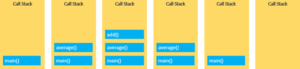
When you execute a script, the JavaScript engine creates a Global Execution Context and pushes it on top of the call stack.
Whenever a function is called, the JavaScript engine creates a Function Execution Context for the function, pushes it on top of the Call Stack, and starts executing the function.
If a function calls another function, the JavaScript engine creates a new Function Execution Context for the function that is being called and pushes it on top of the call stack.
When the current function completes, the JavaScript engine pops it off the call stack and resumes the execution where it left off in the last code listing.
The script will stop when the call stack is empty.
Stack Overflow
The call stack has a fixed size, depending on the implementation of the host environment, either the web browser or Node.js. If the number of the execution contexts exceeds the size of the stack, a stack overflow will occur.
Asynchronous Calls
JavaScript is the single-threaded programming language. The JavaScript engine has only one call stack so that it only can do one thing at a time. When executing a script, the JavaScript engine executes code from top to bottom, line by line. In other words, it is synchronous.
Asynchronous is the opposite of synchronous, which means happening at the same time. So how does JavaScript carry asynchronous tasks such as callbacks, promises , and async/await ? This is where the event loop comes into the picture.
If you have a function that takes a long time to execute, then you cannot do anything on the web browser during the function’s execution. The webpage just hangs. A function that takes a long time to execute is known as a blocking function. Technically, the blocking functions block all the interactions with the webpage such as mouse click. Some examples of blocking functions are the functions that download files from a remote server or functions that call an API from an external server.
To prevent blocking functions from blocking other activities, you typically wrap them in callback functions which can be executed later.
When an asynchronous function is invoked, the function is then placed into a queue called callback queue or task queue.
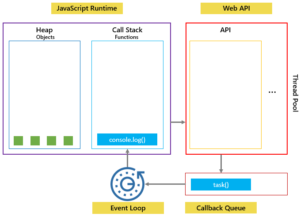
The event loop is a constantly running process that monitors both the callback queue and the call stack.
If the call stack is not empty, the event loop waits until it is empty and places the next function from the callback queue to the call stack. If the callback queue is empty, nothing will happen.
In this example, the timeout is 0 second so the message 'Execute immediately.' should appear before the message 'start!'. However, it is not the case. The console.log('Execute immediately.');is placed on the callback queue and executed only when the call stack is empty. In other words, it is executed only after the console.log('end!') is completed.
console.log('start!');

setTimeout(() => {
    console.log('Execute immediately.');
}, 0);

console.log('end!');
Output
start!
end!
Execute immediately.
Javascript Network Request
The Fetch API is a modern interface that allows you to make HTTP requests to servers from web browsers. The Fetch API is much simpler and cleaner. It uses the promise to deliver more flexible features to make requests to servers from the web browsers. The fetch() method is available in the global scope that instructs the web browsers to send a request to a URL. You don’t have to install any library.
Syntax
let promise = fetch(url, [options]);
Without options that is a simple GET request, downloading the contents of the url. The browser starts the request right away and returns a promise that the calling code should use to get the result.
POST Request
method – set to POST
body – the request body, one of following goes in the options.
-
- a string (e.g. JSON-encoded)
- Formdata object, to submit the data as form/multipart
- Blob / BufferSource to send binary data
The JSON format is used most of the time.
let headers = {
    "Content-Type": "application/json",
    "x-api-key":"lovemesomecoding"
};
let user = {
    firstName: 'Folau',
    lastName: 'Kaveinga',
    email: 'folaukaveinga@gmail.com'
};

let options = {};
options.method = "POST";
options.body = JSON.stringify(user);
options.headers = headers;

let url = "http://localhost:8888/users/signup";

let response = await fetch(url, options);

if (response.ok) { // if HTTP-status is 200-299
    let data = await response.json();

    let content = "";
    content += "id: "+data.id+"<br>";
    content += "firstName: "+data.firstName+"<br>";
    content += "lastName: "+data.lastName+"<br>";
    content += "email: "+data.email+"<br>";

    document.getElementById("signUpContent").innerHTML = content;
    document.getElementById("errorMsg").innerHTML = "";
} else {
    let error = await response.json();
    console.log(error);
    document.getElementById("errorMsg").innerHTML = error.message;
}
GET Request
let headers = {
    "Content-Type": "application/json",
    "token":"lovemesomecoding-token"
};

let options = {};
options.method = "GET";
options.headers = headers;

let id = 1;

let url = "http://localhost:8888/users/"+id;

let response = await fetch(url, options);

if (response.ok) { // if HTTP-status is 200-299
    let data = await response.json();

    let content = "";
    content += "id: "+data.id+"<br>";
    content += "firstName: "+data.firstName+"<br>";
    content += "lastName: "+data.lastName+"<br>";
    content += "email: "+data.email+"<br>";

    document.getElementById("getUserContent").innerHTML = content;
    document.getElementById("errorMsg").innerHTML = "";
} else {
    let error = await response.json();
    console.log(error);
    document.getElementById("errorMsg").innerHTML = error.message;
}
PUT Request
let headers = {
    "Content-Type": "application/json",
    "token":"lovemesomecoding"
};
let user = {
    firstName: 'Folau',
    lastName: 'Kaveinga',
    email: 'folaukaveinga@gmail.com',
    id: 1
};

let options = {};
options.method = "PUT";
options.body = JSON.stringify(user);
options.headers = headers;

let url = "http://localhost:8888/users";

let response = await fetch(url, options);
//console.log(response);

if (response.ok) { // if HTTP-status is 200-299
    let data = await response.json();

    let content = "";
    content += "id: "+data.id+"<br>";
    content += "firstName: "+data.firstName+"<br>";
    content += "lastName: "+data.lastName+"<br>";
    content += "email: "+data.email+"<br>";

    document.getElementById("updateUserContent").innerHTML = content;
    document.getElementById("errorMsg").innerHTML = "";
} else {
    let error = await response.json();
    console.log(error);
    document.getElementById("errorMsg").innerHTML = error.message;
}
Upload File
Upload File
<br>
<div class="form-group">
    <label for="exampleFormControlFile1">file input</label>
    <input type="file" class="form-control-file" id="uploadingFile">
</div>
<button onclick="uploadFile()" type="button" class="btn btn-outline-primary">Upload File</button>
const formData = new FormData();
const fileField = document.getElementById("uploadingFile");
formData.append('file', fileField.files[0]);

let headers = {
    "token":"lovemesomecoding"
};

let options = {};
options.method = "POST";
options.body = formData;
options.headers = headers;

let url = "http://localhost:8888/users/document";

let response = await fetch(url, options);

if (response.ok) { // if HTTP-status is 200-299
    let data = await response.json();

    document.getElementById("uploadFileStatus").innerHTML = "uploaded: "+data;
    document.getElementById("errorMsg").innerHTML = "";
} else {
    let error = await response.json();
    console.log(error);
    document.getElementById("errorMsg").innerHTML = error.message;
}
Upload Multiple Files
Upload Files
<br>
<div class="form-group">
    <label for="exampleFormControlFile1">files input</label>
    <input type="file" class="form-control-file" id="uploadingFiles" multiple>
</div>
<button onclick="uploadFiles()" type="button" class="btn btn-outline-primary">Upload Files</button>
const formData = new FormData();
const fileField = document.getElementById("uploadingFiles");

for (let i = 0; i < fileField.files.length; i++) {
    formData.append('files', fileField.files[i]);
}

let headers = {
    "token":"lovemesomecoding"
};

let options = {};
options.method = "POST";
options.body = formData;
options.headers = headers;

let url = "http://localhost:8888/users/documents";

let response = await fetch(url, options);

if (response.ok) { // if HTTP-status is 200-299
    let data = await response.json();

    document.getElementById("uploadFileStatus").innerHTML = "uploaded: "+data;
    document.getElementById("errorMsg").innerHTML = "";

} else {
    let error = await response.json();
    console.log(error);
    document.getElementById("errorMsg").innerHTML = error.message;
}
Install axios via npm
npm install axios
CDN script
<script src="https://unpkg.com/axios/dist/axios.min.js"></script>
Create an instance of Axios
const axiosInstance = axios.create({
    baseURL: 'http://localhost:8888',
    timeout: 1000,
    headers: {
        "Content-type": "application/json",
        "token": "foobar"
    }
});
POST Request
let headers = {
    "x-api-key":"lovemesomecoding"
};
let user = {
    firstName: 'Folau',
    lastName: 'Kaveinga',
    email: 'folaukaveinga@gmail.com'
};

let options = {};
options.method = "POST";
options.data = JSON.stringify(user);
options.headers = headers;

let url = "/users/signup";

let response = await axiosInstance(url, options);

console.log(response);

if (response.status >= 200) {
    let data = await response.data;

    let content = "";
    content += "id: "+data.id+"<br>";
    content += "firstName: "+data.firstName+"<br>";
    content += "lastName: "+data.lastName+"<br>";
    content += "email: "+data.email+"<br>";

    document.getElementById("signUpContent").innerHTML = content;
    document.getElementById("errorMsg").innerHTML = "";
} else {
    let error = await response.json();
    console.log(error);
    document.getElementById("errorMsg").innerHTML = error.message;
}
GET Request
let headers = {
    "token":"lovemesomecoding-token"
};

let options = {};
options.method = "GET";
options.headers = headers;

let id = 1;

let url = "/users/"+id;

let response = await axiosInstance(url, options);

if (response.status >= 200) {
    let data = await response.data;

    let content = "";
    content += "id: "+data.id+"<br>";
    content += "firstName: "+data.firstName+"<br>";
    content += "lastName: "+data.lastName+"<br>";
    content += "email: "+data.email+"<br>";

    document.getElementById("getUserContent").innerHTML = content;
    document.getElementById("errorMsg").innerHTML = "";
} else {
    let error = await response.data;
    console.log(error);
    document.getElementById("errorMsg").innerHTML = error.message;
}
PUT Request
let headers = {
    "token":"lovemesomecoding"
};
let user = {
    firstName: 'Folau',
    lastName: 'Kaveinga',
    email: 'folaukaveinga@gmail.com',
    id: 1
};

let options = {};
options.method = "PUT";
options.body = JSON.stringify(user);
options.headers = headers;

let url = "/users";

let response = await axiosInstance(url, options);
//console.log(response);

if (response.status >= 200) {
    let data = await response.data;

    let content = "";
    content += "id: "+data.id+"<br>";
    content += "firstName: "+data.firstName+"<br>";
    content += "lastName: "+data.lastName+"<br>";
    content += "email: "+data.email+"<br>";

    document.getElementById("updateUserContent").innerHTML = content;
    document.getElementById("errorMsg").innerHTML = "";
} else {
    let error = await response.data;
    console.log(error);
    document.getElementById("errorMsg").innerHTML = error.message;
}
Upload File
const formData = new FormData();
const fileField = document.getElementById("uploadingFile");
formData.append('file', fileField.files[0]);

let headers = {
    "token":"lovemesomecoding",
    "Content-Type": "multipart/form-data"
};

let options = {
    // `onUploadProgress` allows handling of progress events for uploads
    // browser only
    onUploadProgress: function (progressEvent) {
        console.log("progressEvent");
        console.log(progressEvent);
    },
    // `onDownloadProgress` allows handling of progress events for downloads
    // browser only
    onDownloadProgress: function (progressEvent) {
        console.log("progressEvent");
        console.log(progressEvent);
    }
};
options.headers = headers;

let url = "/users/document";

let response = await axiosInstance.post(url, formData, options);

console.log(response);

if (response.status >= 200) {
    let data = await response.data;

    document.getElementById("uploadFileStatus").innerHTML = "uploaded: "+data.finishUpload;
    document.getElementById("errorMsg").innerHTML = "";
} else {
    let error = await response.json();
    console.log(error);
    document.getElementById("errorMsg").innerHTML = error.message;
}
Upload Multiple Files
const formData = new FormData();
const fileField = document.getElementById("uploadingFiles");

for (let i = 0; i < fileField.files.length; i++) {
    formData.append('files', fileField.files[i]);
}

let headers = {
    "token":"lovemesomecoding",
    "Content-Type":"multipart/form-data"
};

let options = {
    // `onUploadProgress` allows handling of progress events for uploads
    // browser only
    onUploadProgress: function (progressEvent) {
        console.log("progressEvent");
        console.log(progressEvent);
    },
    // `onDownloadProgress` allows handling of progress events for downloads
    // browser only
    onDownloadProgress: function (progressEvent) {
        console.log("progressEvent");
        console.log(progressEvent);
    }
};

options.headers = headers;

let url = "/users/documents";

let response = await axiosInstance.post(url, formData, options);

if (response.status >= 200) {
    let data = await response.data;

    document.getElementById("uploadFileStatus").innerHTML = "uploaded: "+data.finishUpload;
    document.getElementById("errorMsg").innerHTML = "";

} else {
    let error = await response.json();
    console.log(error);
    document.getElementById("errorMsg").innerHTML = error.message;
}
Javascript Error Handling
No matter how great we are at programming, sometimes our code has errors. They may occur because of our mistakes, an unexpected user input, an erroneous server response, and for a thousand other reasons.
Javascript has try and catch to handle these errors and respond to users.
try {
    let name = getName();
} catch (error) {
    /*
    * error object that contains at least the name of the error and message that explains the error in detail.
    * Different web browsers may add more property to the error object.
    * For example, Firefox adds filename, lineNumber, and stack properties to the error object.
    */
    console.log(error);//ReferenceError: getName is not defined
    console.log(error.name + ":" + error.message);//ReferenceError:getName is not defined
}finally {
    console.log("finally");
}
Try and Catch only works synchronously and does not work asynchronously.
/*
* try..catch only works synchronously. It does not work asynchronously.
*/

try {
    setTimeout(function() {
        getName(); // script will die here
    }, 1000);
} catch (error) {
    console.log("Error not caught here.");
}

setTimeout(function() {
    try {
        getName();
    } catch (error) {
        console.log(error);//ReferenceError: getName is not defined
        console.log(error.name + ":" + error.message);//ReferenceError:getName is not defined
    }
}, 1000);
Throw an Error
Use throw new typeOfError to throw an error.
function throwError(){
    throw new Error("Something went wrong due to Error!");
}

function throwReferenceError(){
    throw new ReferenceError("Something went wrong due to ReferenceError!");
}

try {
    throwError();
} catch (error) {
    console.log(error.name + ":" + error.message);
}

try {
    throwReferenceError();
} catch (error) {
    console.log(error.name + ":" + error.message);
}
Types of Error
- Error
- EvalError – an error has occurred in the eval() function. Note: Newer versions of JavaScript does not throw any EvalError. Use SyntaxError instead.
- RangeError – a number “out of range” has occurred
- ReferenceError – an illegal reference has occurred
- SystaxError – a syntax error has occurred
- TypeError – a type error has occurred
- URIError – an error in encodeURI() has occurred
Custom Error
You can create a custom error by extending the Error class
class ValidationError extends Error {
    constructor(message) {
        super(message); // (1)
        this.name = "ValidationError"; // (2)
    }
}

function testValidationError() {
    throw new ValidationError("Whoops!");
}

try {
    testValidationError();
} catch(error) {
    console.log(error.name + ":" + error.message);
    console.log("error stack");
    console.log(error.stack);
}
Javascript Date
Create a date object
By default, Date uses the browser’s time zone and display a date as a full text string: Tue Oct 27 2020 22:52:28 GMT-0600 (Mountain Daylight Time)
new Date()
new Date(year, month, day, hours, minutes, seconds, milliseconds)
new Date(milliseconds)
new Date(date string)
new Date() creates a new date object with the current date and time.
new Date(year, month, day, hours, minutes, seconds, milliseconds)
new Date(year, month, day, hours, minutes, seconds, milliseconds)
new Date(year, month, day, hours, minutes, seconds)
new Date(year, month, day, hours, minutes)
new Date(year, month, day, hours)
new Date(year, month, day)
new Date(year, month)
new Date(year)
Create UTC date
Use new Date(string) constructor. String must be in this format YYYY-MM-DDTHH:MM:SSZ. Note the T in the middle and Z at the end.
let date = new Date("2020-08-25T00:00:00Z")
UTC to local Date and Time
Use the toLocaleDateString() method and the toLocaleTimeString() method together. The method toLocaleDateString() returns a transformation of UTC date to local date in this format (month/day/year). The toLocaleTimeString() returns a transformation of UTC time to local time in this format hour:minute:second AM/PM (11:30:59 PM)
In many cases, API servers return dates in UTC and clients translate UTC dates to local dates.
new Date(data.createdAt).toLocaleDateString()+" "+new Date(data.createdAt).toLocaleTimeString()
data.createdAt and data.updatedAt are in this format YYYY-MM-DDTHH:MM:SSZ
Javascript Objects
An object is a collection of properties , defined as a key-value pair. Each property has a key and a value. The property key can be a string and the property value can be any valid value.
Create an object
You can use {} or the new Object().
let object = {}
object.name = "Folau";
object.age = 33;
// or

let obj = new Object();
obj.name = "Folau";
obj.age = 33;
let user = {
    "name": "Folau",
    "age": 33
}
console.log("user: ", user);//{"name":"Folau","age":33}
Access field value with dot(.)
let user = {
    "name": "Folau",
    "age": 33
}
console.log("user name: ", user.name);//Folau
Access field value with []
let user = {
    "name": "Folau",
    "age": 33
}
console.log("user name: ", user['name']);//Folau
Remove or delete a key value with delete.
let user = {
    "name": "Folau",
    "age": 33
}
console.log("user: ", user);//{"name":"Folau","age":33}

/*
* To remove a property, we can use delete operator.
*/
delete user.age;

console.log("user: ", user);{"name":"Folau"}
let user = {
    "name": "Folau",
    "age": 33
}
console.log("user: ", user);//{"name":"Folau","age":33}

let doesUserHaveName = ("name" in user);
console.log("name in user: ", doesUserHaveName);//true

let doesUserHaveAddress = ("address" in user);
console.log("address in user: ", doesUserHaveAddress);//false
let user = {
    "name": "Folau",
    "age": 33
}
for(let field in user){
    console.log("field: ", field, ", value: ", user[field]);
}

//Output
field:  name , value:  Folau
field:  age , value:  33
Objects are mutable
let user = {
    "name": "Folau",
    "age": 33
}
let member = user;

member.name = "Lisa";
console.log("user: ", user);//{"name":"Lisa","age":33}
console.log("member: ", member);//{"name":"Lisa","age":33}
The object member is not a copy of user. It is user. Both member and user are the same object.
Any changes to member will also change user, because member and user are the same object.
Clone objects
Use object.assign(target, source…). By cloning an object, changes to that object do not reflect on the original object.
let person = {
    name:"Folau",
    age: 33,
    score: {
        sc: 100
    }
}
console.log("person ", person);//{name: "Folau", age: 33, score: {sc: 100}}

person.score.sc = 25;
/*
* Clone objects
*/
let lau = Object.assign({}, person);
console.log("lau", lau);//{name: "Folau", age: 33, score: {sc: 25}}
Object.assign does not copy nested objects.
copyObject(obj){
    let jsonString = JSON.stringify(obj);
    return JSON.parse(jsonString);
}