MySQL Like
The LIKE operator is used to check if a string contains another string.
These two wildcards are used with LIKE:
1. “%” – check for a match of one or more characters
2. “_” – check for a match of a single character
If you are searching for something that ends with a certain pattern of string then put % in the front.
If you are searching for something that starts with a certain pattern of string then put the % at the end.
If you are searching for something that contains a certain pattern of string no matter where it is in the string then put the % in the front and also at the end.
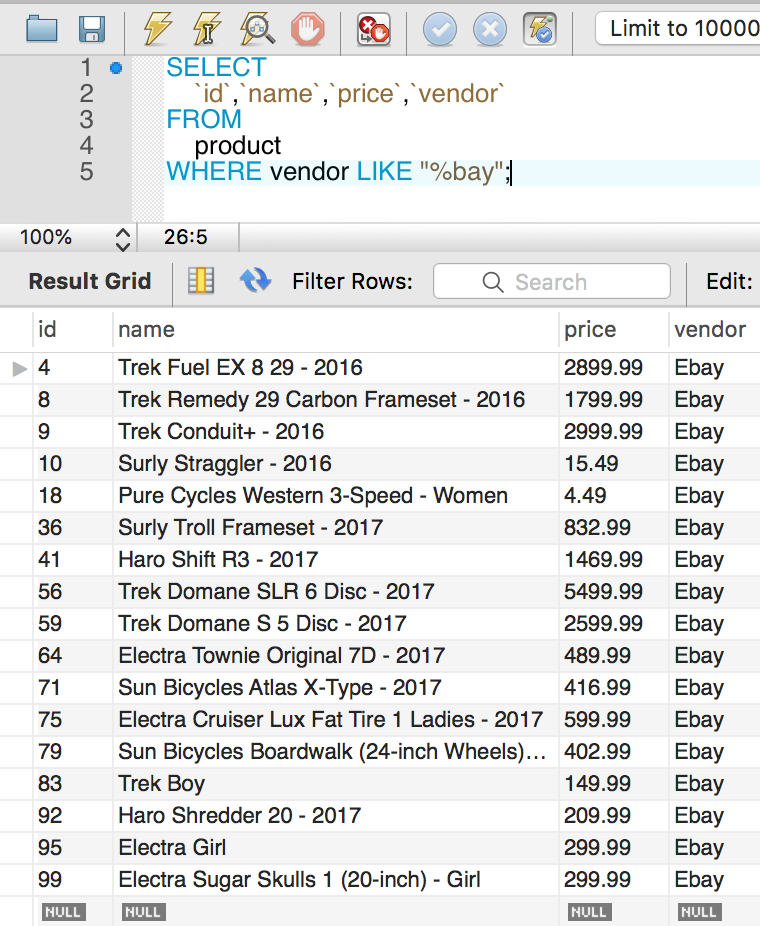
Here is an example of % where we are looking for vendor’s names that end with bay.
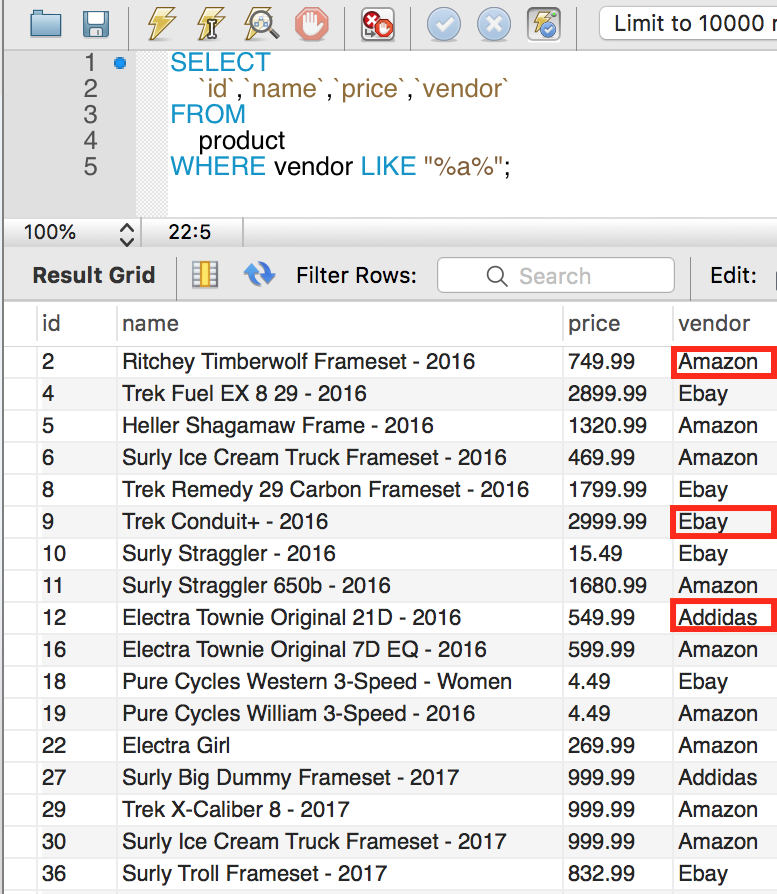
Here we are looking for vendor’s names that contain the letter a.
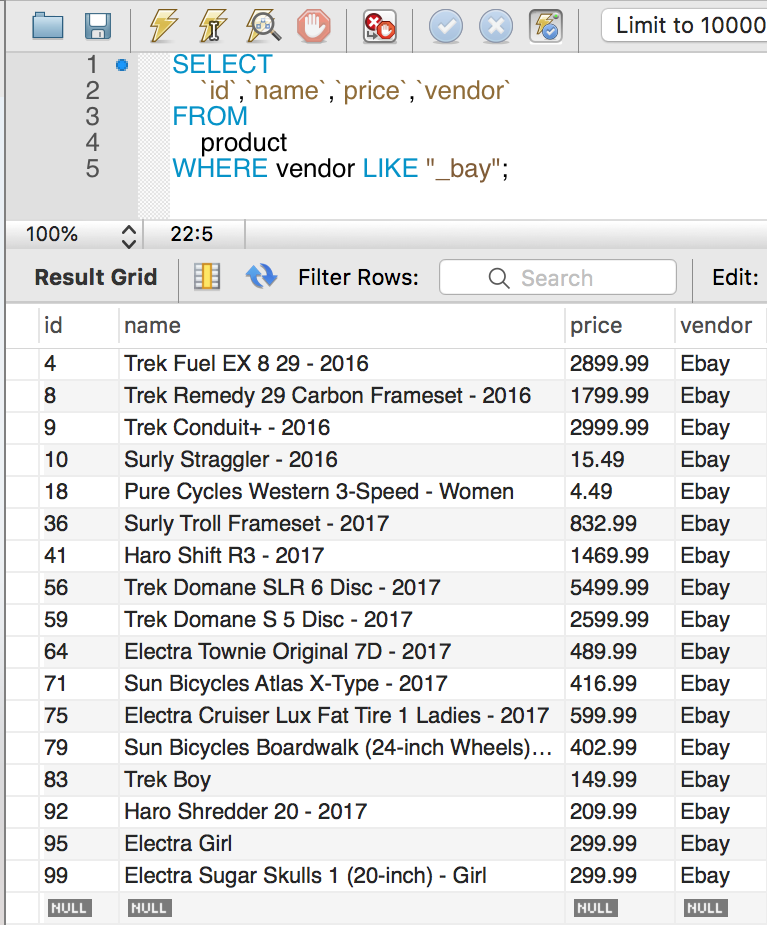
LIKE with _ wildcard
Here we are looking for vendor names that start with any character and end with bay.
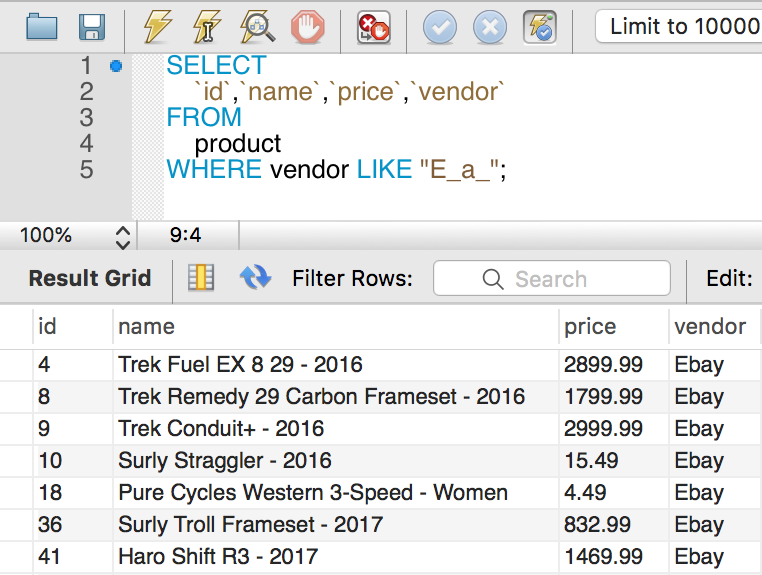
Here we are looking for vendor names that start with E, followed by any character, followed by a, followed by any character.
MySQL Where
The WHERE clause is used in a SELECT statement with conditions to filter the result set. It is also used in the UPDATE and DELETE statement.
SELECT
    column_name1,column_name2,...
FROM
    table_name
WHERE
    conditions;
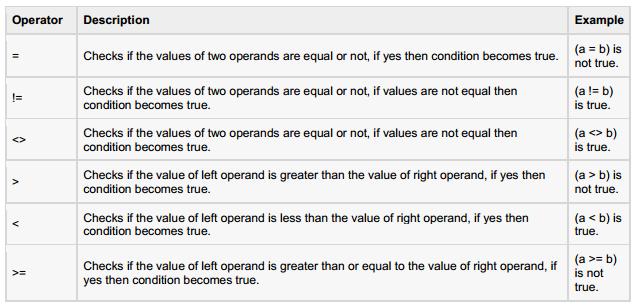
There can be one or many conditions and a condition must be evaluated to true or false.
A row must satisfy all conditions to be included in the result set.
MySQL Select
The SELECT statement is used to read or retrieve rows(data) from one or more database tables or views. You can retrieve one, two, or three, or all columns depending on what you need. Each row you retrieve will have the same number of columns. Here is an example of a SELECT statement.
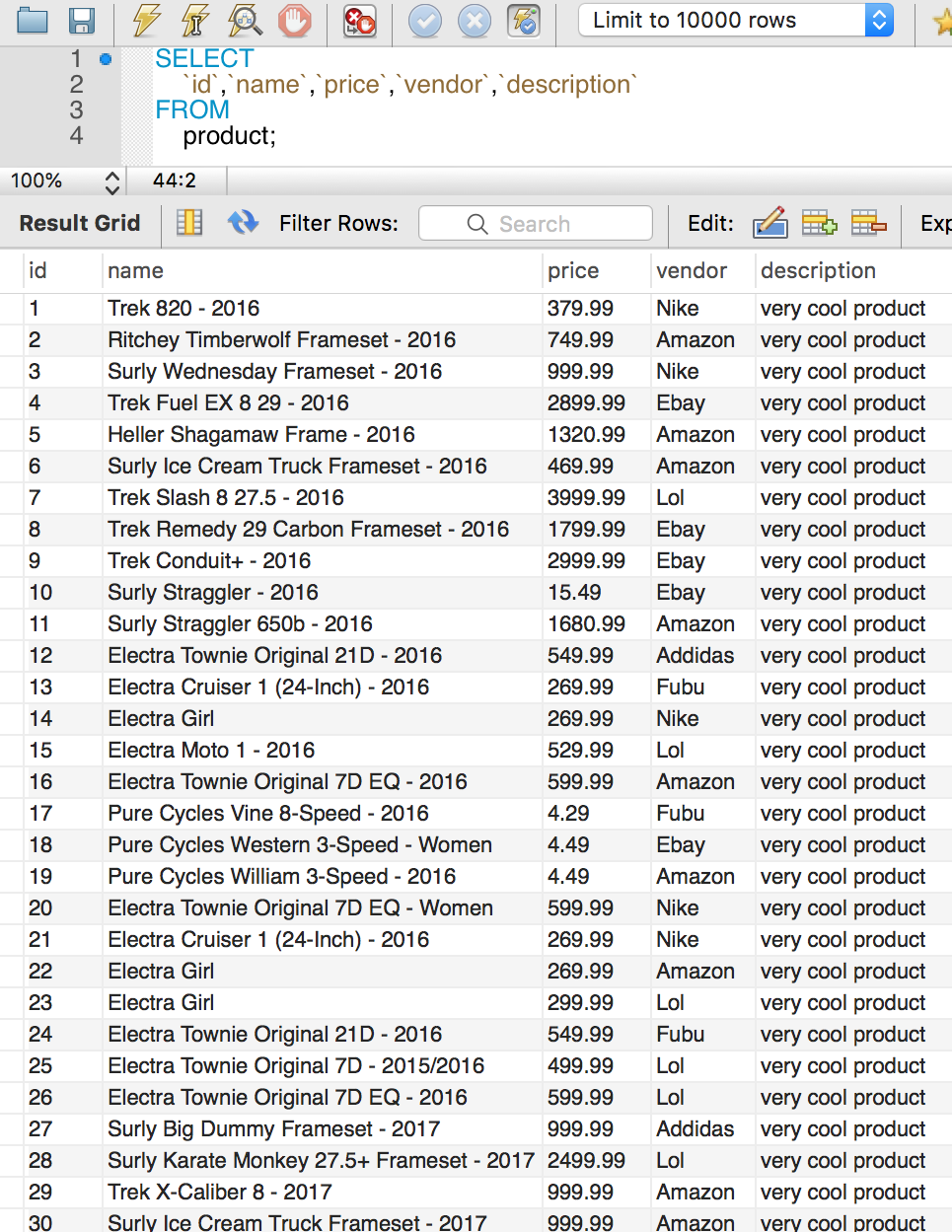
Select Official Syntax
SELECT
    column_name1, column_name2, ...
FROM
    table_name1
[INNER | LEFT |RIGHT] JOIN table_name2 ON conditions
[INNER | LEFT |RIGHT] JOIN table_name3 ON conditions
WHERE
    conditions
GROUP BY column_name1, column_name2, ...
HAVING group_conditions
ORDER BY column_name1 [ASC|DESC], column_name2 [ASC|DESC],...
LIMIT offset, length;
Let’s break down these clauses that the SELECT statement has.
* SELECT(required) – select columns you want to retrieve.
* FROM(required) – this is the tables or views you are retrieving the data from.
* WHERE – filters what rows to return in the result set.
* GROUP BY – group the result set into groups and apply aggregate functions into each group.
* HAVING – filter groups defined or created by the GROUP BY clause.
* ORDER BY – sort the result set by columns.
* LIMIT – determine the number of rows to retrieve.
Why SELECT * is bad
Note that you can use SELECT * to select all columns in a table but I don’t recommend this approach for these reasons.
1. It will retrieve all columns but you might not need all of them. This is result in a slow query.
2. If you are mapping the result set to an object like a User object then you don’t know which column is what.
SELECT DISTINCT
If you want to remove duplicate rows in the result set, use DISTINCT after SELECT.
SELECT DISTINCT
    column_name1,column_name2,...
FROM
    table_name
WHERE
    conditions;
SELECT
	first_name
FROM
	customer
ORDER BY
	first_name;
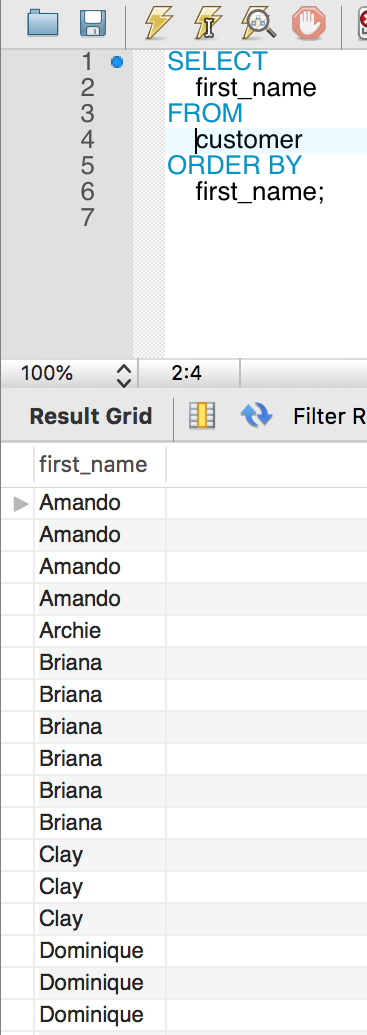
As you can see, using select without DISTINCT you have duplicate first names.
SELECT  DISTINCT
	first_name, last_name
FROM
	customer
ORDER BY
	first_name;
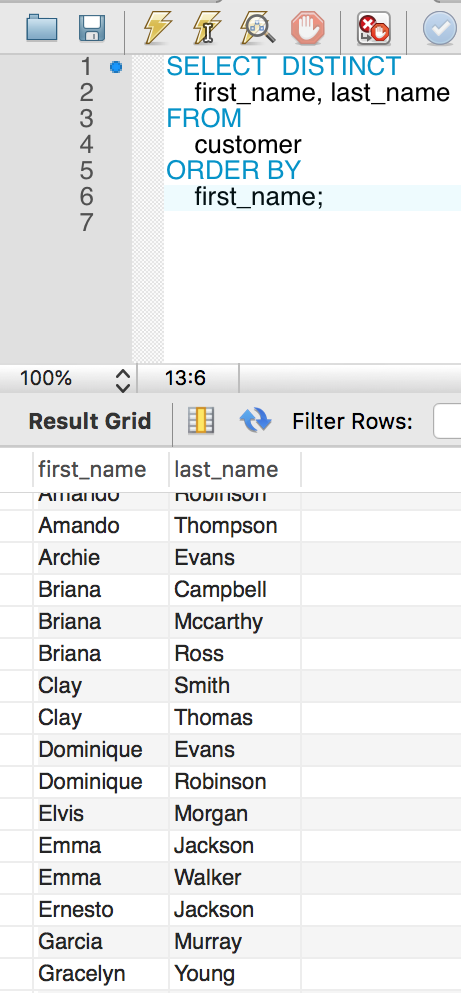
Don’t get confused about having duplicate first names. And yes you are seeing the right result set for the query above. I wanted to show how DISTINCT works with multiple columns. If multiple rows are selected with distinct then uniqueness is checked by row and not by just one column.
Locking rows with SELECT
If you query data and then insert or update related data within the same transaction, the regular SELECT statement does not give enough protection. Other transactions can update or delete the same rows you just queried.InnoDB supports two types of locking reads that offer extra safety.
LOCK IN SHARE MODE
SELECT ... LOCK IN SHARE MODE
Sets a shared mode lock on any rows that are read. Other sessions can read the rows, but cannot modify them until your transaction commits. If any of these rows were changed by another transaction that has not yet committed, your query waits until that transaction ends and then uses the latest values.
For index records the search encounters, locks the rows and any associated index entries, the same as if you issued an UPDATE statement for those rows. Other transactions are blocked from updating those rows, from doing SELECT ... LOCK IN SHARE MODE, or from reading the data in certain transaction isolation levels. Consistent reads ignore any locks set on the records that exist in the read view.
All locks set by LOCK IN SHARE MODE and FOR UPDATE queries are released when the transaction is committed or rolled back.
Locking reads are only possible when autocommit is disabled (either by beginning transaction with START TRANSACTION or by setting autocommit to 0.
A locking read clause in an outer statement does not lock the rows of a table in a nested subquery unless a locking read clause is also specified in the subquery.
SELECT * FROM customer WHERE id = 2 LOCK IN SHARE MODE;
After the LOCK IN SHARE MODE query returns the customer, you can safely add the child record to the CHILD table and commit the transaction. Any transaction that tries to acquire an exclusive lock in the applicable row in the customer table waits until you are finished, that is, until the data in all tables is in a consistent state.
FOR UPDATE
SELECT ... FOR UPDATE
SELECT click_count FROM click_counter WHERE user_id = 4 FOR UPDATE;
UPDATE click_count SET click_count = click_count + 1 WHERE user_id = 4 ;
A SELECT ... FOR UPDATE reads the latest available data, setting exclusive locks on each row it reads. Thus, it sets the same locks a searched SQL UPDATE would set on the rows.
MySQL Delete
To delete data from a table, DELETE statement is used. Once data is deleted from your tables you can’t recover it. It is gone. It is recommended to back up your database regularly so that if data is gone you can still recover it from your backups.
DELETE FROM table_name
WHERE condition;
The WHERE clause is optional but if it’s omitted then all rows will be deleted.
Here is an example of DELETE where we are deleting customer with id 21.
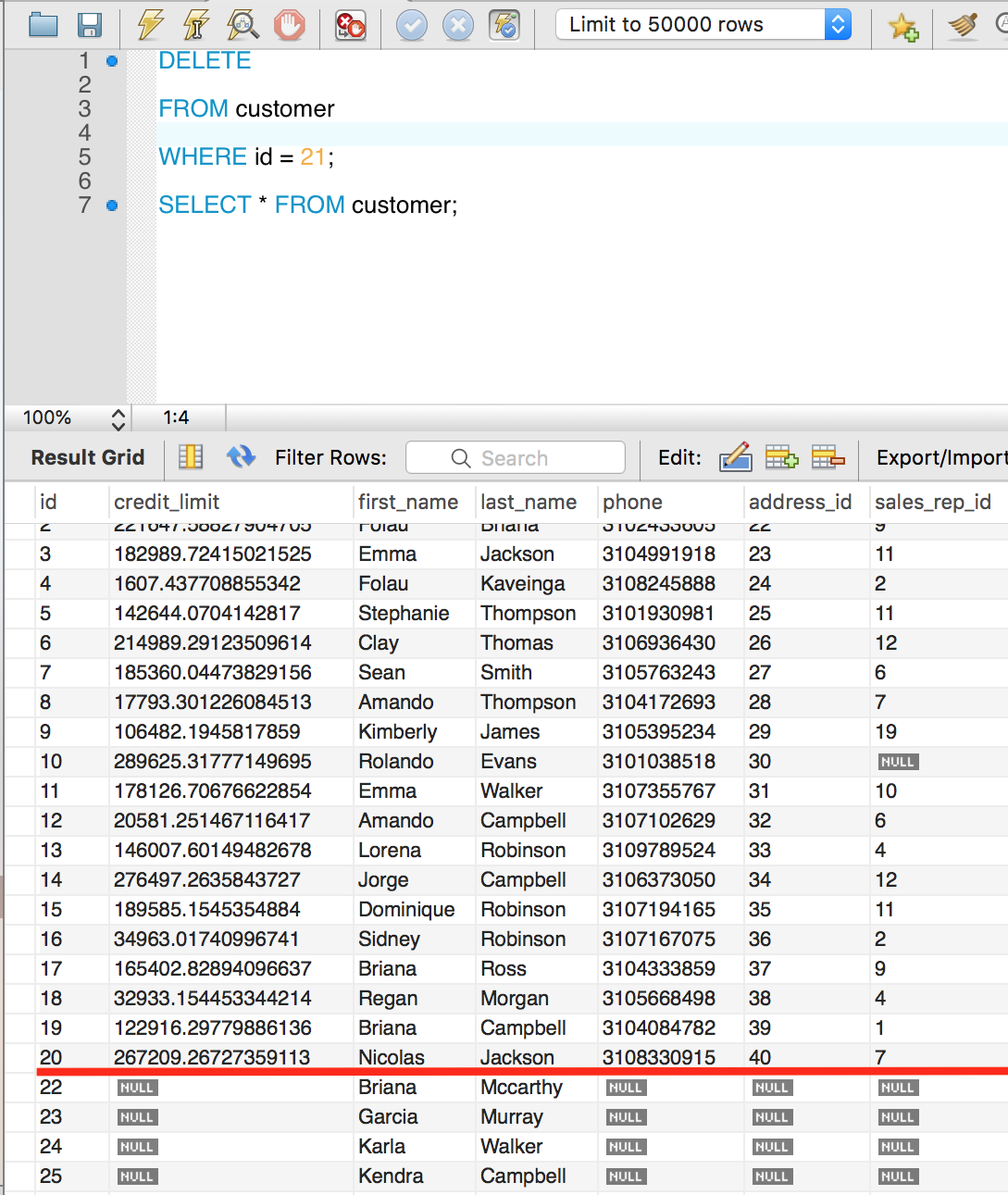
As you can see row 21st is gone. The DELETE statement returns the number of rows deleted.
To delete all rows within a table, use the TRUNCATE command which has better performance.
DELETE with LIMIT
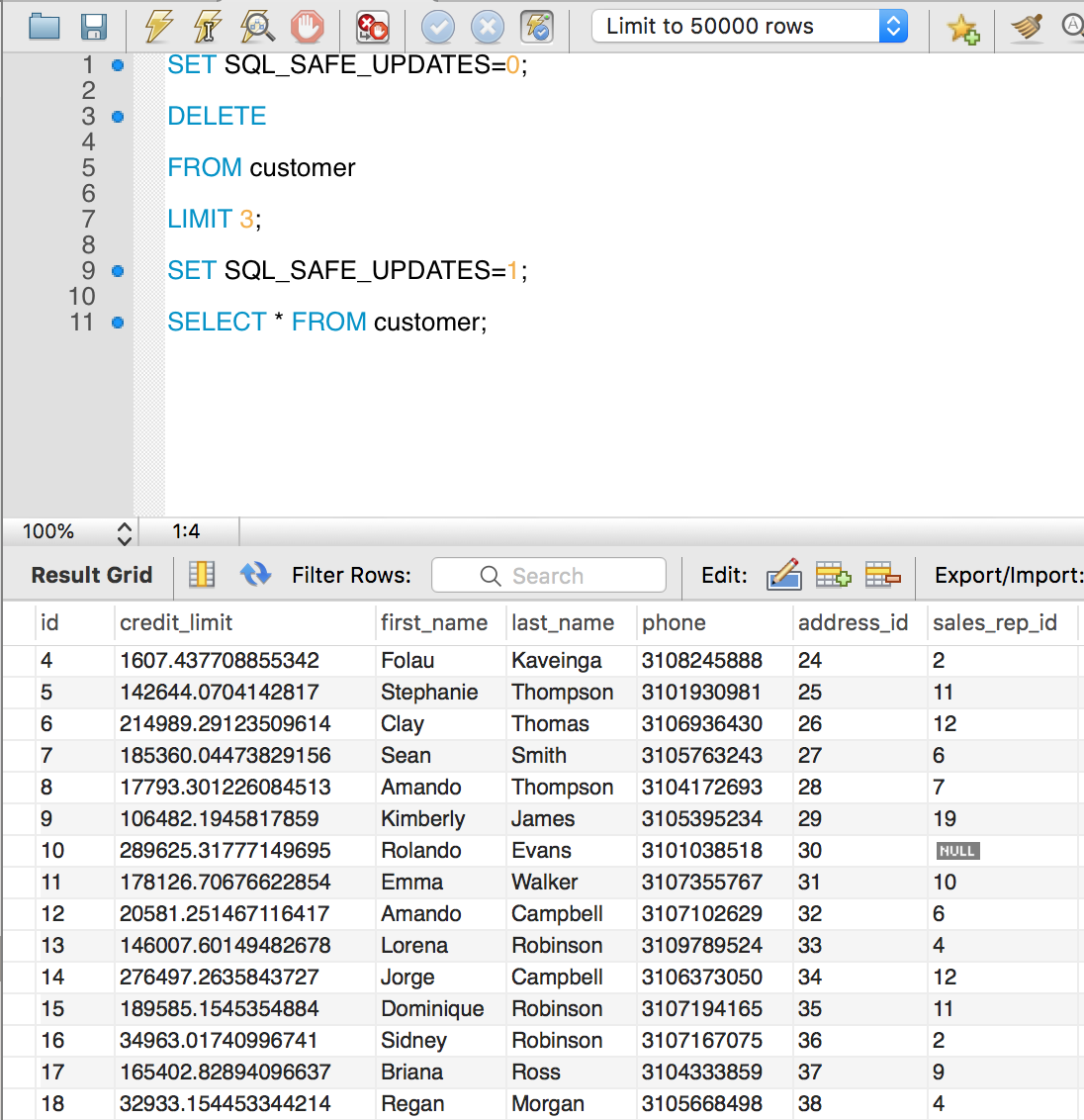
When deleting data it is recommended to turn off SQL_SAFE_UPDATES.
DELETE FROM table_name
ORDER BY column_name
LIMIT count;
DELETE with ON CASCADE
ON DELETE CASCADE is used to delete rows or data in a child table when a row is deleted in the parent table.
You have to create your child table with it.
CREATE TABLE table_name (
    column_names...
    FOREIGN KEY (FK)
        REFERENCES parent_table_name (FK)
        ON DELETE CASCADE
);
Here is the query to show which tables use ON DELETE CASCADE.
USE information_schema;

SELECT
    table_name
FROM
    referential_constraints
WHERE
    constraint_schema = 'database_name'
        AND referenced_table_name = 'parent_table'
        AND delete_rule = 'CASCADE'
MySQL Update
The UPDATE clause is used to update an existing row. It can be used to update a single row, a group of rows, or all rows within a table.
UPDATE
    table_name1, table_name2,...
SET
    column_name1 = value1,
    column_name2 = value2,
    ...
WHERE conditions;
How to use UPDATE
1. Specify the tables you want to update.
2. Set the column values to their new values.
3. The WHERE clause is optional but in most cases required. If you forget the WHERE clause, your UPDATE will affect every row which is something you might not want.
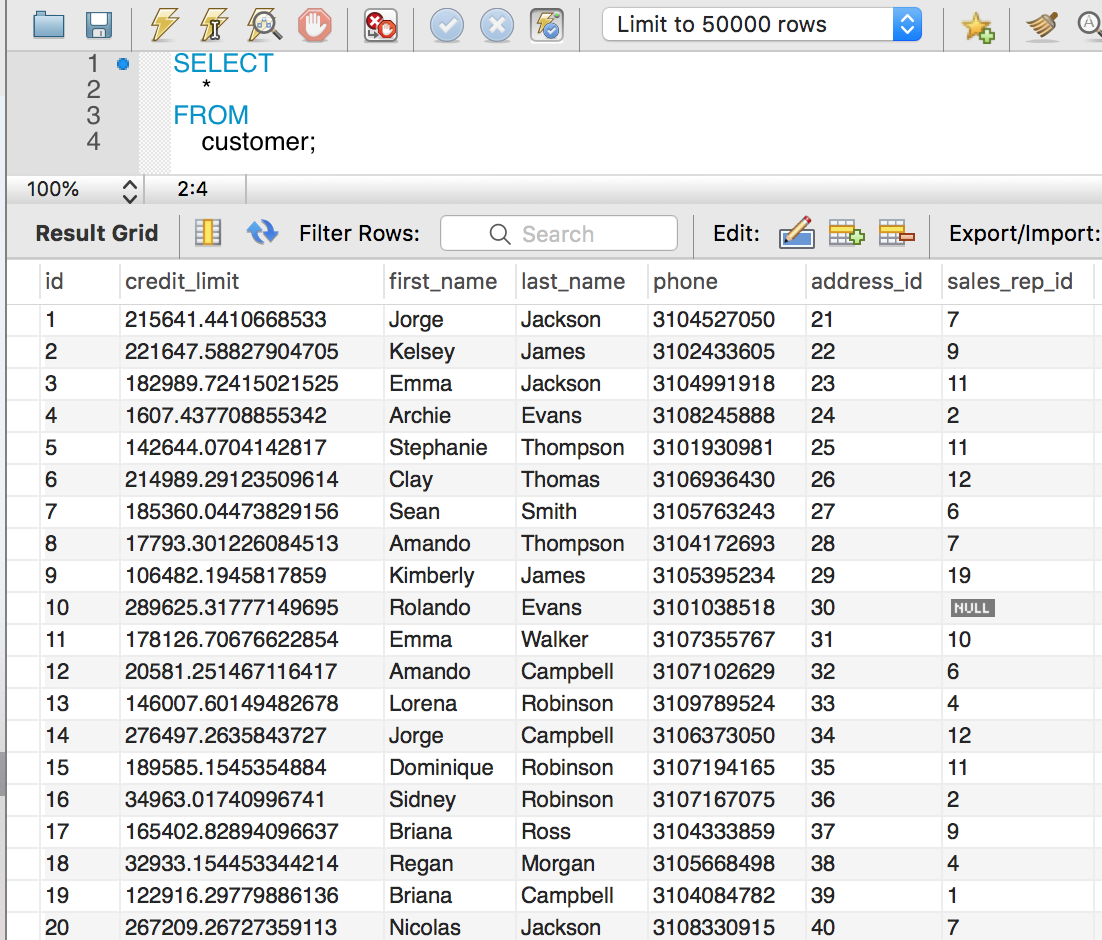
Let’s update the row with id 2.
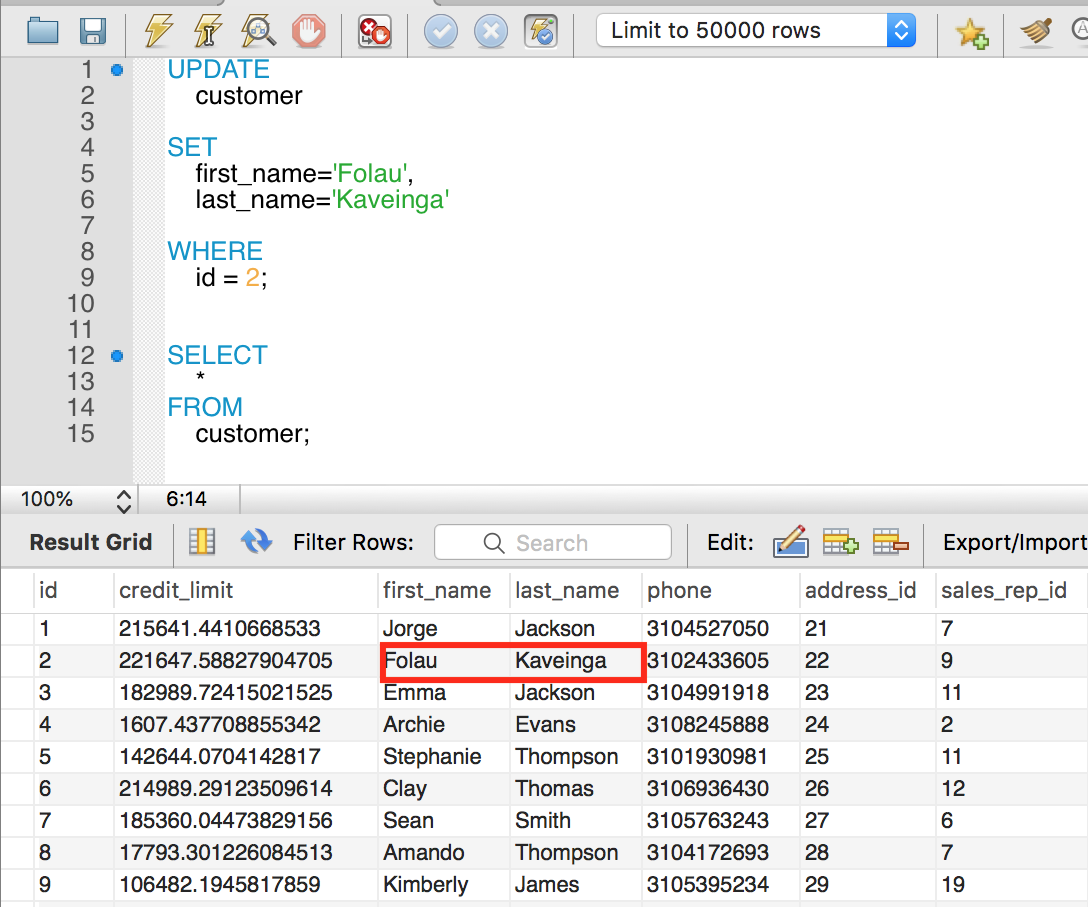
We updated the first_name and last_name of the row with id 2 to Folau and Kaveinga. Don’t be confused that we have two queries above. One for the update and the other is a SELECT query which is used to check our update.
UPDATE with LOW_PRIORITY
LOW_PRIORITY tells MySQL to perform the update after all reading from any connection to the table is done.
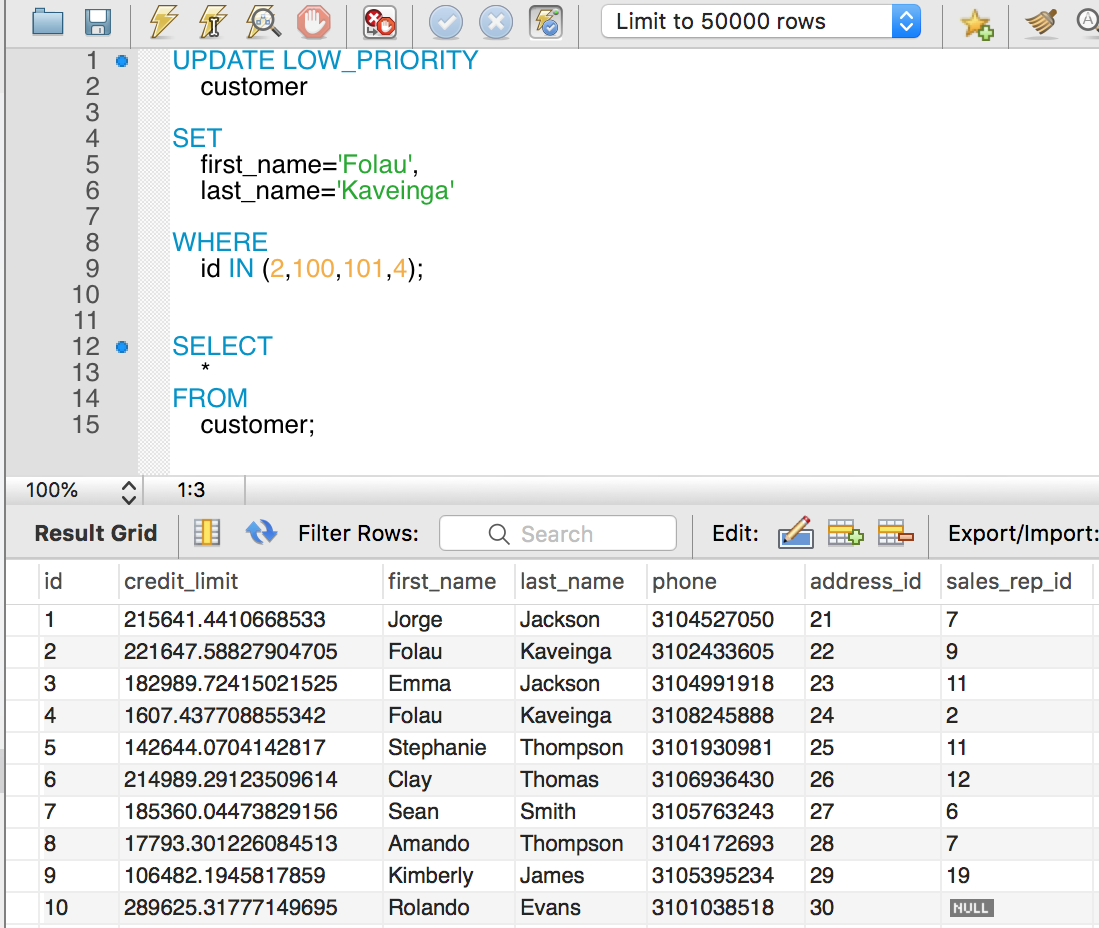
UPDATE with IGNORE
IGNORE tells MySQL to ignore an error in the update. If errors occur then ignore those rows and continue til the end.
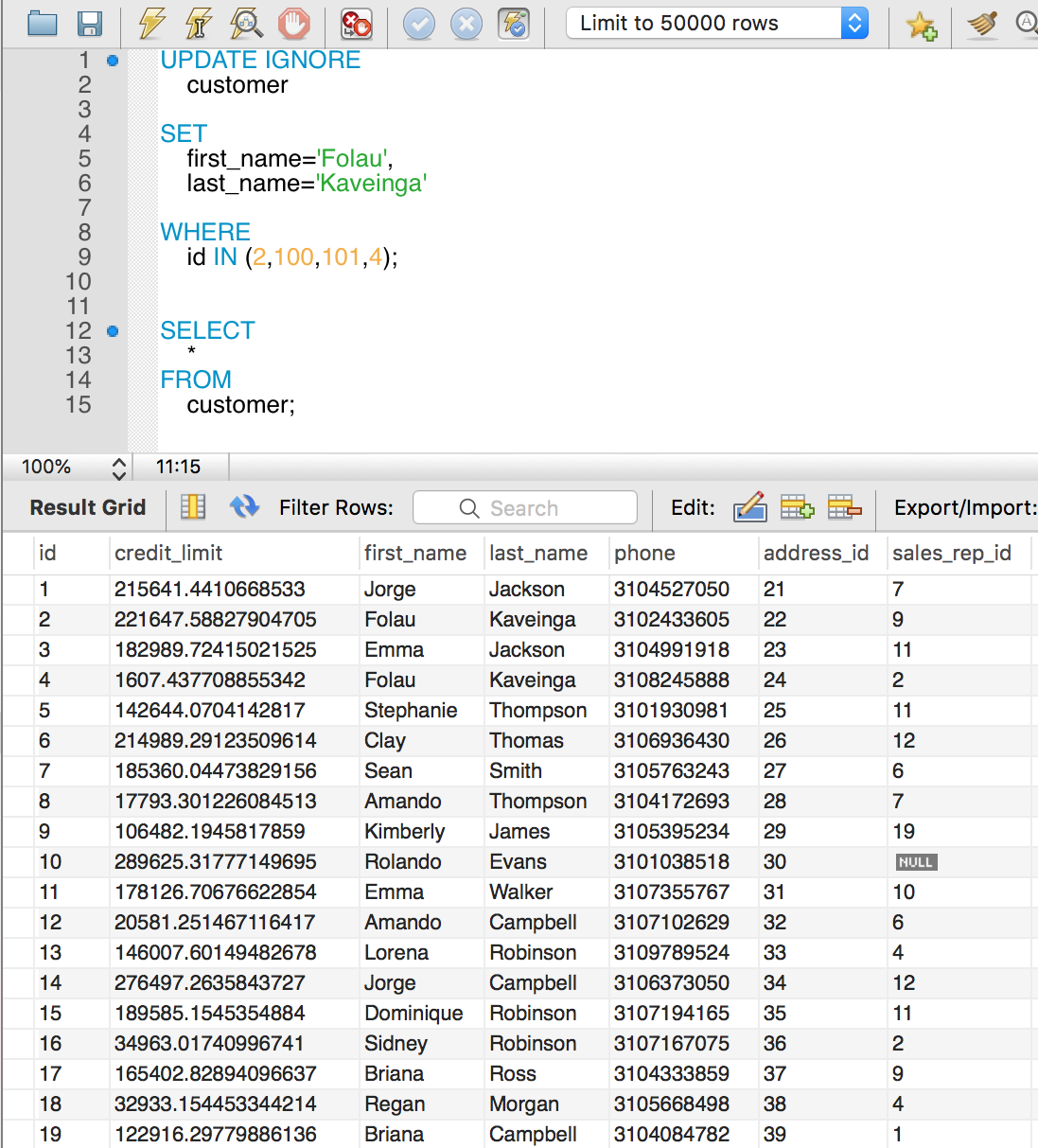
Our example above updated rows 2 and 4 even though ids 100 and 101 don’t exist.
How to update a table column by values return from a SELECT statement
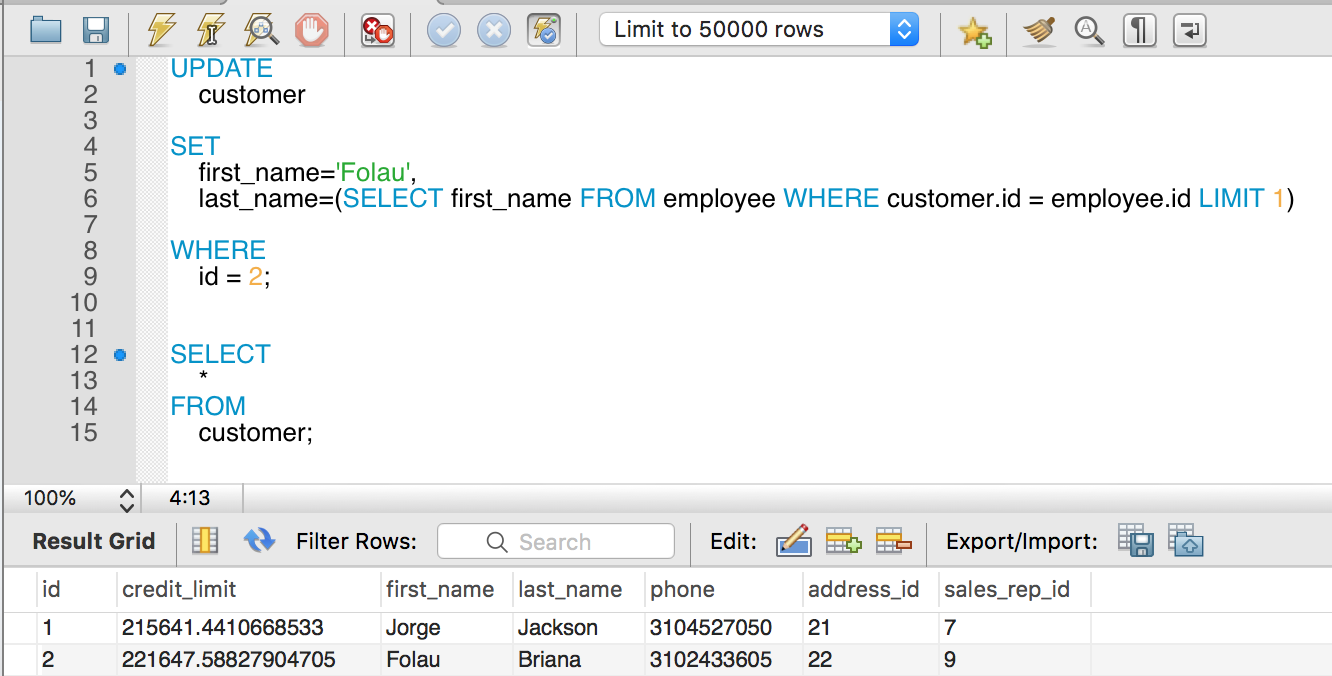
Here we are updating the last_name of the customer by the last_name of the employee whose id is 2.
How to update a table from a table in another database but in the same server instance.
SET SQL_SAFE_UPDATES=0;

UPDATE

	db_account.user as acctUser, db_billing.user as billingUser

SET

    billingUser.name = acctUser.name

WHERE

    acctUser.id = billingUser.id;

SET SQL_SAFE_UPDATES=1;
Here we have a db_account database and db_billing database that live in the same server. And we are updating the user name of the db_billing.user by the user name of the db_account.user.
UPDATE with no KEY
MySQL will not allow you to use UPDATE without a WHERE clause or a LIMIT clause. MySQL will not allow you to use WHERE without including the id column in the WHERE condition.
These queries will not run because the first query does not use a WHERE clause. The second query does not have a id check condition.
UPDATE user SET name = 'Folau';
or
UPDATE user SET name = 'Folau' WHERE email = 'test@gmail.com';
MySQL uses SQL_SAFE_UPDATES as being set to 0 to disable this checking.
SET SQL_SAFE_UPDATES=0;
It is always good practice to turn SQL_SAFE_UPDATES back to on right after.
SET SQL_SAFE_UPDATES=1;
Bulk UPDATE
Sometimes you are tasked to update database records which are too much to write individual UPDATE queries for.
UPDATE user SET name = 'Folau' WHERE id=1;
UPDATE user SET name = 'Lisa' WHERE id=2;
UPDATE user SET name = 'Kinga' WHERE id=3;
...
The above queries can be 10000+ rows which will perform very slow to execute.
What you can do is use the case statement
UPDATE user
SET name =
  (CASE id WHEN 1 THEN 'Folau'
           WHEN 2 THEN 'Lisa'
           WHEN 3 THEN 'Kinga'
   END)
WHERE id IN (1,2,3);
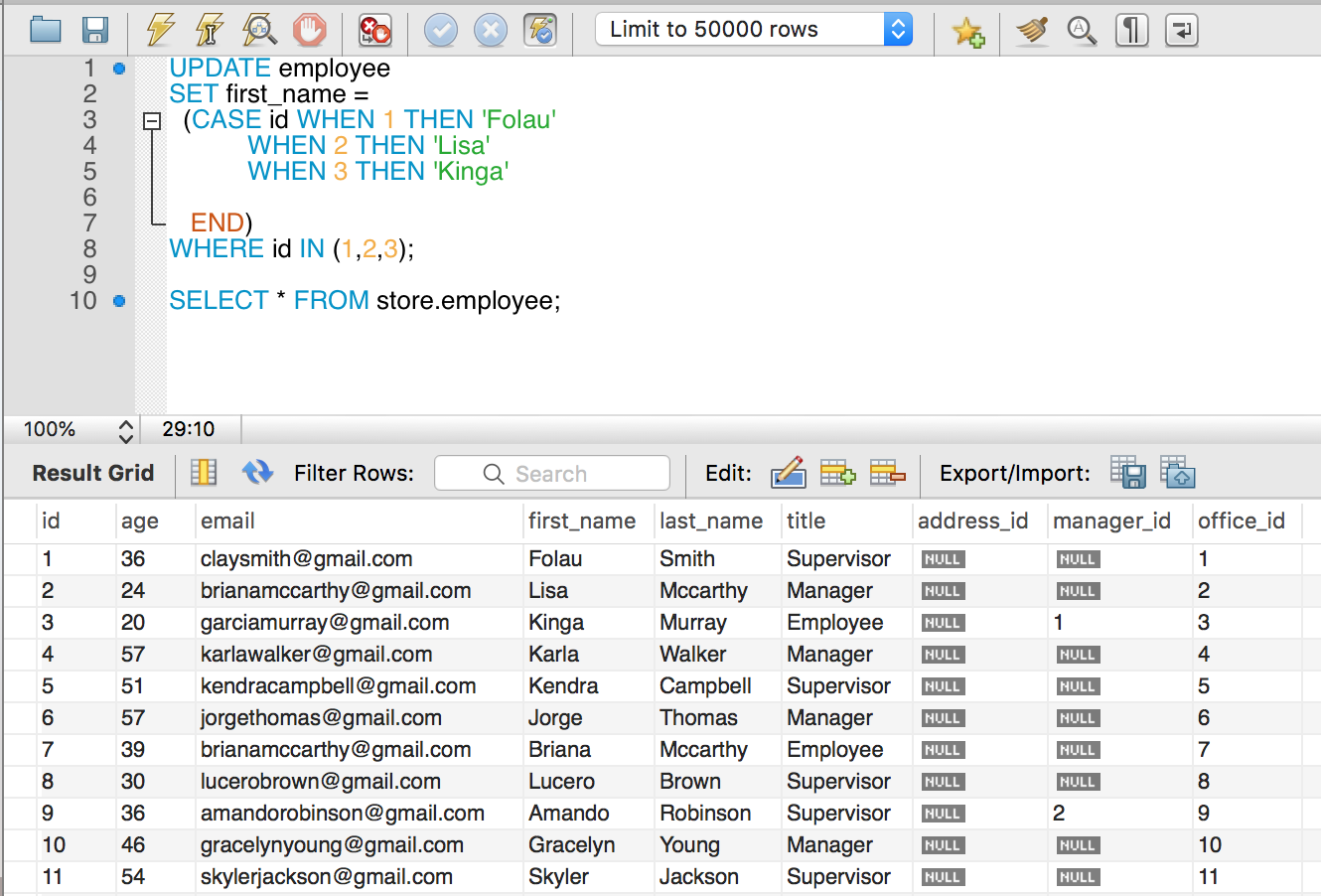
And you can have 10000+ WHEN THEN clauses and the query will perform better than individual UPDATEs.
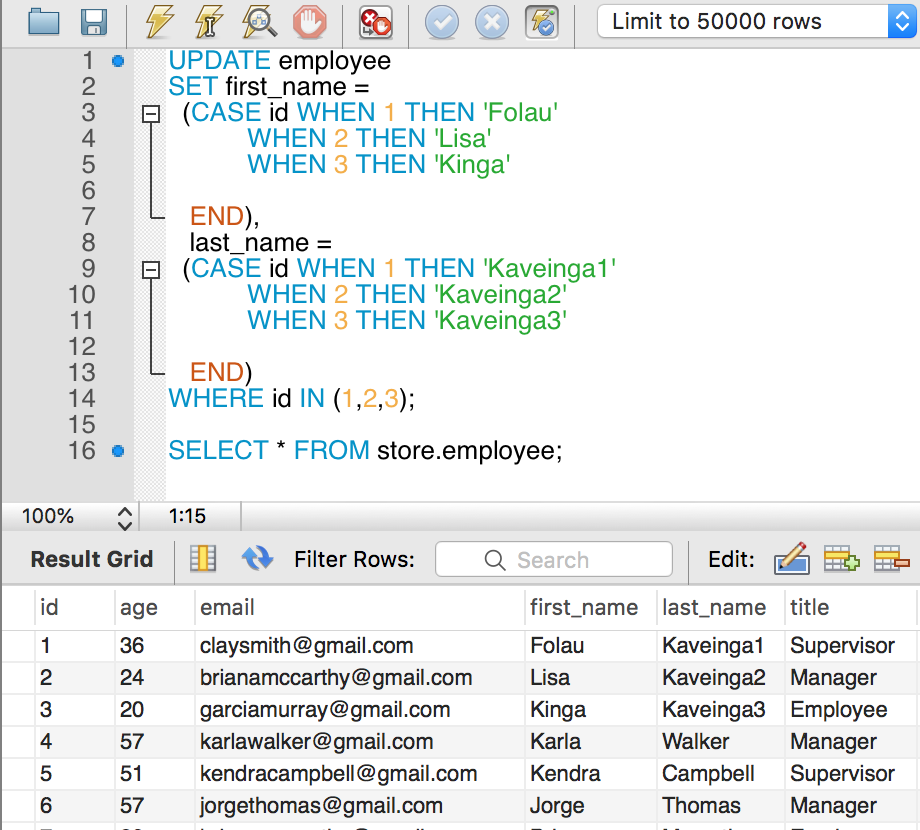
Bulk UPDATE with multiple columns
You can update multiple columns all at the same time.
UPDATE with JOIN
UPDATE account as acct
  LEFT JOIN member as memb ON memb.account_id = acct.id
  LEFT JOIN group as grp ON grp.uuid = memb.group_uuid
SET acct.group_uuid = memb.group_uuid,
  acct.partner_slug = grp.url_slug,
  acct.paid_by = grp.paid_by
WHERE acct.id <> 0
  AND memb.group_uuid IS NOT NULL
  AND acct.group_uuid IS NULL;